
Introduction
This manual provides detailed instructions for the safe and effective use of your Bellissima Imetec Sensitive MP1 100 Professional Manicure and Pedicure Set. This 4-in-1 kit is designed for comprehensive nail care, offering features such as dual rotation direction and various attachments for professional results at home. Please read this manual thoroughly before first use and retain it for future reference.
Safety Information
- Always ensure your hands are dry before handling the device or power adapter.
- Do not use the device near water or immerse it in any liquid.
- Keep the device out of reach of children and individuals with reduced physical, sensory, or mental capabilities.
- Disconnect the device from the power supply before cleaning or when not in use.
- Do not use the device if the power cord or plug is damaged. Contact customer support for assistance.
- This device is intended for personal cosmetic use only. It is not a medical device and should not be used for treating medical conditions.
- Avoid applying excessive pressure, as the device features a stop sensor to prevent injury.
- Do not use on irritated, inflamed, or infected skin or nails.
Package Contents
Carefully unpack the box and ensure all items are present and in good condition. The Bellissima Imetec Sensitive MP1 100 set includes:
- Main Manicure/Pedicure Unit
- Exfoliating Cone (fine grain)
- Rounded Fine Tip
- Shaping Disc (fine grain)
- Power Adapter (12V 600mAh)
- LED Illumination System
- Comfortable Storage Bag

Figure 1: Complete Bellissima Imetec Sensitive MP1 100 set, showing the main unit, three interchangeable attachments, and the included white zippered storage case.
Product Overview
The Bellissima Imetec Sensitive MP1 100 features an ergonomically designed main unit for comfortable handling. It is equipped with intuitive controls for operation and an integrated LED light for enhanced visibility during use. The set includes three specialized attachments for various nail care needs.
Main Unit Features:
- Ergonomic Design: Conical shape for a secure and comfortable grip.
- Control Panel: Touch-sensitive buttons for power, rotation direction, and speed adjustment.
- LED Illumination: Removable LED light system to illuminate the treatment area.
- Stop Sensor: Automatically stops rotation and emits a beep if excessive pressure is applied, preventing skin irritation or damage.

Figure 2: Detail of the control panel on the main unit, featuring touch buttons for operation.
Attachments:
- Exfoliating Cone (Fine Grain): Ideal for removing rough skin, calluses, and hardened areas on feet and hands.
- Rounded Fine Tip: Used for gently pushing back and shaping cuticles, and for precise work around the nail edges.
- Shaping Disc (Fine Grain): Designed for filing and shaping nails, providing a smooth finish.
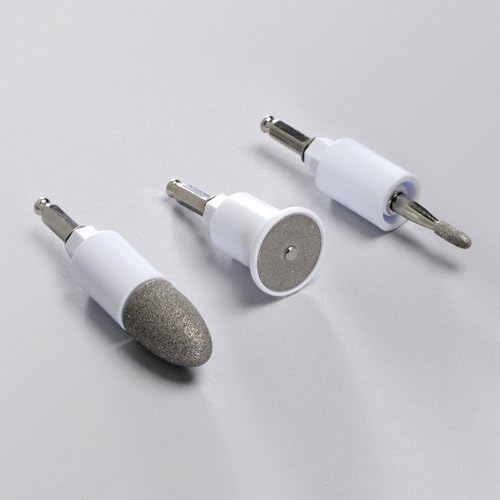
Figure 3: The three professional attachments included with the set.
Setup
- Unpack: Remove all components from the packaging.
- Connect Power: Insert the power adapter into the device's power port, then plug the adapter into a suitable electrical outlet.
- Attach Accessory: Select the desired attachment for your nail care needs. Align the attachment with the spindle on the main unit and push it firmly until it clicks into place. Ensure it is securely fastened.
- Optional LED Light: If desired, attach the LED illumination system to the designated slot on the main unit for better visibility.
Operating Instructions
Before starting, ensure your nails and skin are clean and dry. For best results, soften cuticles if necessary.
- Power On: Press the power button on the control panel to turn on the device. The LED indicator will light up.
- Select Rotation Direction: Use the rotation direction button to choose between clockwise or counter-clockwise rotation. This allows for optimal use on both hands and feet, and for working on different sides of the nail.
- Adjust Speed: The device typically offers two speed settings. Use the speed adjustment buttons (often marked 'I' and 'II' or similar) to select your preferred operating speed. Start with a lower speed until you are comfortable.
- Apply Attachment: Gently place the rotating attachment onto the nail or skin area you wish to treat. Move the device slowly and steadily.
- Utilize Stop Sensor: The device is equipped with a safety stop sensor. If you apply too much pressure, the motor will temporarily stop, and an audible beep will sound. Reduce pressure to resume operation. This feature helps prevent over-filing or skin irritation.
- Using Specific Attachments:
- Exfoliating Cone: Use on dry, hardened skin. Apply light pressure and move in small circular motions.
- Rounded Fine Tip: Gently push back cuticles. Use carefully around the nail bed.
- Shaping Disc: Hold the disc parallel to the nail edge and move it in one direction to shape and smooth the nail.
- Power Off: After use, press the power button to turn off the device. Disconnect from the power outlet.
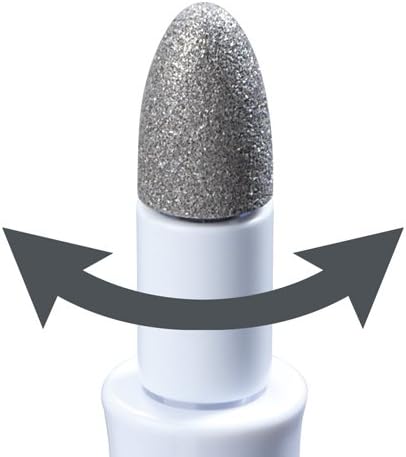
Figure 4: The exfoliating cone attachment demonstrating the dual rotation feature.
Maintenance
Regular cleaning and proper storage will extend the life of your manicure and pedicure set.
- Disconnect Power: Always unplug the device from the power outlet before cleaning.
- Clean Attachments: Remove each attachment from the main unit. Clean them with a small brush to remove dust and nail particles. You may wipe them with a damp cloth and mild soap, then dry thoroughly. Do not use harsh chemicals or abrasive cleaners.
- Clean Main Unit: Wipe the main unit with a soft, dry or slightly damp cloth. Do not immerse the unit in water.
- Storage: Store the device and all attachments in the provided comfortable storage bag. Keep it in a cool, dry place, away from direct sunlight and moisture.
Troubleshooting
If you encounter any issues with your device, refer to the following common problems and solutions:
- Device does not turn on:
- Ensure the power adapter is securely plugged into both the device and a working electrical outlet.
- Check if the power outlet is functional by plugging in another appliance.
- Attachments stop rotating during use:
- This is likely the safety stop sensor activating due to excessive pressure. Reduce the pressure applied to the nail or skin.
- Ensure the attachment is correctly and securely fitted onto the main unit.
- Attachments wear out quickly:
- The abrasive attachments are subject to wear over time, especially with frequent use or on very hard nails/skin. Replacement attachments may be available from the manufacturer or authorized retailers.
- Device feels hot:
- It is normal for the motor to warm up slightly during prolonged use. If it becomes excessively hot, discontinue use and allow it to cool down before resuming.
Specifications
| Manufacturer | IMETH |
| Model Number | 5024L |
| Dimensions (L x W x H) | 7.4 x 12.8 x 20.6 cm |
| Weight | 359.99 g |
| Power Input | 12V 600mAh (via included adapter) |
Warranty and Support
For warranty information, technical support, or to inquire about replacement parts, please refer to the warranty card included with your product or contact Bellissima Imetec customer service directly. Contact details can typically be found on the manufacturer's official website or on the product packaging.