
Johnson Controls LP-NET152-010C
JOHNSON CONTROLS LP-NET152-010C LON Communication Card User Manual
Model: LP-NET152-010C
1. Introduction
This manual provides essential information for the installation, operation, and maintenance of the Johnson Controls LP-NET152-010C LON Communication Card. This card is designed for use with FX15 and FX16 controllers and features an extended temperature range for robust performance in various environments.
Please read this manual thoroughly before attempting to install or operate the device to ensure proper function and safety.
2. Product Overview
The LP-NET152-010C is a specialized LON communication card. It facilitates network communication for Johnson Controls FX15 and FX16 series controllers, enabling integration into larger building automation systems.
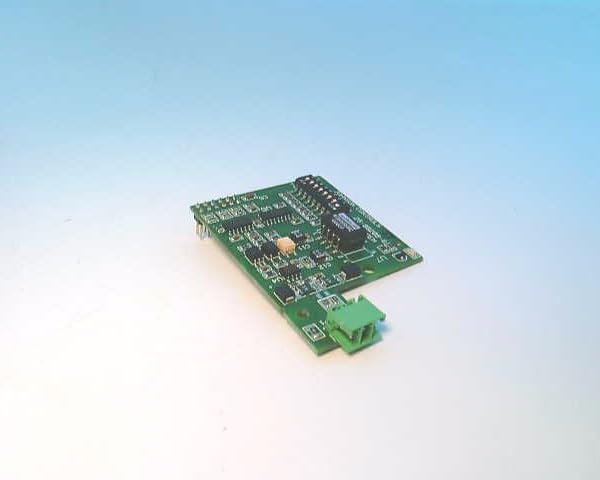
Figure 2.1: Johnson Controls LP-NET152-010C LON Communication Card. This image shows the green circuit board with various electronic components and a green terminal block connector on one end.
Key Features:
- LON Communication Capability
- Extended Temperature Range Operation
- Designed for FX15 and FX16 Controllers
- Robust and Reliable Design
3. Safety Information
Always observe the following safety precautions when handling, installing, or servicing the LP-NET152-010C card:
- Disconnect Power: Ensure all power to the FX15 or FX16 controller is disconnected before installing or removing the communication card.
- ESD Precautions: Use electrostatic discharge (ESD) protective measures (e.g., wrist strap, anti-static mat) when handling the card to prevent damage to sensitive electronic components.
- Qualified Personnel: Installation and servicing should only be performed by qualified and trained personnel.
- Environmental Conditions: Operate the device within its specified extended temperature range and avoid exposure to excessive moisture or corrosive environments.
4. Setup and Installation
Follow these steps to properly install the LP-NET152-010C LON Communication Card into a compatible FX15 or FX16 controller:
- Prepare the Controller:
a. Power down the FX15 or FX16 controller completely and disconnect it from the power source.
b. Open the controller's enclosure to access the internal expansion slots.
- Handle the Card:
a. Wear an anti-static wrist strap and work on an anti-static surface.
b. Carefully remove the LP-NET152-010C card from its protective packaging, holding it by the edges.
- Insert the Card:
a. Locate the designated expansion slot within the FX15 or FX16 controller. Refer to the controller's specific manual for slot identification.
b. Align the card with the slot connector and gently but firmly press it into place until it is fully seated.
- Secure Connections:
a. If applicable, secure the card with any retaining clips or screws provided by the controller's design.
b. Connect the LON network cables to the green terminal block on the LP-NET152-010C card. Ensure correct polarity and secure connections.
- Close and Power On:
a. Close the controller's enclosure.
b. Reconnect the power source to the FX15 or FX16 controller.
c. Verify that the controller powers on and recognizes the newly installed communication card.
5. Operating Instructions
Once installed, the LP-NET152-010C card operates as an integral part of the FX15 or FX16 controller's communication system. Its primary function is to enable LON network connectivity.
Network Configuration:
Configuration of the LON communication parameters (e.g., network address, domain, subnet) is typically performed through the FX15 or FX16 controller's programming interface or associated software. Refer to the specific controller's programming manual for detailed instructions on configuring LON network settings.
Status Indicators:
The communication card may feature LED indicators to show its operational status. Consult the FX15/FX16 controller documentation for interpretation of these indicators, which typically include:
- Power/Status LED: Indicates the card is powered and functioning correctly.
- Activity LED: Flashes to indicate data transmission or reception on the LON network.
6. Maintenance
The LP-NET152-010C LON Communication Card is designed for long-term, reliable operation with minimal maintenance. However, periodic checks can help ensure optimal performance.
General Maintenance:
- Visual Inspection: Periodically inspect the card and its connections for any signs of physical damage, loose wiring, or corrosion.
- Environmental Check: Ensure the operating environment remains within the specified temperature and humidity limits.
- Cleaning: If necessary, gently clean the card using a soft, dry, lint-free cloth. Do not use liquid cleaners or solvents. Ensure power is disconnected before cleaning.
No user-serviceable parts are contained within the communication card itself. Do not attempt to repair the card.
7. Troubleshooting
This section provides basic troubleshooting steps for common issues related to the LP-NET152-010C LON Communication Card. For more complex issues, refer to the FX15/FX16 controller's troubleshooting guide or contact Johnson Controls technical support.
| Problem | Possible Cause | Solution |
|---|---|---|
| Card not recognized by controller. |
|
|
| No LON network communication. |
|
|
| Status LED off. |
|
|
8. Specifications
| Parameter | Value |
|---|---|
| Model Number | LP-NET152-010C |
| Compatibility | Johnson Controls FX15 and FX16 Controllers |
| Communication Protocol | LON (Local Operating Network) |
| Temperature Range | Extended (Specific range not provided, refer to controller manual for exact limits) |
| Item Weight | 14.4 ounces (approx. 408 grams) |
| Manufacturer | JOHNSON CONTROLS |
9. Warranty and Technical Support
For information regarding the warranty of the LP-NET152-010C LON Communication Card, please refer to the warranty documentation provided with your FX15 or FX16 controller, or contact Johnson Controls directly.
For technical assistance, installation queries, or troubleshooting beyond the scope of this manual, please contact Johnson Controls technical support or your authorized distributor.
Johnson Controls Contact Information:
Please visit the official Johnson Controls website for the most current contact details and support resources.
Related documentsLP-NET152-010C


Ask a question about this manual
Ask about setup, troubleshooting, compatibility, parts, safety, or missing instructions. Manuals+ will review the question and use this page’s manual context to help answer it.