1. Introduction
Thank you for choosing the Fantech FR100 Inline Centrifugal Duct Fan. This manual provides essential information for the safe and efficient use of your new ventilation fan. Please read all instructions carefully before installation and operation to ensure proper function and to prevent injury or damage.
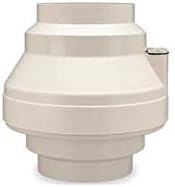
A beige, cylindrical Fantech 4-inch inline fan, designed for duct ventilation. It features a molded housing and a compact design suitable for various ventilation applications.
2. Safety Information
Always observe the following safety precautions to reduce the risk of fire, electric shock, or injury to persons:
- Read all instructions before installing or servicing this fan.
- Ensure power is disconnected at the service panel before installation or maintenance.
- Installation and wiring must be done by a qualified person in accordance with all applicable codes and standards.
- Do not use this fan with any solid-state speed control device unless specifically designed for it.
- This fan is for general ventilating use only. Do not use to exhaust hazardous or explosive materials and vapors.
- To avoid motor bearing damage and noisy and/or unbalanced impellers, keep drywall spray, construction dust, etc., off power unit.
- Duct work must be installed with minimum turns and bends for optimal airflow.
3. Setup and Installation
Proper installation is crucial for the fan's performance and longevity. Follow these steps carefully:
3.1 Pre-Installation Checklist
- Verify all components are present and undamaged.
- Ensure the installation location is suitable for the fan's size and weight.
- Confirm power supply matches fan specifications (12 Volts, 12 Watts).
3.2 Mounting the Fan
- Choose a secure, accessible location for mounting the fan, preferably near the center of the duct run.
- Use appropriate mounting brackets (not included) to secure the fan firmly to a joist, rafter, or other structural support. Ensure the fan is level to prevent vibration and noise.
- Connect the ductwork to both ends of the fan using duct clamps or tape to ensure airtight seals. The fan is designed for 4-inch diameter ducts.
3.3 Electrical Connection
- Ensure power is OFF at the circuit breaker before proceeding.
- Connect the fan's electrical cord to a suitable 12-volt power source. Refer to local electrical codes for proper wiring procedures.
- All wiring connections must be secure and insulated.
- Once wiring is complete, restore power and test the fan.
4. Operating Instructions
The Fantech FR100 fan is designed for continuous or intermittent operation, depending on your ventilation needs. It operates quietly and efficiently to move air through duct systems.
- Power On/Off: The fan is typically controlled by an external switch connected to its power supply. Flip the switch to turn the fan on or off.
- Airflow Direction: Ensure the fan is installed with the correct airflow direction as indicated by an arrow on the fan housing (if present). Incorrect installation will reduce efficiency.
- Continuous Operation: For applications requiring constant air circulation, the fan can be left running continuously.
- Intermittent Operation: For demand-controlled ventilation, use a timer or humidity/occupancy sensor (sold separately) to activate the fan as needed.
5. Maintenance
Regular maintenance ensures optimal performance and extends the life of your Fantech FR100 fan. Always disconnect power before performing any maintenance.
- Cleaning the Impeller: Periodically (every 6-12 months, depending on usage and environment), disconnect power and remove the fan from the ductwork. Carefully clean the impeller blades and housing interior with a soft cloth or brush to remove dust and debris. Do not use harsh chemicals or abrasive materials.
- Motor Maintenance: The motor is permanently lubricated and requires no additional lubrication.
- Ductwork Inspection: Inspect the ductwork for any blockages, leaks, or damage that could impede airflow. Repair as necessary.
- Electrical Connections: Annually check all electrical connections for tightness and signs of wear or corrosion.
6. Troubleshooting
If you experience issues with your Fantech FR100 fan, consult the table below for common problems and solutions.
| Problem | Possible Cause | Solution |
|---|---|---|
| Fan does not turn on | No power; loose wiring; faulty switch | Check power supply, circuit breaker; inspect wiring connections; test or replace switch. |
| Low airflow | Blocked ductwork; dirty impeller; incorrect fan direction | Clear obstructions in ducts; clean impeller; verify fan is installed in correct airflow direction. |
| Excessive noise or vibration | Loose mounting; debris in fan; damaged impeller | Tighten mounting hardware; clean fan interior; inspect impeller for damage (replace if necessary). |
| Fan runs intermittently | Overheating (thermal overload); faulty external control | Ensure adequate ventilation around fan; check for blockages; inspect external timer/sensor. |
7. Specifications
Key technical specifications for the Fantech FR100 Inline Centrifugal Duct Fan:
| Feature | Value |
|---|---|
| Model Number | FR100 |
| Brand | FANTECH |
| Material | Plastic |
| Color | Beige |
| Exterior Finish | Plastic/Polymer |
| Item Weight | 5.1 ounces |
| Voltage | 12 Volts |
| Wattage | 12 watts |
| Air Flow Capacity | 122 Cubic Feet Per Minute (CFM) |
| Item Package Quantity | 1 |
| Included Components | Cord |
8. Warranty and Support
Fantech products are manufactured to the highest quality standards. For specific warranty details, please refer to the warranty card included with your product or visit the official Fantech website. Keep your proof of purchase for warranty claims.
For technical support, troubleshooting assistance beyond this manual, or to inquire about replacement parts, please contact Fantech customer service:
- Website: www.fantech.net (for general information and contact details)
- Customer Service: Refer to the contact information provided on the Fantech website or product packaging for phone and email support.


