
Introduction
This manual provides essential instructions for the installation, operation, and maintenance of the Copeland 985011001 Demand Cooling Temperature Control unit. This device is designed to manage and protect compressor systems by regulating temperature and providing a reset function. Please read this manual thoroughly before installation and operation to ensure safe and efficient use.
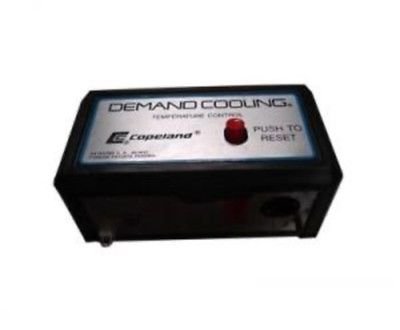
Figure 1: Front view of the Copeland 985011001 Demand Cooling Temperature Control unit. The unit features a silver faceplate with "DEMAND COOLING. TEMPERATURE CONTROL." text, the Copeland logo, and a prominent red "PUSH TO RESET" button.
Safety Information
WARNING: Improper installation, adjustment, alteration, service, or maintenance can cause property damage, injury, or death. Read these instructions thoroughly before installing or servicing this equipment.
- Always disconnect power before servicing the unit to prevent electrical shock.
- Ensure all wiring complies with local and national electrical codes.
- Only qualified personnel should install and service this equipment.
- Do not operate the unit if it appears damaged.
Setup and Installation
The Copeland 985011001 unit is designed for integration into existing compressor control systems. Follow these general steps for installation:
- Mounting: Select a suitable location near the compressor system, ensuring it is protected from excessive vibration, moisture, and extreme temperatures. Secure the unit using appropriate fasteners through its mounting points.
- Wiring:
- Refer to the specific wiring diagram provided with your compressor system or by the manufacturer for correct connections.
- Connect the power supply (240V) to the designated terminals.
- Connect the control output from the Demand Cooling unit to the compressor's control circuit.
- Ensure all connections are secure and insulated.
- Sensor Placement: If an external temperature sensor is used with this unit, ensure it is placed in a location that accurately reflects the temperature requiring control.
- Initial Power-Up: After all connections are verified, apply power to the system. Observe the unit for any indicator lights or initial operational responses.
Operating Instructions
The Demand Cooling unit operates automatically based on temperature control parameters. The primary user interaction is the reset function.
- Automatic Operation: The unit continuously monitors the system temperature and activates or deactivates cooling as required to maintain optimal conditions.
- Reset Function: The red "PUSH TO RESET" button is used to clear certain fault conditions or to re-initialize the unit after a power interruption or system adjustment.
- If the system enters a fault state (e.g., due to an over-temperature event), the unit may shut down the compressor.
- To reset, press and release the red "PUSH TO RESET" button firmly.
- The unit should then attempt to resume normal operation. If the fault persists, further investigation is required (refer to Troubleshooting).
Maintenance
Regular maintenance ensures the longevity and reliable operation of your Demand Cooling unit.
- Visual Inspection: Periodically inspect the unit for any signs of physical damage, loose connections, or corrosion. Ensure the housing is intact.
- Cleaning: Keep the unit free from dust and debris. Use a soft, dry cloth for cleaning. Do not use abrasive cleaners or solvents.
- Connection Check: Annually, or as part of your system's maintenance schedule, verify that all electrical connections are tight and secure.
Troubleshooting
If the Demand Cooling unit or the connected compressor system is not functioning as expected, consider the following troubleshooting steps:
| Problem | Possible Cause | Solution |
|---|---|---|
| Unit does not power on. | No power supply; loose wiring. | Check power source and all electrical connections. Ensure circuit breaker is not tripped. |
| Compressor not engaging/disengaging. | Incorrect temperature sensor reading; control wiring issue; unit in fault state. | Verify sensor placement and functionality. Check control wiring. Press "PUSH TO RESET" button. |
| "PUSH TO RESET" button has no effect. | Persistent fault condition; internal unit failure. | Investigate the underlying fault condition in the compressor system. If no external fault is found, contact qualified service personnel. |
If troubleshooting steps do not resolve the issue, contact a qualified service technician.
Specifications
- Model: Copeland 985011001
- Manufacturer: COPELAND CORPORATION
- Product Dimensions: 3.2 x 6 x 2.5 inches
- Item Weight: 4 pounds
- Voltage: 240V
- Function: Demand Cooling Temperature Control
- ASIN: B008FM5IR0
- Date First Available: June 28, 2012
Warranty and Support
For specific warranty information and technical support, please refer to the documentation provided with your purchase or contact Copeland Corporation directly. This manual does not contain warranty details or specific support contact information.
Manufacturer Contact: Please refer to the official Copeland Corporation website or your product supplier for the most current contact information.


