
1. Introduction
The Heil Sound Pro Set 3 Studio Headphones are professional-quality headphones engineered for exceptional audio clarity, balanced frequency response, and comfort during extended use. Designed for critical listening environments, they are ideal for studio recording, podcast production, live sound monitoring, and broadcast applications. This manual provides essential information for setting up, operating, and maintaining your headphones to ensure optimal performance.
2. Product Features
- Closed-Back Design: Provides excellent sound isolation for focused listening.
- Professional 40mm Driver Unit: Delivers accurate sound reproduction across the frequency spectrum.
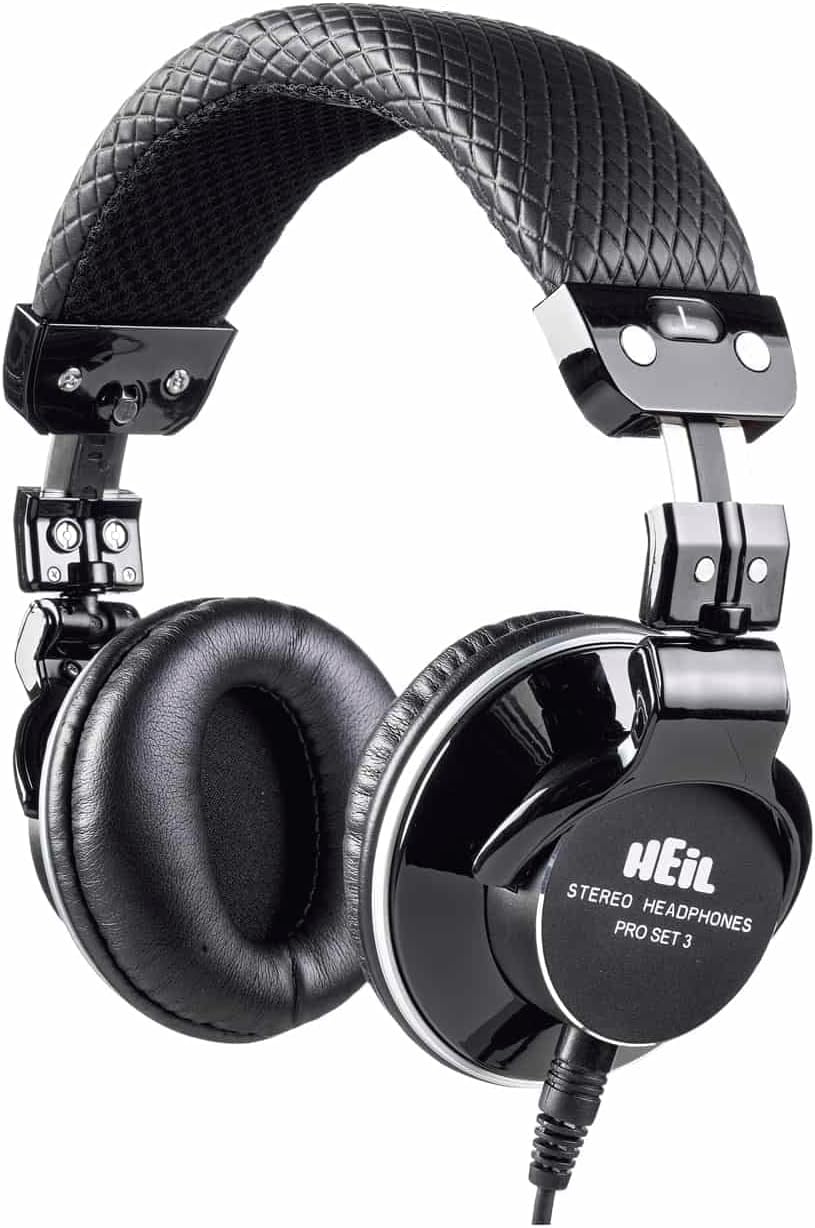
- Comfortable Construction: Lightweight design with soft ear cushions and an adjustable metal headband for extended wear without fatigue.
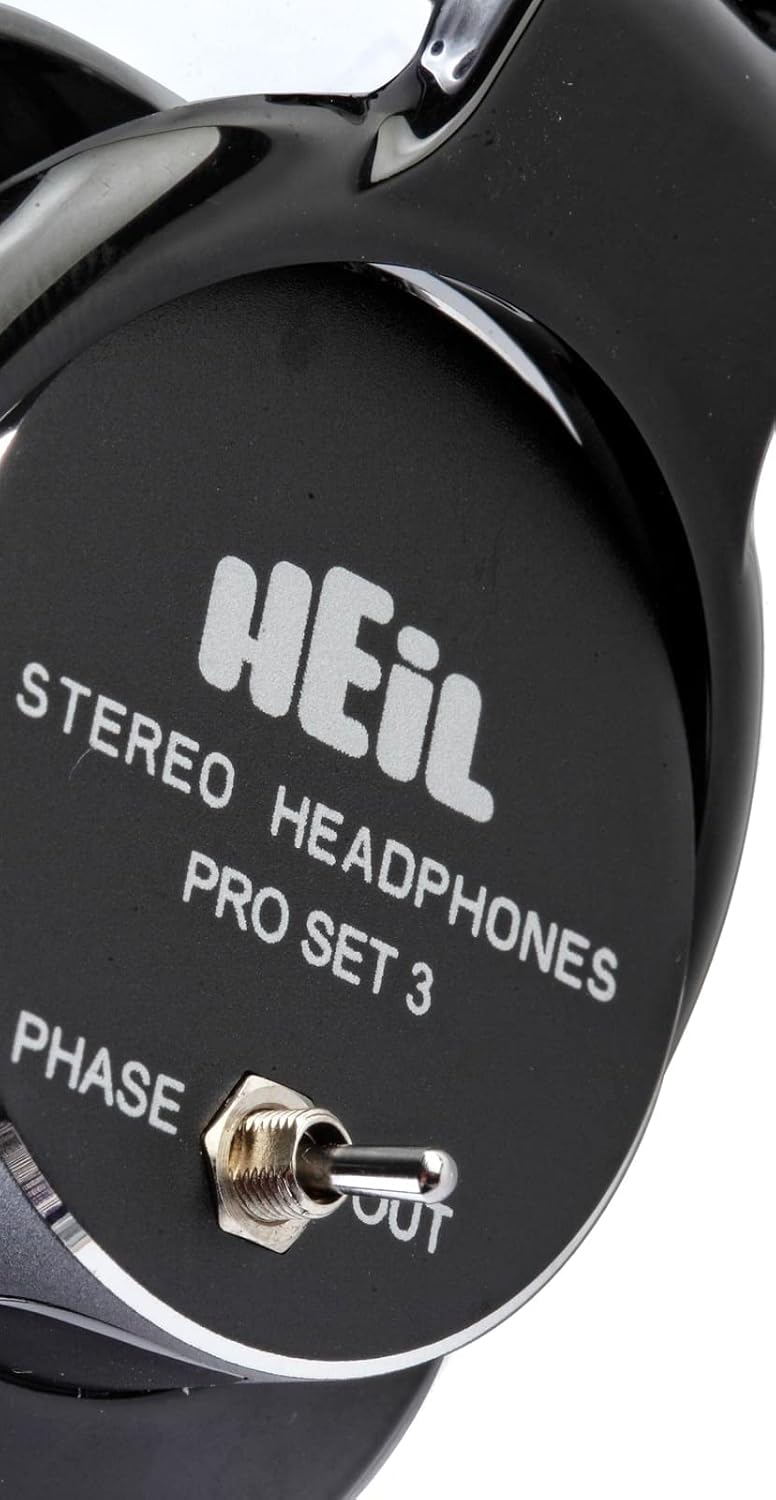
- Phase Reversal Switch: A unique feature that runs the speakers out of phase when engaged, reducing listener fatigue during long sessions and aiding accurate monitoring in noisy environments.
- Detachable Cables: Includes three versatile cables for various applications.
3. Setup
To set up your Heil Sound Pro Set 3 headphones, follow these steps:
- Select the Appropriate Cable: Choose from the three included detachable cables based on your audio source and connection requirements.
- Connect to Headphones: Insert the 1/8" (3.5 mm) twist-lock end of the chosen cable into the jack located on the left earcup. Twist clockwise to secure the connection.
- Connect to Audio Source: Plug the other end of the cable into your audio device (e.g., mixer, audio interface, computer, smartphone). Use the included 1/4" (6.3 mm) gold-plated screw-on adapter if your device requires a larger jack.
- Adjust Headband: Extend or retract the metal headband on both sides to achieve a comfortable and secure fit on your head. The earcups should sit comfortably over your ears.
4. Operating Instructions
Once connected, your headphones are ready for use. Pay attention to the unique phase reversal switch for enhanced listening control.
4.1. Using the Phase Reversal Switch
The Heil Sound Pro Set 3 features a phase reversal switch located on one of the earcups. This switch allows you to alter the phase relationship of the audio signals to the speakers.
- Phase IN (Normal): This is the standard listening mode, providing a balanced and accurate stereo image.
- Phase OUT (Reversed): Engaging this switch runs the speakers out of phase. This can be beneficial for:
- Reducing listener fatigue during prolonged monitoring sessions.
- More accurately identifying and isolating specific audio elements, particularly in complex or noisy mixes, by altering the perceived spatial characteristics of the sound.
Experiment with the switch to understand its effect on different audio materials and find the setting that best suits your monitoring needs.

5. Maintenance
Proper maintenance ensures the longevity and performance of your headphones.
- Cleaning Ear Cushions: Gently wipe the ear cushions with a soft, damp cloth. Avoid harsh chemicals or abrasive materials.
- Cleaning Headband: Wipe the headband with a soft, dry cloth.
- Cable Care: Handle cables with care. Avoid sharp bends or excessive pulling. Disconnect cables by gripping the plug, not the cable itself.
- Storage: When not in use, store the headphones in their protective case to prevent dust accumulation and physical damage.
6. Troubleshooting
If you encounter issues with your headphones, refer to the following common problems and solutions:
| Problem | Possible Cause | Solution |
|---|---|---|
| No Sound / Intermittent Sound | Loose cable connection, incorrect audio source selection, faulty cable. | Ensure cables are securely connected at both the headphone and audio source. Verify audio source output. Try a different cable. |
| Distorted Sound | Volume too high, audio source issue, phase reversal switch engaged incorrectly. | Reduce volume on the audio source. Test with a different audio source. Check the position of the phase reversal switch. |
| Uncomfortable Fit | Headband not adjusted properly. | Adjust the metal headband on both sides until a comfortable fit is achieved. The headband is designed to be flexible and can be gently shaped for comfort. |
7. Specifications
| Feature | Detail |
|---|---|
| Model Name | Heil Sound Pro Set 3 (PS3) |
| Ear Placement | Over Ear |
| Noise Control | Sound Isolation |
| Connectivity Technology | Wired |
| Headphones Jack | 6.35 mm Jack (with 3.5mm adapter) |
| Impedance | 32 Ohms |
| Frequency Response | 10 Hz – 22 KHz |
| Maximum Input | 1,000 mW |
| Sensitivity | 102 dB |
| Weight | 198 g (7 oz) |
| Material | Plastic |
| Special Feature | Closed Back Dynamic, Phase reversal switch |
8. What's in the Box
Your Heil Sound Pro Set 3 Studio Headphones package includes:
- Heil Sound Pro Set 3 Studio Headphones
- 1.8 M flexible straight cable (1/8" / 3.5 mm twist-lock to 1/8" / 3.5 mm)
- 1.8 M straight cable with iPhone/iPod compatible 3.5mm plug (1/8" / 3.5 mm twist-lock to 1/8" / 3.5 mm)
- 3 M coil cable (1/8" / 3.5 mm twist-lock to 1/8" / 3.5 mm)
- 1/8" (3.5 mm) to 1/4" (6.3 mm) gold-plated screw-on adapter
- Protective Case
- Ear Cushions (pre-installed)
- Headband (pre-installed)

9. Warranty and Support
Heil Sound products are manufactured to high standards. For information regarding warranty coverage, technical support, or service, please refer to the official Heil Sound website or contact their customer service department. Keep your purchase receipt as proof of purchase for any warranty claims.


