
1. Introduction
This manual provides detailed instructions for the installation, operation, and maintenance of your Hertz Dieci Series DSK-1653 Component Speaker Kit. Please read this manual thoroughly before attempting installation or operation to ensure proper function and longevity of your product. This kit is designed to enhance your vehicle's audio system with high-quality sound reproduction.
2. Product Overview
The Hertz Dieci Series DSK-1653 is a 6.5-inch 2-way component speaker system engineered for car audio applications. It comprises two woofers (DV 165.3), two tweeters (DT 24.3), and two passive crossover networks (DX 300), along with grilles for protection. This system is designed to deliver a balanced audio experience with clear highs, detailed mid-range, and robust bass.

Image 2.1: Complete Hertz Dieci Series DSK-1653 Component Speaker Kit, including woofers, tweeters, and crossover networks.
3. Components Included
Your DSK-1653 kit includes the following components:
- Two (2) DV 165.3 Woofers: 6.5-inch (165mm) mid-bass drivers with water-repellent pressed paper cones and ferrite magnets.
- Two (2) DT 24.3 Tweeters: 24mm PEI dome tweeters with neodymium magnets.
- Two (2) DX 300 Crossover Networks: Passive 2-way crossovers to separate audio frequencies for woofers and tweeters.
- Two (2) Woofer Grilles: Protective covers for the woofers.
- Mounting hardware and wiring accessories.

Image 3.1: Front view of the Hertz DV 165.3 woofer, showcasing the cone and surround.

Image 3.2: Hertz DT 24.3 tweeter with its protective grille.

Image 3.3: Hertz DX 300 passive 2-way crossover network, showing input and output terminals.
4. Setup and Installation
Proper installation is crucial for optimal performance. If you are unfamiliar with car audio installations, it is recommended to seek professional assistance. Always disconnect the vehicle's battery before beginning any electrical work.
4.1. Planning the Installation
- Location Selection: Identify suitable locations in your vehicle for the woofers and tweeters. Woofers are typically installed in door panels or kick panels, while tweeters can be mounted in A-pillars, dash, or door panels for optimal sound staging.
- Crossover Placement: Crossovers should be placed in a dry, accessible location, away from heat sources and moisture.
- Wiring: Plan your wiring paths to avoid interference with vehicle electronics and to ensure sufficient cable length. Use appropriate gauge wiring for power and speaker connections.
4.2. Woofer Installation (DV 165.3)
The DV 165.3 woofers are 6.5 inches (165mm) in diameter. Ensure adequate mounting depth and clearance. Refer to the dimensions diagram below.
- Carefully remove the existing speakers or prepare the mounting location.
- If necessary, use speaker adapters or mounting rings to secure the woofer.
- Connect the woofer to the 'WF' output of the DX 300 crossover network. Ensure correct polarity (+ to + and - to -).
- Secure the woofer using the provided screws.
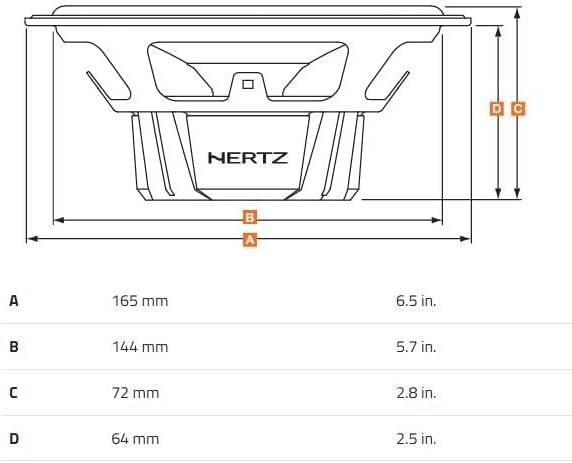
Image 4.1: Technical diagram showing the dimensions of the Hertz DV 165.3 woofer (A: 165mm/6.5in, B: 144mm/5.7in, C: 72mm/2.8in, D: 64mm/2.5in).
4.3. Tweeter Installation (DT 24.3)
The DT 24.3 tweeters can be flush-mounted or surface-mounted using the included hardware.
- Choose the desired mounting method and prepare the opening.
- Connect the tweeter to the 'TW' output of the DX 300 crossover network, observing polarity.
- Secure the tweeter in place.
4.4. Crossover Network Connection (DX 300)
The DX 300 crossover network manages the frequency distribution to the woofer and tweeter.
- Connect the input terminals of the DX 300 crossover to the amplifier's speaker output.
- Connect the 'WF' output of the crossover to the woofer.
- Connect the 'TW' output of the crossover to the tweeter.
- Ensure all connections are secure and properly insulated.
5. Operating Instructions
Once installed, the Hertz DSK-1653 system operates as part of your car's audio system. Follow these guidelines for optimal performance:
- Initial Power-Up: After installation, reconnect the vehicle's battery. Turn on your head unit or amplifier at a low volume level to verify all connections are correct and sound is produced from all components.
- Break-in Period: Allow a break-in period of approximately 20-30 hours of normal listening. During this time, the speaker components will loosen up, leading to improved sound quality and bass response. Avoid playing music at excessively high volumes during this period.
- Volume Control: Adjust the volume to a comfortable listening level. Avoid prolonged listening at maximum volume, which can lead to distortion and potential damage to the speakers.
- Audio Settings: Use your head unit or amplifier's equalizer and sound settings to fine-tune the audio to your preference. Start with flat settings and make small adjustments.
6. Maintenance
The Hertz DSK-1653 speakers require minimal maintenance to ensure long-lasting performance.
- Cleaning: Periodically wipe the speaker grilles and surrounds with a soft, dry cloth to remove dust and debris. Avoid using harsh chemicals or abrasive cleaners.
- Moisture: Protect the speakers from excessive moisture. While the woofer cone is water-repellent, direct exposure to water should be avoided.
- Inspection: Occasionally inspect the wiring connections to ensure they remain secure and free from corrosion.
7. Troubleshooting
If you encounter issues with your DSK-1653 speaker kit, refer to the following common problems and solutions:
| Problem | Possible Cause | Solution |
|---|---|---|
| No sound from speakers | Loose wiring connection Incorrect polarity Amplifier/head unit issue | Check all speaker and crossover connections. Verify correct positive (+) and negative (-) wiring. Test amplifier/head unit with another speaker. |
| Distorted or unclear sound | Over-driving speakers (volume too high) Incorrect gain settings on amplifier Loose speaker cone/surround | Reduce volume. Adjust amplifier gain settings according to manufacturer recommendations. Inspect speakers for physical damage. |
| One speaker not working | Faulty speaker wire Crossover issue Damaged speaker | Check wiring for continuity. Verify crossover connections for that specific speaker. Swap speakers to isolate the problem. |
If these steps do not resolve the issue, contact Hertz Audio customer support or a qualified car audio technician.
8. Specifications
Key technical specifications for the Hertz Dieci Series DSK-1653 Component Speaker Kit:
- Speaker Type: 2-Way Component System
- Woofer Diameter: 6.5 inches (165 mm)
- Woofer Cone: Water-Repellent Pressed Paper
- Woofer Magnet: Ferrite
- Tweeter Diameter: 24 mm
- Tweeter Dome: PEI
- Tweeter Magnet: Neodymium
- Impedance: 4 Ohm
- Peak Power Handling: 160 Watts
- Signal-to-Noise Ratio: 60.2 dB
- Product Dimensions: 11.81 x 11.81 x 11.81 inches (packaging)
- Item Weight: 2 pounds
- Model Name: DSK-1653
- UPC: 133588270357
9. Warranty and Support
The Hertz Dieci Series DSK-1653 Component Speaker Kit comes with a Limited Warranty. Please refer to the warranty card included with your product for specific terms and conditions, including coverage duration and claim procedures.
For technical support, service, or warranty inquiries, please contact Hertz Audio customer service through their official website or authorized dealers. Keep your proof of purchase for warranty claims.


