
Product Overview
The BOSS eBand JS-10 is a versatile audio player and trainer designed for musicians. It integrates a powerful 2.1 sound system with built-in BOSS effects and COSM amp modeling, allowing users to practice guitar or bass along with their favorite tracks. It supports playback from USB and SD media and features minus-one center cancellation technology for vocal removal. The unit is portable and serves as a comprehensive practice solution.

Figure 1: Front view of the BOSS JS-10 eBand. This image displays the main control panel, including the display screen, navigation buttons, input jacks for guitar/mic, and master level controls. The unit features a sleek black and silver design with integrated speakers on both sides.
Setup Guide
1. Unpacking and Inspection
Carefully remove all components from the packaging. Verify that all items are present:
- BOSS JS-10 eBand unit
- AC adapter
- Owner's Manual (this document)
Inspect the unit for any signs of damage during transit. If any damage is found or components are missing, contact your retailer immediately.
2. Power Connection
The JS-10 operates on 9 Volts DC power supplied via the included AC adapter. Ensure the unit is placed on a stable, flat surface before connecting power.
- Connect the DC plug of the AC adapter to the DC IN jack on the rear of the JS-10.
- Plug the AC adapter into a standard electrical outlet.

Figure 2: The AC adapter and associated cables for the BOSS JS-10. This image shows the power supply unit and the necessary power cords for connecting the device to a wall outlet.
3. Connecting Instruments and Audio Devices
The JS-10 provides multiple input options for instruments, microphones, and external audio sources.
- Input 1 (GUITAR/MIC): Connect your guitar, bass, or a microphone to this 1/4-inch jack.
- Input 2 (GUITAR/MIC): Connect a second instrument or microphone to this 1/4-inch jack.
- AUX IN: Use the 3.5mm stereo mini-jack to connect external audio players (e.g., smartphone, MP3 player) for playback.
- PHONES: Connect headphones to the 3.5mm stereo mini-jack for private practice.
- USB: Connect to a computer for audio capture or data transfer.

Figure 3: Side view of the BOSS JS-10, illustrating the various input and output jacks. This image highlights the connectivity options available on the unit's side panel, including headphone and auxiliary inputs.
Operating Instructions
1. Powering On/Off
Press the POWER button located on the front panel to turn the unit on or off. The display will illuminate upon power-on.
2. Basic Controls
The JS-10 features intuitive controls for navigation and playback:
- SONG LIST: Access the list of songs stored on USB or SD media.
- PLAY/STOP/REC: Standard transport controls for audio playback and recording.
- MENU/EXIT/ENTER: Navigate through menus, confirm selections, and exit screens.
- Navigation Buttons (Up/Down/Left/Right): Used for menu navigation and parameter adjustment.
- A<->B: Sets loop points for repeated playback of a specific section.
- SPEED: Adjusts the playback speed of audio tracks without changing pitch.
- AMP: Activates and adjusts the built-in COSM amp models.
- TUNER: Engages the integrated chromatic tuner for instrument tuning.
- EFFECTS: Access and modify the various built-in BOSS effects.
- INPUT LEVEL 1-2 / MASTER LEVEL: Adjust input gain for connected instruments/mics and overall output volume.
3. Playing Audio Tracks
The JS-10 supports audio playback from USB flash drives and SD/SDHC memory cards. Insert your media into the respective slot on the unit.
- Press the SONG LIST button.
- Use the navigation buttons to select a song from the list.
- Press PLAY to begin playback.
- Adjust the MASTER LEVEL knob to set the desired listening volume.
4. Using the Trainer Functions
The JS-10 offers powerful training features:
- Speed Change: While a song is playing, press the SPEED button and use the navigation controls to slow down or speed up the track for easier learning or challenging practice.
- A-B Repeat: Press the A<->B button at the start of a section you wish to loop (point A), then press it again at the end (point B). The section will repeat continuously. Press A<->B again to cancel the loop.
- Center Cancel: This function reduces the volume of the center-panned audio (often vocals or lead instruments) in a stereo track, allowing you to play along more effectively. Access this feature through the MENU.
5. Applying Effects and Amp Models
The JS-10 includes a wide array of BOSS effects and COSM amp models to shape your instrument's tone.
- Connect your instrument to Input 1 or 2.
- Press the AMP or EFFECTS button.
- Use the navigation buttons and ENTER to browse and select desired amp models or effects.
- Adjust parameters using the navigation buttons or dedicated knobs as displayed on the screen.
Maintenance
1. Cleaning
To maintain the appearance and functionality of your JS-10:
- Wipe the exterior with a soft, dry cloth.
- For stubborn dirt, use a slightly damp cloth with mild, non-abrasive cleaner, then wipe dry.
- Do not use abrasive cleaners, waxes, or solvents as they may damage the finish.
- Keep the ventilation grilles clear of dust and debris to ensure proper airflow.
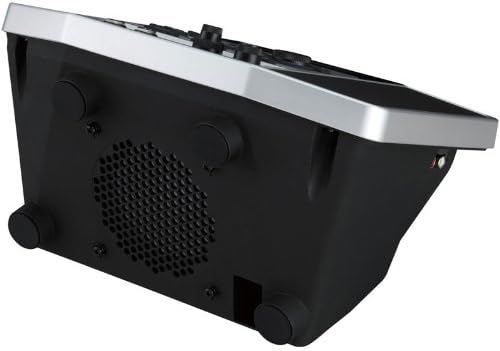
Figure 4: Bottom view of the BOSS JS-10, showing the ventilation grille and rubber feet. This area should be kept clear to ensure proper cooling of the internal components.
2. Storage
When not in use for extended periods, store the JS-10 in a cool, dry place away from direct sunlight, extreme temperatures, and high humidity. Disconnect the AC adapter from the unit and the power outlet.
3. Battery Information (Optional Use)
While primarily powered by an AC adapter, the JS-10 can also operate on 6 AA batteries. If using batteries:
- Ensure batteries are inserted with correct polarity.
- Do not mix old and new batteries, or different types of batteries.
- Remove batteries if the unit will not be used for a long time to prevent leakage.
- Dispose of used batteries according to local regulations.
Troubleshooting
This section provides solutions to common issues you might encounter with your BOSS JS-10. If the problem persists after trying these steps, please contact customer support.
| Problem | Possible Cause | Solution |
|---|---|---|
| No power | AC adapter not connected properly; Power outlet not active; Batteries depleted or incorrectly inserted. | Ensure AC adapter is securely connected to the unit and a working outlet. Check battery status and polarity if using batteries. |
| No sound output | Master Level knob turned down; Headphones not connected properly; Input Level knobs turned down; Incorrect input selected; Speaker/headphone issue. | Increase MASTER LEVEL. Check headphone connection. Increase INPUT LEVEL for connected instruments. Verify correct input selection. Test with different headphones/speakers. |
| Instrument sound is distorted or weak | Input Level too high/low; Incorrect amp model/effect settings; Cable issue. | Adjust INPUT LEVEL. Review AMP and EFFECTS settings. Try a different instrument cable. |
| Cannot play back audio from USB/SD | Media not inserted correctly; Unsupported file format; Corrupted media. | Ensure USB drive/SD card is fully inserted. Check that audio files are in a supported format (e.g., MP3, WAV). Try a different USB drive/SD card. |
Specifications
Detailed technical specifications for the BOSS JS-10 eBand:
- Model Number: JS-10
- Item Weight: 4.84 pounds (2.2 Kilograms)
- Product Dimensions: 11.65 x 13.23 x 8.9 inches (29.59 x 33.60 x 22.61 cm)
- Power Source: Corded Electric (AC Adapter)
- Voltage: 9 Volts
- Wattage: 10 watts
- Batteries: 6 AA batteries required (for portable use)
- Hardware Interface: 3.5mm Audio, Headphone, USB
- Signal Format: Analog
- Color: Black, Silver
- First Available Date: August 10, 2012
Warranty & Support
Warranty Information
Specific warranty terms and conditions for the BOSS JS-10 eBand are provided by the manufacturer, BOSS, or your retailer at the time of purchase. Please refer to the warranty card included with your product or visit the official BOSS website for detailed information regarding warranty coverage, duration, and claims procedures.
Customer Support
For technical assistance, service, or further inquiries regarding your BOSS JS-10, please contact BOSS customer support. You can find contact information and additional resources on the official BOSS website:
Official BOSS Store: Visit the BOSS Store on Amazon
Please have your product model number (JS-10) and serial number ready when contacting support.


