
Introduction
Thank you for choosing the TRUGLO TG8030GB 30mm Dual-Color Red-Dot Sight. This sight is engineered for precision and reliability, specifically designed with a turkey hunting reticle to enhance your aiming experience. Please read this manual thoroughly before installation and use to ensure proper operation and longevity of your device.
Product Features
- Turkey Hunting Reticle: Features a specially designed reticle optimized for turkey hunting.
- Dual-Color Illumination: Offers both red and green reticle illumination for varying light conditions and preferences.
- Illuminated Ring: The illuminated ring represents a 24-inch circle at 30 yards, aiding in target estimation.
- Detachable Sunshade: An extended sunshade is included to eliminate glare from the front lens, improving visibility.
- Spare Battery Compartment: Integrated storage for a spare battery ensures you're always prepared.
- Flip-Up Lens Caps: Includes flip-up lens caps with a lanyard system for protection and convenience.
- Weaver Mount: Designed for easy and secure mounting on Weaver-style bases.
Package Contents
Please verify that all items are present before proceeding with installation:
- TRUGLO TG8030GB 30mm Dual-Color Red-Dot Sight
- Detachable Extended Sunshade
- Flip-Up Lens Caps with Lanyard
- Battery (pre-installed or separate)
- Mounting Hardware (for Weaver-style bases)
- Instruction Manual (this document)
Setup
1. Battery Installation
The TG8030GB sight requires a CR2032 battery (typically). To install or replace the battery:
- Locate the battery compartment cap, usually on the side of the sight's housing.
- Unscrew the cap counter-clockwise.
- Insert a fresh CR2032 battery with the positive (+) side facing outwards.
- Carefully screw the cap back on clockwise until snug, ensuring a watertight seal. Do not overtighten.
The sight also features a spare battery storage compartment. To access it, locate the small cap on the opposite side of the main battery compartment and follow similar steps.
2. Mounting the Sight
The TG8030GB is designed for Weaver-style mounting systems.
- Ensure your firearm is unloaded and pointed in a safe direction.
- Loosen the mounting screws on the sight's base.
- Place the sight onto your Weaver-style rail, aligning the cross-slots.
- Slide the sight forward in the rail slot to ensure consistent recoil engagement.
- Tighten the mounting screws securely. Do not overtighten.

Image: Side view of the TRUGLO TG8030GB Red-Dot Sight, illustrating the location of the adjustment knobs and battery compartment for setup.
3. Attaching the Sunshade and Lens Caps
- Sunshade: Screw the detachable extended sunshade onto the objective (front) end of the sight until it is finger-tight.
- Lens Caps: Attach the flip-up lens caps to the objective and ocular (rear) ends of the sight. Ensure they fit snugly and can be flipped open and closed easily. Connect the lanyard if desired.
Operating Instructions
1. Powering On/Off and Reticle Selection
The TG8030GB features a rotary switch for power, brightness, and reticle color selection.
- Rotate the knob located on the side of the sight.
- Settings typically include "OFF", "R" (Red) with multiple brightness levels, and "G" (Green) with multiple brightness levels.
- Turn the knob to the desired brightness level under "R" or "G" to activate the reticle.
- To turn off the sight, rotate the knob back to the "OFF" position.
2. Windage and Elevation Adjustments
The sight features capped windage and elevation adjustment turrets. These turrets adjust the point of impact of your reticle.
- Remove the protective caps from the windage (side) and elevation (top) turrets.
- Use a coin or flat-head screwdriver to turn the adjustment dials.
- Elevation: Turning the top turret clockwise typically moves the point of impact DOWN. Turning counter-clockwise moves it UP.
- Windage: Turning the side turret clockwise typically moves the point of impact RIGHT. Turning counter-clockwise moves it LEFT.
- Each click represents a specific change in point of impact (e.g., 1 MOA or 1/2 MOA). Refer to the sight's markings for precise values.
- After zeroing, replace the protective caps to prevent accidental adjustments and protect the turrets.
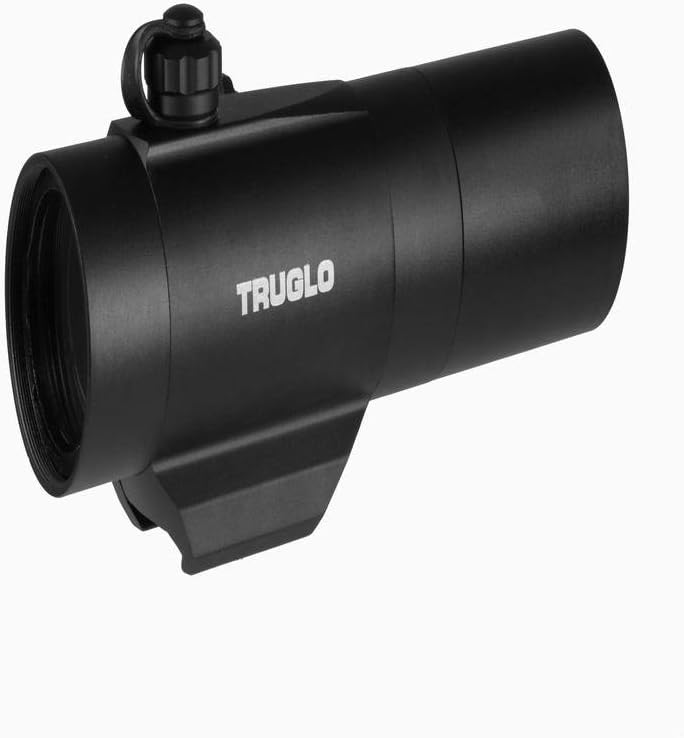
Image: Angled view of the TRUGLO TG8030GB Red-Dot Sight, highlighting the TRUGLO branding and the robust construction.
3. Zeroing the Sight
Zeroing your sight is crucial for accurate shooting. This process should be performed at a safe shooting range.
- Mount the sight securely to your firearm.
- Set up a target at your desired zeroing distance (e.g., 30 yards for turkey hunting).
- Fire a group of shots (e.g., 3 shots) at the target.
- Observe the point of impact relative to your aim point.
- Adjust the windage and elevation turrets to move the reticle towards the actual point of impact. For example, if shots are hitting low and left, adjust elevation UP and windage RIGHT.
- Repeat the firing and adjustment process until your shots consistently hit your aim point.
Maintenance
1. Cleaning the Lenses
To maintain optical clarity, keep the lenses clean.
- Gently brush away any loose dust or debris using a soft lens brush or compressed air.
- Apply a small amount of lens cleaning solution to a microfiber lens cloth.
- Wipe the lens surfaces in a circular motion, starting from the center and moving outwards.
- Avoid using harsh chemicals, abrasive cloths, or excessive pressure, as this can damage the lens coatings.

Image: Front view of the TRUGLO TG8030GB Red-Dot Sight, highlighting the objective lens which requires regular cleaning for optimal performance.
2. General Care and Storage
- Keep the sight dry. If it gets wet, wipe it down with a clean, dry cloth immediately.
- Store the sight in a cool, dry place, away from direct sunlight and extreme temperatures.
- When storing for extended periods, remove the battery to prevent leakage and potential damage to the electronics.
- Ensure lens caps are in place during storage and transport to protect the lenses.
Troubleshooting
| Problem | Possible Cause | Solution |
|---|---|---|
| Reticle does not illuminate. | Battery is dead or incorrectly installed. | Replace the battery with a fresh CR2032, ensuring correct polarity. |
| Reticle is dim or flickers. | Low battery or poor contact. | Replace the battery. Clean battery contacts if necessary. |
| Inaccurate shots / Cannot zero. | Sight is not securely mounted; loose mounting screws. | Check and tighten all mounting screws. Ensure the sight is seated correctly on the rail. |
| Reticle appears blurry or distorted. | Lenses are dirty or damaged. | Clean the lenses according to the maintenance instructions. If damage is present, contact TRUGLO support. |
Specifications
| Model: | TG8030GB |
| Brand: | TRUGLO |
| Magnification: | 1x (Non-magnifying) |
| Objective Lens Diameter: | 30mm |
| Reticle Type: | Dual-Color Turkey Hunting Reticle |
| Reticle Colors: | Red, Green |
| Mounting Type: | Weaver Mount |
| Compatible Devices: | Shotgun |
| Power Source: | CR2032 Battery (typically) |
| Item Weight: | 2 Pounds (approx.) |
| UPC: | 788130011904 |
Warranty and Support
For warranty information, product support, or service inquiries, please contact TRUGLO directly. Details regarding specific warranty terms and conditions are typically provided with the product packaging or can be found on the official TRUGLO website.
Manufacturer: Truglo
Website: www.truglo.com (Note: This is a general placeholder for the brand's website. Please refer to your product packaging for the most accurate contact information.)

