
Dish EL-UDON-81457
DISH Network 40.0 UHF 2G Remote User Manual
Model: EL-UDON-81457
Introduction
This user manual provides comprehensive instructions for the DISH Network 40.0 UHF 2G Remote, designed specifically for use with DISH Hopper and Joey Receivers. This remote offers reliable control over your entertainment system, utilizing a UHF signal for enhanced range and performance.
Setup
1. Battery Installation
The DISH Network 40.0 remote requires two (2) AA batteries for operation. Follow these steps to install them:
- Locate the battery compartment on the back of the remote control.
- Slide the battery cover downwards and lift it off.
- Insert two AA batteries, ensuring the positive (+) and negative (-) terminals align correctly with the indicators inside the compartment.
- Replace the battery cover by sliding it back into place until it clicks securely.
2. Pairing the Remote with Your Receiver
The 40.0 remote operates using a UHF signal, which requires pairing with your Hopper or Joey receiver. This allows the remote to control the receiver without needing a direct line of sight.
- Ensure your Hopper or Joey receiver is powered on.
- On the remote, press the SYSTEM INFO button (or MENU then navigate to Settings > Remote Control > Pair Remote).
- Follow the on-screen prompts to complete the pairing process. This typically involves pressing a specific button combination on the remote or confirming a code displayed on the screen.
- Once successfully paired, a confirmation message will appear on your TV screen.
For detailed pairing instructions specific to your receiver model, refer to your receiver's user manual or the DISH Network support website.
Operating Instructions
The DISH Network 40.0 remote provides intuitive control over your Hopper or Joey receiver. Below is an overview of key buttons and their functions.
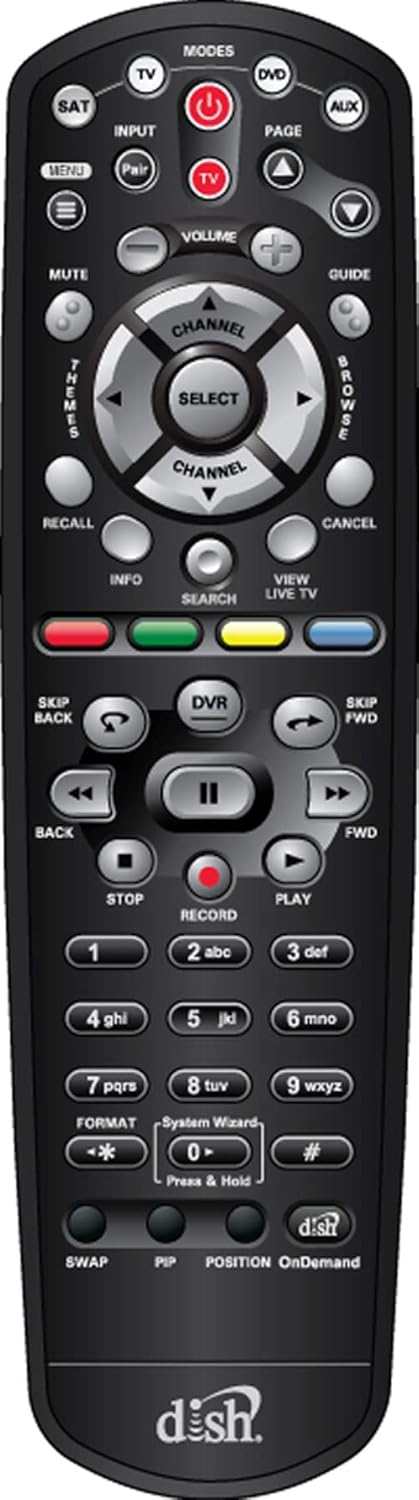
Figure 1: Front view of the DISH Network 40.0 UHF 2G Remote, showing all buttons and their layout.
Remote Button Functions
| Button | Function |
|---|---|
| POWER | Turns the receiver and TV on/off. |
| MODES (TV, DVD, AUX, SAT) | Selects the device the remote controls. Ensure SAT mode is selected for receiver control. |
| INPUT | Changes the input source on your TV. |
| MENU | Accesses the main menu of the DISH receiver. |
| GUIDE | Displays the program guide. |
| VOLUME (+/-) | Adjusts the TV volume. |
| CHANNEL (+/-) | Changes the channel. |
| SELECT / Navigation Arrows | Navigates menus and selects options. |
| DVR | Accesses your Digital Video Recorder (DVR) recordings. |
| PLAY, PAUSE, STOP, FWD, BACK, SKIP FWD, SKIP BACK | Controls playback of live TV and recorded content. |
| RECORD | Initiates recording of the current program. |
| INFO | Displays program information. |
| SEARCH | Opens the search function for programs and content. |
| VIEW LIVE TV | Returns to live television. |
| Colored Buttons (Red, Green, Yellow, Blue) | Functions vary depending on the on-screen menu or application. For Hopper 3, these buttons may offer enhanced features like one-click Closed Captioning (Green button). |
| Numeric Keypad (0-9) | Direct channel entry and text input. |
| SWAP | Switches between the current and previous channel. |
| PIP | Picture-in-Picture function (if supported by receiver/TV). |
| OnDemand | Accesses On Demand content. |
For specific programming of the TV, DVD, or AUX modes, refer to the programming instructions provided with your receiver or on the DISH Network support website. The remote may come with a label sheet for custom input programming, as shown in Figure 2.

Figure 2: DISH Network 40.0 UHF 2G Remote shown with an accompanying sheet of input labels, which can be used to customize the remote's functions for various devices.
Maintenance
To ensure the longevity and optimal performance of your DISH Network 40.0 remote, follow these maintenance guidelines:
- Cleaning: Use a soft, dry cloth to wipe the remote. For stubborn dirt, slightly dampen the cloth with water or a mild, non-abrasive cleaner. Avoid excessive moisture and harsh chemicals.
- Battery Replacement: Replace batteries when the remote's response becomes sluggish or if the indicator light (if present) signals low battery. Always replace both batteries at the same time with new ones of the same type (AA).
- Storage: Store the remote in a cool, dry place away from direct sunlight, extreme temperatures, and high humidity.
- Avoid Drops: Protect the remote from physical impact, as drops can damage internal components.
Troubleshooting
If you encounter issues with your DISH Network 40.0 remote, try the following solutions:
| Problem | Possible Cause / Solution |
|---|---|
| Remote not responding. |
|
| Remote controls TV but not receiver. |
|
| Remote controls receiver but not TV (e.g., volume, power). |
|
| Buttons are sticky or unresponsive. |
|
If these steps do not resolve the issue, contact DISH Network customer support for further assistance.
Specifications
| Feature | Detail |
|---|---|
| Model Number | EL-UDON-81457 (DISH Network 40.0) |
| Compatibility | DISH Hopper and Joey Receivers only |
| Communication Type | UHF (Ultra High Frequency) 2G Signal |
| Power Source | 2 x AA Batteries (required) |
| Dimensions (L x W x H) | 8.5 x 1.2 x 4.1 inches (approximate) |
| Item Weight | 4 ounces (approximate, without batteries) |
| Color | Black |
| Max Number of Supported Devices | 4 (SAT, TV, DVD, AUX) |
Warranty and Support
Warranty Information
This product is typically covered by a limited warranty provided by DISH Network or the retailer from whom it was purchased. Warranty terms and conditions may vary. Please retain your proof of purchase for warranty claims.
Note: The provided product information includes a legal disclaimer from a specific seller regarding returns. For official product warranty, please refer to DISH Network's official documentation.
Customer Support
For further assistance, technical support, or to inquire about replacement parts, please contact DISH Network customer service:
- DISH Network Official Website: www.dish.com/support
- Phone Support: Refer to the DISH Network website for current contact numbers.
When contacting support, please have your receiver model number and the remote's model number (EL-UDON-81457) readily available.
Ask a question about this manual
Ask about setup, troubleshooting, compatibility, parts, safety, or missing instructions. Manuals+ will review the question and use this page’s manual context to help answer it.