
Introduction
The Sunbeam Electric Premium Water Resistant Restful Quilted Heated Mattress Pad provides customizable warmth and comfort. This manual contains important information regarding the safe operation, setup, use, care, and maintenance of your heated mattress pad. Please read thoroughly before first use and retain for future reference.
Important Safeguards
When using electrical appliances, basic safety precautions should always be followed to reduce the risk of fire, electric shock, and/or injury to persons, including the following:
- Read all instructions before using this mattress pad.
- Do not use with an infant, a child, an incapacitated person, a paraplegic, a quadriplegic, a diabetic, anyone insensitive to heat, or anyone who cannot clearly understand the instructions and/or operate the controls.
- Do not use with pets.
- Never use the pad if the fabric is torn, or if the electrical cord or controller is damaged.
- Do not use with or near oxygen administration equipment.
- Do not use pins or other metallic objects with this product. They may damage the wiring.
- Do not use this product on a waterbed, pull-out sofa, or mechanically adjustable bed.
- Do not dry clean this product. Dry cleaning solvents may damage the insulation of the heating element.
- Do not tuck in the electrical cord or controller. Ensure the cord is not pinched or tangled.
- Always unplug the mattress pad from the electrical outlet when not in use.
- This product is for household use only.
Package Contents
- 1 Sunbeam Electric Premium Water Resistant Restful Quilted Heated Mattress Pad (Queen)
- 2 Digital Controllers (for Queen size)
Setup Instructions
- Place Mattress Pad: Position the heated mattress pad directly on your mattress, ensuring it is spread evenly and smoothly. The built-in skirt stretches to fit mattresses with depths up to 18 inches, securing it like a fitted sheet.
- Position Connectors: Ensure the power cord connectors are positioned at either the head or foot of the bed, depending on the location of your electrical outlet and personal preference.
- Connect Controllers: Plug each digital controller into its respective connector on the mattress pad. For Queen size, there are two controllers for dual-zone heating.
- Plug into Power: Plug the main power cord(s) from the controllers into a 120V AC electrical outlet.

Image: The Sunbeam Heated Mattress Pad is shown fitted on a queen-sized bed, with its two digital controllers placed on either side of the headboard. The pad features a quilted design.

Image: This image demonstrates how the heated mattress pad fits securely over a mattress up to 18 inches deep, ensuring a snug and stable placement.
Video: This official seller video demonstrates the setup process and highlights the water-resistant and quilted features of the Sunbeam Heated Mattress Pad.
Operating Instructions
Using the Digital Controller
- Power On/Off: Press the power button on the controller to turn the mattress pad on or off. The LED screen will illuminate.
- Adjust Heat Setting: Use the 'Temp' buttons (up/down arrows) to select your desired heat level. There are 12 heat settings available, from low to high.
- Set Auto Shut-Off Timer: Use the 'Time' buttons (up/down arrows) to set the automatic shut-off timer. You can select a duration from 1 to 12 hours. The pad will automatically turn off after the selected time.
- Dual Zone Control: For Queen and King sizes, two separate controllers allow independent heat and timer settings for each side of the bed.

Image: A detailed view of the easy-to-use digital controller, featuring a backlit LED screen displaying heat settings and timer, along with buttons for power, temperature adjustment, and auto shut-off.
Video: This official seller video demonstrates the various heat settings and auto shut-off timer functions of the Sunbeam Heated Mattress Pads.
Video: This official seller video showcases the connected features of the Sunbeam Heated Mattress Pad, including control via a mobile app.
Care and Maintenance
Proper care ensures the longevity and performance of your heated mattress pad.
Washing Instructions
- Detach Controllers: Always detach the controllers from the mattress pad before washing.
- Pre-soak (Optional): If desired, pre-soak the mattress pad for 5-10 minutes in cold water with a small amount of mild detergent.
- Machine Wash: Machine wash on a gentle or delicate cycle in cold water (maximum 86°F / 30°C). Use a small amount of all-purpose detergent. Do not bleach.
- Rinse: Rinse on a normal cycle.
- Spin Dry: Spin dry on a slow speed to remove excess water.
- Tumble Dry: Tumble dry on a low heat setting for a maximum of 5 minutes. Remove while still damp and gently stretch to original size.
- Air Dry: Drape the mattress pad over a clothesline or shower rod to air dry completely. Ensure it is fully dry before reconnecting the controllers or storing.
- Do Not Iron or Dry Clean: Do not iron the mattress pad. Do not dry clean, as dry cleaning solvents may damage the wiring.

Image: This image illustrates the machine washable feature of the mattress pad. Users can detach the controllers and place the pad directly into a washing machine for easy cleaning.
Troubleshooting
| Problem | Possible Cause | Solution |
|---|---|---|
| Mattress pad does not heat. | Power cord not securely plugged in. Controller not properly connected. | Ensure all connections are secure. Plug the power cord firmly into a working electrical outlet. Check that the controller is fully plugged into the mattress pad. |
| Controller displays an error code. | Internal malfunction or wiring issue. | Unplug the unit from the wall outlet for 30 seconds, then plug it back in. If the error persists, contact customer support. |
| Uneven heating or cold spots. | Mattress pad is bunched or folded. | Ensure the mattress pad is spread flat and smooth on the bed. Avoid folding or bunching the pad during use. |
Specifications
| Feature | Detail |
|---|---|
| Brand | Sunbeam |
| Model Name | Heated Mattress Pad |
| Model Number | MSU6SQS-T000-11A00 |
| Size | Queen (60" x 80" x 18" deep pocket fit) |
| Color | White |
| Fabric Type | Satin (Polyester material) |
| Heat Settings | 12 |
| Auto Shut-Off | 1 to 12-hour selectable |
| Special Features | Adjustable, Quilted, Washable, Water Resistant, Dual Zone Control |
| Product Care | Machine Wash, Hang Dry |
| Item Weight | 6.6 pounds |
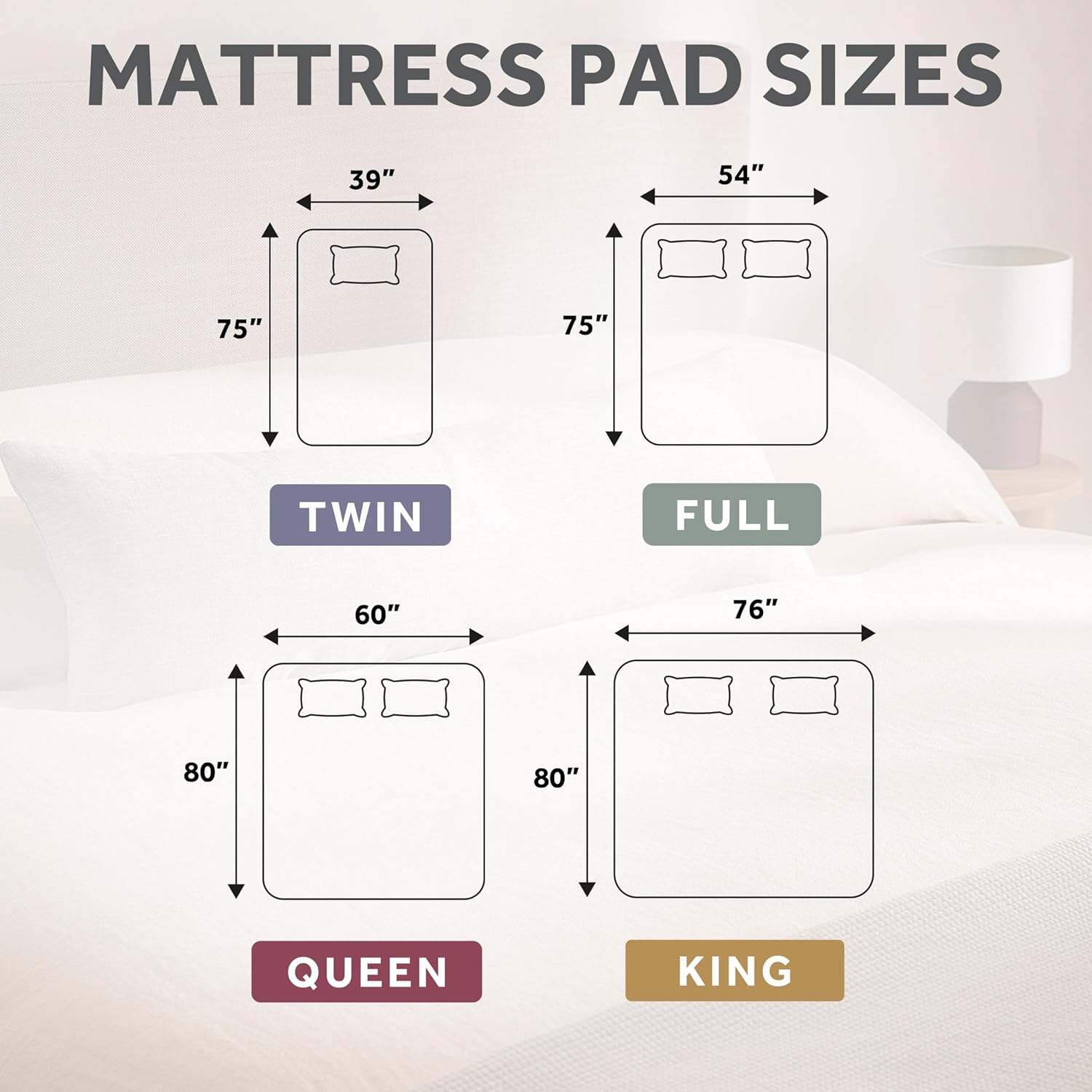
Image: This diagram provides dimensions for various mattress pad sizes, including Twin (39"x75"), Full (54"x75"), Queen (60"x80"), and King (76"x80"), helping users choose the correct fit.

Image: A cutaway diagram reveals the advanced wire technology within the mattress pad, designed to sense and adjust for continuous, even heat and safe operation, including shielded exterior wiring.
Warranty and Support
This Sunbeam Electric Premium Water Resistant Heated Mattress Pad is backed by a 5-year limited warranty. For warranty claims, technical support, or any questions regarding your product, please refer to the contact information provided in the product packaging or visit the official Sunbeam website.


