
1. Introduction
The Genesis GRT2103-40 Variable Speed Rotary Tool is a versatile power tool designed for a wide range of household, hobby, and project applications. Its variable speed control allows for precision work across various tasks, including cutting, sawing, sanding, grinding, drilling, polishing, buffing, sharpening, and cleaning. This tool is equipped with a 1.0 Amp motor and offers speeds from 8,000 to 30,000 RPM, making it suitable for both delicate and demanding jobs.
This manual provides essential information for the safe and effective operation, maintenance, and troubleshooting of your Genesis Rotary Tool. Please read it thoroughly before first use and keep it for future reference.
2. Safety Information
WARNING: Always wear appropriate personal protective equipment, including safety glasses or goggles, hearing protection, and a dust mask, when operating the rotary tool. Ensure your work area is well-ventilated.
CALIFORNIA PROPOSITION 65 WARNING: This product can expose you to Lead and other chemicals known to the State of California to cause cancer, birth defects or other reproductive harm. Wash your hands after handling. For more information go to www.P65WARNINGs.ca.gov.
- Keep the work area clean and well-lit. Cluttered or dark areas invite accidents.
- Do not operate power tools in explosive atmospheres, such as in the presence of flammable liquids, gases, or dust.
- Keep children and bystanders away while operating a power tool. Distractions can cause you to lose control.
- Avoid accidental starting. Ensure the switch is in the off-position before plugging in.
- Use the correct tool for your application. Do not force the tool.
- Secure the workpiece. Use clamps or a vise to hold the workpiece.
- Disconnect the plug from the power source before making any adjustments, changing accessories, or storing the tool.
3. Package Contents
Your Genesis GRT2103-40 Variable Speed Rotary Tool package should include the following items:
- Genesis GRT2103-40 Variable Speed Rotary Tool
- 40-Piece Accessory Set (in a plastic storage box)
- User Manual
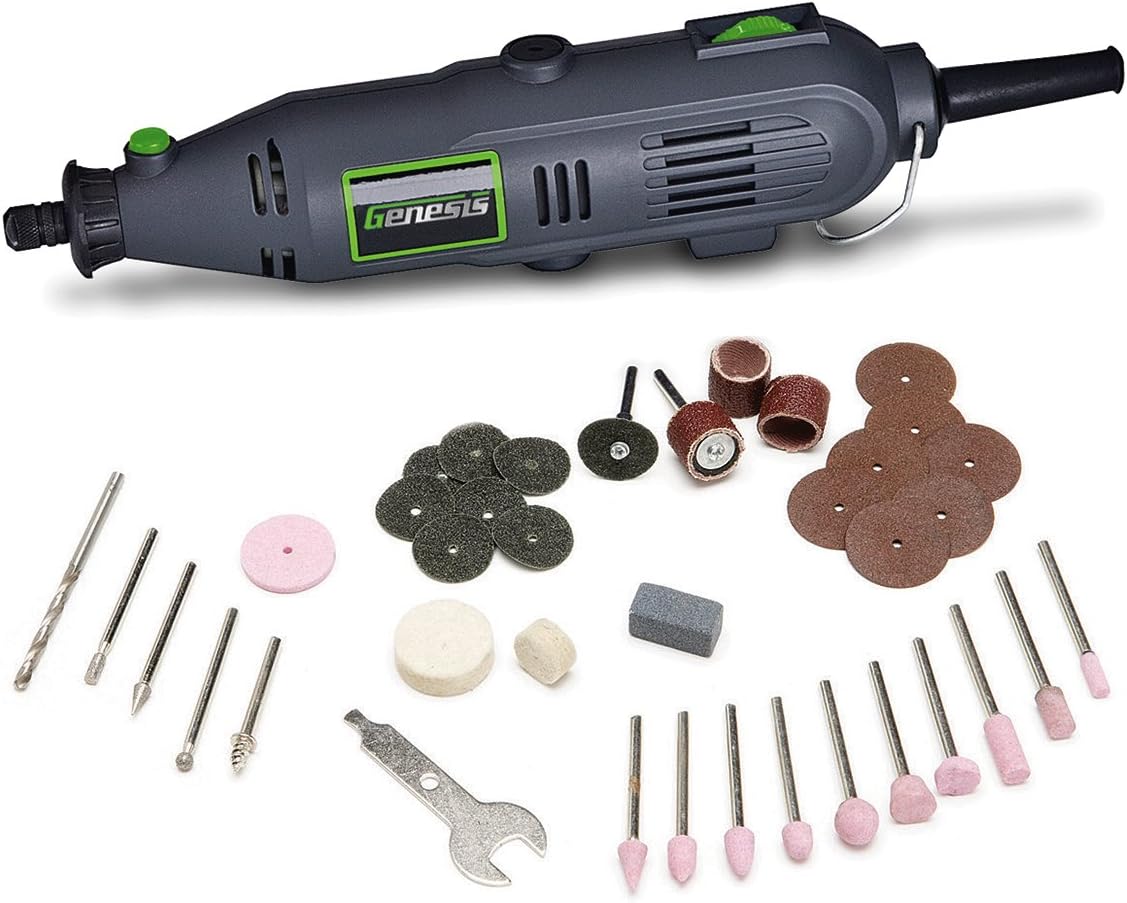
Image 1: Genesis GRT2103-40 Rotary Tool and its included 40-piece accessory set, neatly laid out.
4. Setup
Before operating your rotary tool, ensure it is properly set up and the correct accessory is installed for your task.
- Power Connection: Ensure the tool is unplugged from the power outlet before any adjustments or accessory changes. The tool operates on 120 Volts AC.
- Accessory Installation:
- Locate the collet nut and the collet. The tool uses a 1/8-inch collet, which accepts all standard rotary tool accessories.
- Press and hold the spindle lock button (usually located near the collet).
- Unscrew the collet nut counter-clockwise using the provided wrench or by hand until it is loose enough to insert an accessory.
- Insert the shank of the desired accessory fully into the collet.
- While still holding the spindle lock button, tighten the collet nut clockwise until the accessory is securely held. Do not overtighten.
- Release the spindle lock button.
- Work Area Preparation: Clear your workspace of any obstructions. Ensure adequate lighting and ventilation. Secure your workpiece to prevent movement during operation.
5. Operating Instructions
The Genesis Rotary Tool features separate ON/OFF and speed control switches for precise operation.
- Turning On/Off: Locate the ON/OFF switch. Move it to the 'ON' position to start the tool and to the 'OFF' position to stop it.
- Adjusting Speed: The tool has a variable speed control dial, allowing you to select speeds from 8,000 to 30,000 RPM. Turn the speed control dial to the desired setting. Lower speeds are suitable for polishing, buffing, and delicate tasks, while higher speeds are ideal for cutting, grinding, and drilling.
- General Operation Tips:
- Always start the tool at a lower speed and gradually increase it to the desired operating speed.
- Apply light, consistent pressure. Do not force the tool, as this can lead to overheating, damage to the tool or accessory, and poor results.
- Allow the tool to reach full speed before contacting the workpiece.
- Keep the tool moving to prevent burning or gouging the material.
- For cutting applications, use appropriate cutting wheels and ensure the workpiece is stable.

Image 2: The rotary tool in use for cutting a small metal piece, demonstrating its capability for precise material removal.

Image 3: A user polishing a decorative metal tray with the rotary tool, highlighting its use for finishing and buffing tasks.

Image 4: The rotary tool being used to sharpen an axe blade, showcasing its utility for sharpening various tools.
6. Maintenance
Regular maintenance ensures the longevity and optimal performance of your rotary tool.
- Cleaning: After each use, unplug the tool and use a soft brush or compressed air to clean dust and debris from the ventilation openings and around the collet. Do not use harsh chemicals or abrasive cleaners.
- Collet Care: Periodically inspect the collet and collet nut for wear or damage. A worn collet can lead to accessories slipping or vibrating excessively. Replace if necessary.
- Cord Inspection: Check the power cord for any cuts, fraying, or damage. Do not use the tool if the cord is damaged.
- Storage: Store the tool and its accessories in a clean, dry place, out of reach of children. The included plastic storage box is ideal for organizing accessories.
7. Troubleshooting
If you encounter issues with your Genesis Rotary Tool, refer to the following common problems and solutions:
| Problem | Possible Cause | Solution |
|---|---|---|
| Tool does not turn on | No power supply; ON/OFF switch in 'OFF' position; Damaged cord | Check power outlet; Ensure switch is 'ON'; Inspect cord for damage |
| Accessory slips or vibrates excessively | Collet nut not tightened; Worn collet; Incorrect accessory shank size | Tighten collet nut securely; Replace collet; Use accessories with 1/8-inch shank |
| Tool overheats | Excessive pressure; Blocked ventilation; Prolonged use at high load | Reduce pressure; Clean ventilation slots; Allow tool to cool down |
| Reduced performance/speed | Low voltage; Motor wear; Carbon brush wear (if applicable) | Ensure stable power supply; Contact customer support for service |
If the problem persists after attempting these solutions, please contact Genesis customer support.
8. Specifications
| Feature | Specification |
|---|---|
| Model Number | GRT2103-40 |
| Voltage | 120 Volts |
| Amperage | 1.0 Amps |
| No-Load Speed | 8,000 - 30,000 RPM (Variable Speed) |
| Collet Size | 1/8 inch |
| Power Source | Corded Electric |
| Cord Length | 6.5 Feet |
| Item Weight | 544 g (approx. 1.2 lbs) |
| Product Dimensions | 30.73 x 14.48 x 6.6 cm (12.1 x 5.7 x 2.6 inches) |
9. Warranty and Support
This Genesis Rotary Tool is covered by a manufacturer's warranty. Please refer to the warranty card included with your product for specific terms and conditions, including the warranty period and coverage details.
For technical assistance, replacement parts, or warranty claims, please contact Genesis customer support. Keep your purchase receipt as proof of purchase for warranty purposes.
Manufacturer: Genesis
Place of Business: EDMOND, OK, 73013 US


