
Olympus Pen EE-3
Olympus Pen EE-3 Half Frame 35mm Camera Instruction Manual
Model: Pen EE-3 | Brand: Olympus
Introduction
The Olympus Pen EE-3 is a compact half-frame 35mm camera, designed for ease of use and portability. It captures two images on a single 35mm film frame, effectively doubling the number of exposures per roll. This manual will guide you through the setup, operation, and care of your camera to ensure optimal performance and enjoyment.
Product Overview
The Pen EE-3 features a fixed 28mm f/3.5 lens, automatic exposure control, and a robust plastic/composite body. Its half-frame design allows for more shots per roll of film, making it an economical and fun choice for everyday photography.
Key Components
- Lens: Fixed 28mm f/3.5 lens.
- Viewfinder: Optical viewfinder for framing your shots.
- Shutter Button: Activates the shutter to take a photograph.
- Film Advance Wheel: Used to advance the film to the next frame after each shot.
- Film Rewind Knob: Used to rewind the film back into its cassette when the roll is finished.
- Exposure Meter: Integrated light meter for automatic exposure settings.
- Tripod Mount: Standard 3/8-16 or 1/4-20 thread for mounting on a tripod.

Figure 1: Front view of the Olympus Pen EE-3 camera, showing the lens and viewfinder.
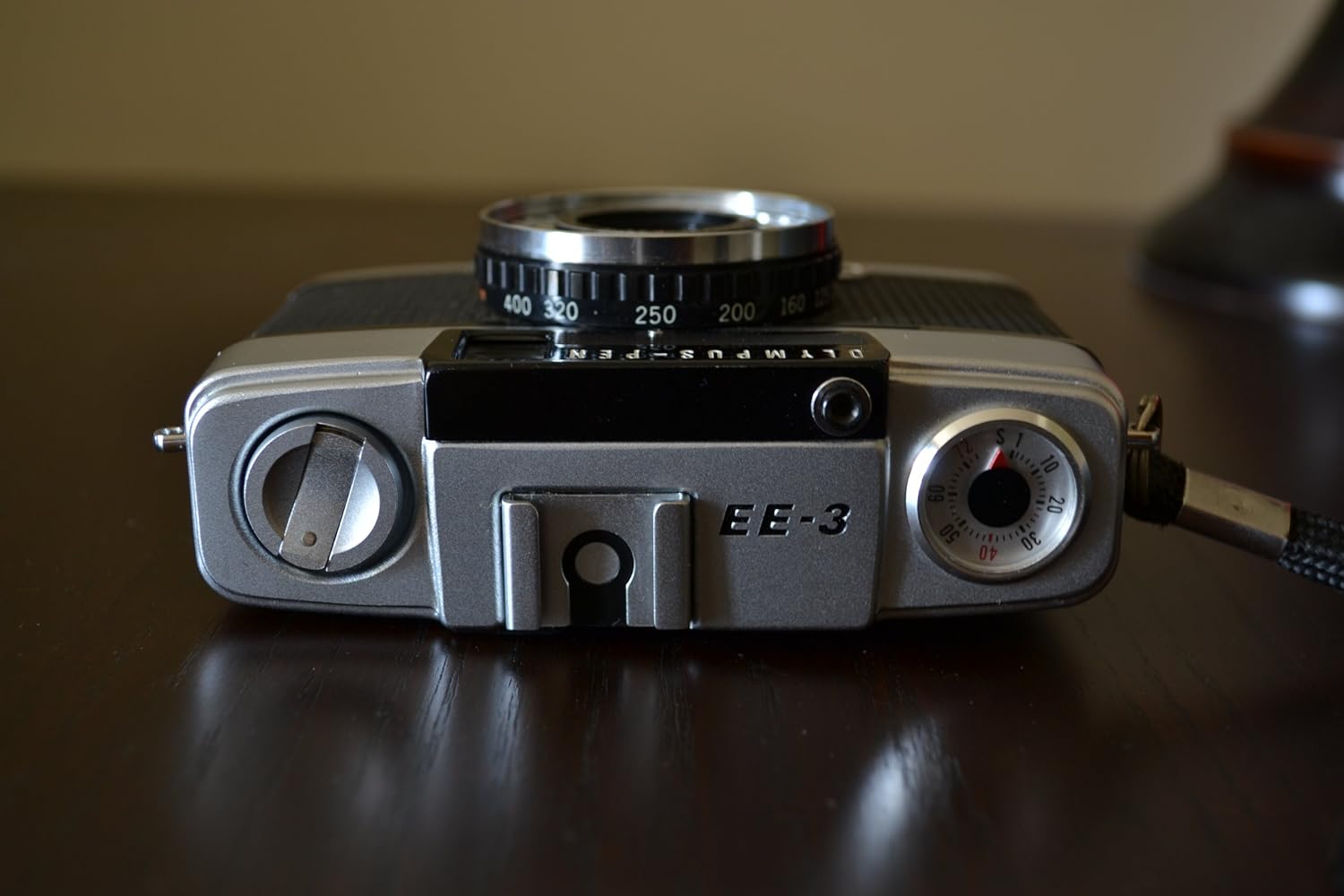
Figure 2: Top view of the Olympus Pen EE-3 camera, highlighting the film advance wheel and shutter button.

Figure 3: Bottom view of the Olympus Pen EE-3 camera, showing the tripod mount and "Made in Japan" engraving.
Setup
Loading Film
- Open the camera back by sliding the latch on the side of the camera downwards.
- Place a 35mm film cassette into the film chamber on the left side.
- Pull the film leader across to the take-up spool on the right side and insert it into one of the slots.
- Advance the film slightly using the film advance wheel to ensure it is securely engaged.
- Close the camera back firmly until it latches.
- Advance the film two or three times, pressing the shutter button each time, until the frame counter shows '1'. This ensures the exposed film leader is wound onto the take-up spool.

Figure 4: Rear view of the Olympus Pen EE-3 with the camera back open, showing the film chamber and take-up spool.
Battery Installation (Not Applicable)
The Olympus Pen EE-3 is a fully mechanical camera and does not require batteries for its core functions or light meter. It operates without external power.
Operating Instructions
Taking a Photograph
- Look through the optical viewfinder to compose your shot.
- The camera's automatic exposure system will set the appropriate shutter speed (1/40 or 1/200 sec) and aperture (f/3.5) based on available light.
- Press the shutter button gently but firmly to take the picture.
- After each shot, turn the film advance wheel until it stops to move to the next frame. The frame counter will indicate the current frame number.
Rewinding Film
- Once you have taken all the pictures on the roll (the film advance wheel will no longer turn), locate the film rewind button on the bottom of the camera.
- Press and hold the film rewind button.
- Turn the film rewind knob (usually on the top left of the camera) clockwise until you feel the tension release, indicating the film has fully rewound into the cassette.
- Open the camera back and remove the film cassette.
Maintenance
- Keep the lens clean using a soft, lint-free cloth and lens cleaning solution.
- Store the camera in a dry, dust-free environment when not in use.
- Avoid exposing the camera to extreme temperatures or humidity.
- Regularly check the film chamber for any dust or debris that could affect film quality.
Troubleshooting
Common Issues
- Light Leaks: If your photos show streaks of light, inspect the camera back seals for wear or damage. These may need to be replaced.
- Film Not Advancing: Ensure the film leader is properly engaged with the take-up spool. If the film is at the end of the roll, it will also stop advancing.
- Shutter Not Firing: Check if the film advance wheel has been fully turned. The shutter will not fire if the film is not advanced.
Specifications
| Brand | Olympus |
| Model Name | EE-3 |
| Lens | 28mm f/3.5 (fixed) |
| Film Type | 35mm Half Frame |
| Shutter Speed | 1/40 or 1/200 sec (automatic) |
| Exposure Control | Automatic |
| Viewfinder | Optical |
| Battery Type | No battery required |
| Material | Plastic/Composite |
Warranty and Support
For information regarding warranty coverage or technical support, please refer to the documentation provided at the time of purchase or contact Olympus customer service directly. Specific warranty terms may vary based on region and retailer.
Related documentsPen EE-3


Ask a question about this manual
Ask about setup, troubleshooting, compatibility, parts, safety, or missing instructions. Manuals+ will review the question and use this page’s manual context to help answer it.