
1. Introduction
This manual provides comprehensive instructions for the Timex Intelligent Quartz T2N944 Mens World Time Watch. It covers initial setup, operational procedures, maintenance guidelines, and troubleshooting tips to ensure optimal performance and longevity of your timepiece.
The Timex Intelligent Quartz T2N944 features a polished stainless steel bracelet, a polished stainless steel case, a grey world etching with silver detailing, backlit three-hand movement, a date window, and a technical sub-dial chronograph. This watch is designed for durability and precision, offering a blend of classic aesthetics and modern functionality.
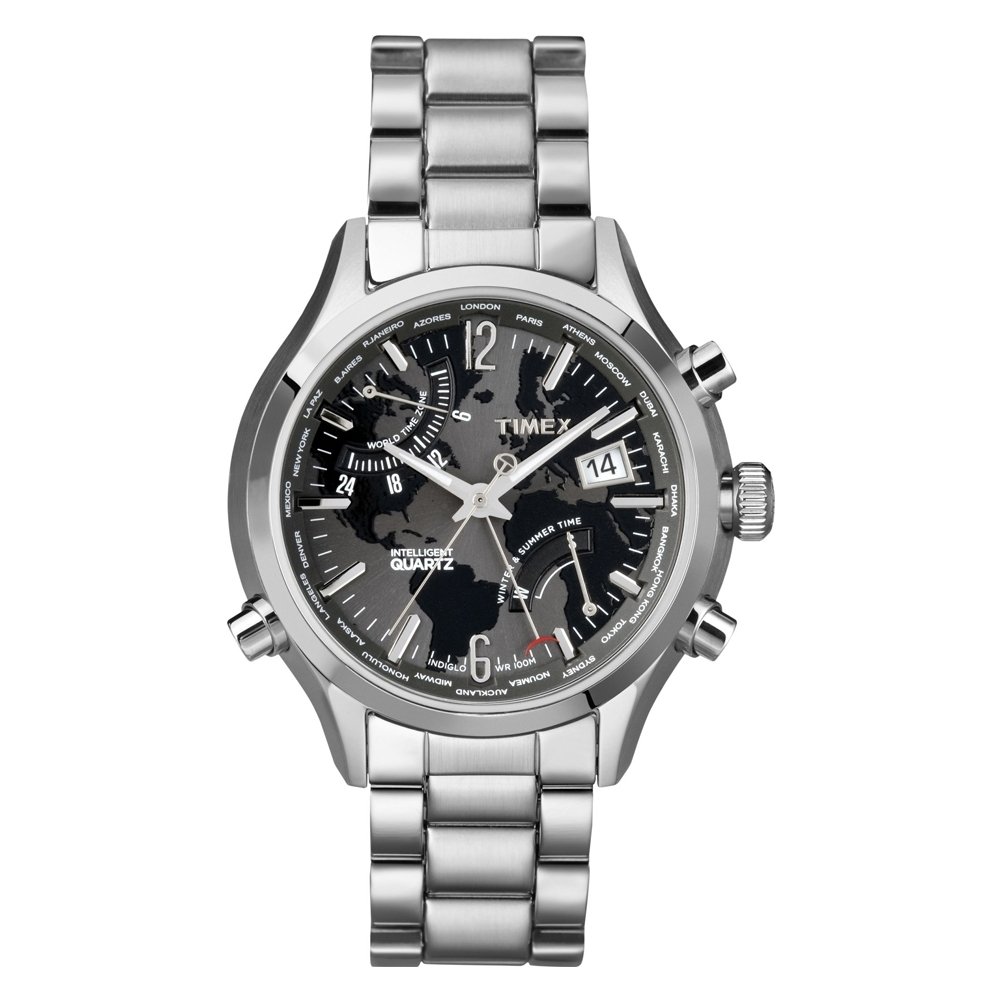
Figure 1: Front view of the Timex Intelligent Quartz T2N944 Mens World Time Watch. The image displays the watch with its stainless steel bracelet, round case, and a detailed grey dial featuring multiple sub-dials and markers. The watch hands are visible, indicating time, and the overall design emphasizes a sophisticated and functional appearance.
2. Setup
Before using your watch, it is important to set the correct time, date, and configure the world time function.
2.1 Setting the Time and Date
- Pull out the crown: Gently pull the crown (the knob on the side of the watch) to its outermost position. This will stop the second hand.
- Set the time: Rotate the crown clockwise or counter-clockwise to move the hour and minute hands to the desired time. Ensure you distinguish between AM and PM if your watch has a 24-hour indicator or date change mechanism.
- Set the date: If your watch has a quick-set date function, pull the crown to the middle position and rotate it to adjust the date. If not, you may need to cycle the hour hand past midnight to advance the date.
- Push in the crown: Once the time and date are set, push the crown back into its original position. The second hand will resume movement.
2.2 World Time Function
The World Time feature allows you to view the time in different global cities. Refer to the specific markings on your watch dial or bezel for city indicators.
- Identify World Time Crown/Pusher: Locate the dedicated crown or pusher for the World Time function, typically marked or positioned differently from the main crown.
- Select City: Rotate the World Time crown or press the pusher to align the desired city with the 12 o'clock position or a specific indicator on the dial. The watch's sub-dial or main hands will then display the corresponding time for that city.
- Daylight Saving Time: Be aware that some cities observe Daylight Saving Time (DST). You may need to manually adjust for DST if the watch does not do so automatically.
2.3 Bracelet Adjustment
For optimal comfort, the stainless steel bracelet may need adjustment. It is recommended to have this procedure performed by a qualified jeweler or watch technician to prevent damage to the bracelet or watch.
3. Operating the Watch
Understanding the various functions of your Timex Intelligent Quartz watch will enhance your user experience.
3.1 Basic Timekeeping
Your watch continuously displays the current time (hours, minutes, seconds) and date once properly set. The quartz movement ensures accurate timekeeping.
3.2 Chronograph Function
The technical sub-dial chronograph allows for precise measurement of elapsed time.
- Start: Press the upper pusher (button) to start the chronograph. The chronograph second hand will begin to move.
- Stop: Press the upper pusher again to stop the chronograph. The elapsed time will be indicated by the sub-dials.
- Reset: Press the lower pusher to reset the chronograph hands to their zero positions.
3.3 INDIGLO® Night-Light
Your Timex watch features the INDIGLO® night-light for illumination in low-light conditions.
- Activation: Press and hold the crown (or a designated pusher, if applicable) to activate the INDIGLO® night-light. The entire dial will illuminate.
- Duration: The light will remain on as long as the button is pressed, or for a short duration if it has a timed activation.
3.4 Water Resistance
This watch is water resistant to 100 meters (330 feet). This rating makes it suitable for showering, swimming, and snorkeling, but not for scuba diving. Always ensure the crown is fully pushed in before exposing the watch to water.
- Do not operate the crown or pushers while the watch is submerged in water.
- Avoid exposing the watch to extreme temperature changes, as this can compromise water seals.
- After exposure to saltwater, rinse the watch with fresh water and dry it thoroughly.
4. Maintenance
Proper care and maintenance will help preserve the appearance and functionality of your Timex watch.
4.1 Cleaning Your Watch
- Case and Bracelet: Use a soft, damp cloth to wipe the case and stainless steel bracelet. For stubborn dirt, a mild soap solution can be used, followed by rinsing with clean water and thorough drying.
- Crystal: Clean the mineral crystal with a soft, lint-free cloth. Avoid abrasive materials that could scratch the surface.
- Do not use harsh chemicals, solvents, or abrasive cleaners on any part of the watch.
4.2 Battery Replacement
The watch is powered by a quartz battery. When the battery runs low, the second hand may begin to jump every few seconds (End-of-Life indicator) or stop entirely. Battery replacement should be performed by a qualified watch technician to ensure proper sealing and maintain water resistance.
- Attempting to replace the battery yourself may void the warranty and compromise the watch's water resistance.
- Dispose of used batteries responsibly according to local regulations.
4.3 General Care
- Avoid exposing your watch to strong magnetic fields, as this can affect the accuracy of the quartz movement.
- Protect your watch from extreme shocks and impacts.
- Store your watch in a cool, dry place when not in use, away from direct sunlight.
5. Troubleshooting
If you encounter issues with your watch, refer to the following common problems and solutions.
| Problem | Possible Cause | Solution |
|---|---|---|
| Watch is not running or stops intermittently. | Depleted battery. Crown is pulled out. | Push the crown fully in. If the watch still does not run, the battery may need replacement by a qualified technician. |
| Time or date is incorrect. | Time/date not set correctly. Impact or shock. | Refer to Section 2.1 "Setting the Time and Date" to reset. If the issue persists, seek professional service. |
| Chronograph hands do not reset to zero. | Chronograph reset mechanism misalignment. | Some models allow for manual calibration of chronograph hands. Consult a watch technician if unable to resolve. |
| INDIGLO® night-light not working. | Depleted battery. Malfunction. | The battery may be too low to power the light. Replace the battery. If the issue persists after battery replacement, professional service is required. |
For issues not covered here or if troubleshooting steps do not resolve the problem, please contact Timex customer support or an authorized service center.
6. Specifications
| Brand | TIMEX |
| Model Number | T2N944AU |
| Movement Type | Quartz |
| Display Type | Analogue |
| Case Diameter | 41 Millimetres |
| Case Thickness | 12 Millimetres |
| Band Material | Stainless Steel |
| Band Width | 43 Millimetres |
| Crystal Material | Mineral |
| Water Resistance Depth | 100 Metres |
| Item Weight | 240 g |
| Power Source | Battery Powered |
7. Warranty and Support
Your Timex watch is covered by a limited warranty against manufacturing defects. The specific terms and duration of the warranty may vary by region. Please retain your proof of purchase for warranty claims.
For detailed warranty information, service, or to locate an authorized service center, please visit the official Timex website or contact Timex customer support in your region. Do not attempt to repair the watch yourself, as this may void the warranty.
Online Support: www.timex.com/support