
Product Overview
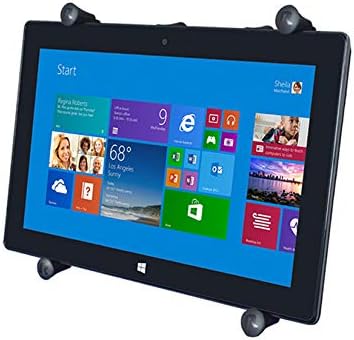
The RAM Mounts RAM-HOL-UN9U X-Grip Universal Holder is a robust and versatile mounting solution designed to securely hold 9-11 inch tablets. Its spring-loaded 'X' design, complemented by rubber caps, provides strong holding power without obstructing your device's screen. Constructed from marine-grade aluminum, stainless steel components, and high-strength composite, this holder ensures durability and reliability in various demanding environments. Easy access grip knobs facilitate quick release of your tablet.
This holder is compatible with a wide range of tablets, including various Apple iPad models (Air, Pro 9.7, 10.5, 11"), Samsung Galaxy Tab models (S 10.5, S3 9.7, S4 10.5, A 10.1), and Microsoft Surface Pro 4, among others. It is designed to integrate with RAM B 1" and C 1.5" size round ball bases (sold separately), offering flexible mounting options.

Setup and Assembly
The RAM-HOL-UN9U X-Grip holder is designed for straightforward assembly with compatible RAM ball bases and arms (sold separately). Ensure all components are securely fastened before use.
Components
- RAM-HOL-UN9U X-Grip Universal Holder
- Rubber caps for grip arms
- Mounting hardware (screws, wall anchors) for various applications
Assembly Instructions
- Attach the X-Grip holder to a compatible RAM ball. The holder features a circular plate with a central ball socket for this connection.
- Secure the RAM ball to a compatible RAM arm.
- Connect the RAM arm to your desired mounting base (e.g., dashboard mount, handlebar mount, wall mount). Ensure all knobs and fasteners are tightened to prevent movement.
- Verify that the rubber caps are firmly seated on the X-Grip arms to provide optimal grip and protection for your tablet.


Operating Instructions
Inserting Your Tablet
- Gently pull apart the spring-loaded 'X' arms of the holder.
- Position your tablet within the holder, ensuring all four rubber-tipped arms securely grip the edges of the device.
- Release the 'X' arms slowly, allowing them to firmly hold the tablet in place. The spring mechanism will adjust to the tablet's dimensions.
Removing Your Tablet
- To remove, simply pull apart two opposing 'X' arms and carefully lift the tablet out of the holder.
Adjusting Viewing Angle
- Loosen the knob on the RAM arm to adjust the angle and orientation of the tablet holder.
- Once the desired position is achieved, tighten the knob firmly to secure the holder in place. The ball and socket design allows for 360-degree rotation and various tilt angles.

Maintenance
- Regularly inspect all components for wear and tear, especially the rubber caps and the tension knob.
- Clean the holder with a damp cloth. Avoid harsh chemicals that may damage the materials.
- Ensure all mounting points remain tight and secure, particularly after prolonged use or exposure to vibrations.
Troubleshooting
Tablet feels loose or moves during use:
- Ensure the tension knob on the RAM arm is fully tightened.
- Verify that all four rubber-tipped arms are making firm contact with the tablet's edges.
- Check if your tablet's dimensions fall within the specified range for the RAM-HOL-UN9U holder (9-11 inches).
Difficulty inserting or removing tablet:
- Apply sufficient force to spread the spring-loaded 'X' arms. The mechanism is designed to be firm for secure holding.
- Ensure no obstructions are preventing the arms from moving freely.
Specifications
| Model Number | RAM-HOL-UN9U |
| Compatible Tablet Size | 9" - 11" Tablets |
| Product Dimensions | 8 x 3 x 12 inches |
| Item Weight | 1.07 pounds |
| Materials | Powder-coated, marine-grade aluminum, stainless steel components, high-strength composite |
| Color | Black |


Warranty and Support
RAM Mounts products are backed by a manufacturer's warranty. For warranty claims, technical support, or customer service, please contact RAM Mounts directly. You can reach their Seattle-based customer support at 1-800-497-7479 or via email at support@rammount.com.


