
1. Introduction
This manual provides instructions for the safe and effective use of your Empire Ni-MH 3.6V 700mAh replacement battery. This battery is designed for compatibility with Motorola MH230R 2-Way Radios and serves as a replacement for the Motorola 53617 battery.
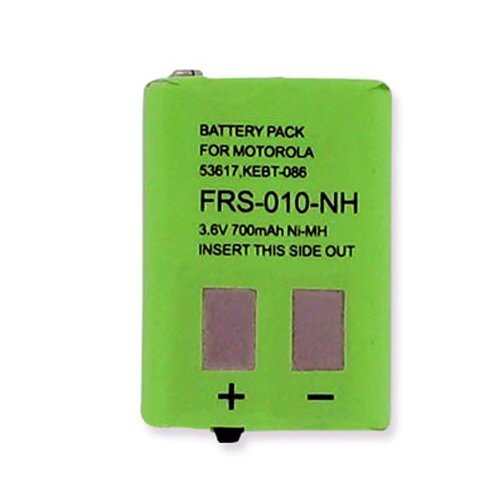
Image showing the Empire Ni-MH 3.6V 700mAh replacement battery.
2. Safety Information
Please read and understand all safety instructions before using the battery. Failure to follow these instructions may result in fire, electric shock, injury, or damage to the product or property.
- Do not disassemble, open, or shred the battery pack.
- Do not short-circuit the battery. Avoid storing batteries haphazardly in a box or drawer where they may short-circuit each other or be short-circuited by conductive materials.
- Do not expose the battery to heat or fire. Avoid storage in direct sunlight.
- Do not subject the battery to mechanical shock.
- Do not expose the battery to liquids. In case of battery leakage, prevent the liquid from coming into contact with skin or eyes. If contact occurs, wash the affected area with copious amounts of water and seek medical advice.
- Use only the charger specifically provided for the equipment.
- Observe polarity markings on the battery and equipment.
- Keep batteries out of reach of children.
- Seek medical advice immediately if a battery has been swallowed.
- Do not use any charger other than that specifically provided for use with the equipment.
- Do not leave a battery on prolonged charge when not in use.
- Dispose of batteries properly at designated collection points.
3. Setup (Installation)
Follow these steps to properly install the Empire replacement battery into your Motorola MH230R 2-Way Radio:
- Power Off Radio: Ensure your Motorola MH230R 2-Way Radio is powered off before beginning installation.
- Locate Battery Compartment: Turn the radio over to locate the battery compartment cover on the back.
- Remove Cover: Depending on your radio model, slide a latch or unscrew a fastener to remove the battery compartment cover.
- Remove Old Battery (if applicable): If replacing an existing battery, carefully remove it from the compartment.
- Insert New Battery: Align the Empire Ni-MH battery with the contacts inside the compartment. Ensure the battery is oriented correctly according to the polarity markings (+/-) within the compartment. Gently push the battery into place until it sits securely.
- Replace Cover: Reattach the battery compartment cover, ensuring it clicks into place or is securely fastened.
- Initial Charge: It is recommended to fully charge the new battery before its first use. Refer to the "Operating (Charging)" section for details.
4. Operating (Charging)
To ensure optimal performance and longevity of your Empire Ni-MH battery, follow these charging guidelines:
- Use Compatible Charger: Always use the original Motorola charger or a compatible charger specifically designed for Ni-MH batteries and your Motorola MH230R radio. Using an incompatible charger can damage the battery or radio.
- Connect Radio to Charger: Place your radio with the installed Empire battery into its charging cradle or connect the charging cable directly, as per your radio's instructions.
- Observe Charging Indicator: The radio or charger will typically have an indicator light that shows the charging status (e.g., solid light for charging, blinking for error, green for fully charged). Refer to your radio's manual for specific indicator meanings.
- First Charge: For the initial charge, allow the battery to charge for 14-16 hours, even if the indicator light suggests it's full sooner. This helps to condition the battery for optimal performance.
- Regular Charging: For subsequent charges, charge the battery until the indicator shows it is full. Avoid leaving the battery on charge for extended periods after it is fully charged, as this can reduce battery life.
- Temperature: Charge the battery at room temperature (typically between 0°C to 45°C / 32°F to 113°F) for best results.
5. Maintenance
Proper maintenance can extend the life and performance of your Ni-MH battery:
- Avoid Deep Discharges: While Ni-MH batteries are less prone to memory effect than Ni-Cd, it's still beneficial to avoid consistently deep discharging the battery before recharging.
- Avoid Overcharging: Do not leave the battery on a charger indefinitely once it is fully charged. Modern chargers often have trickle charge features, but prolonged overcharging can still degrade battery life.
- Clean Contacts: Periodically clean the battery contacts and the radio's charging contacts with a clean, dry cloth to ensure good electrical connection.
- Storage: If storing the battery for an extended period, charge it to about 50% capacity and store it in a cool, dry place away from direct sunlight and extreme temperatures. Recharge it every 3-6 months to prevent over-discharge.
- Disposal: When the battery reaches the end of its life, dispose of it responsibly at a local recycling center or designated collection point for Ni-MH batteries. Do not dispose of it in household waste or by incineration.
6. Troubleshooting
If you encounter issues with your Empire Ni-MH battery, consider the following troubleshooting steps:
- Battery Not Charging:
- Ensure the radio is correctly seated in the charger or the charging cable is securely connected.
- Verify the charger is plugged into a working power outlet.
- Check for any debris or corrosion on the battery and charger contacts; clean if necessary.
- Confirm you are using a compatible charger for Ni-MH batteries and your radio model.
- If the battery is very old, it might have reached the end of its service life and require replacement.
- Short Operating Time After Full Charge:
- Ensure the battery was fully charged according to the instructions, especially the initial 14-16 hour charge.
- Battery capacity naturally degrades over time and with usage cycles. If the battery is old, its capacity may have diminished.
- Extreme temperatures (very hot or very cold) can temporarily reduce battery performance.
- Radio Not Powering On:
- Check if the battery is properly installed in the compartment, ensuring correct polarity and secure fit.
- Confirm the battery has sufficient charge. Try charging it for a few hours.
- If possible, test the radio with another known-good battery to rule out a radio issue.
7. Specifications
| Brand | Empire |
| Model Number | 157698-EM-FRS-010-NH |
| Battery Cell Composition | NiMH (Nickel-Metal Hydride) |
| Voltage | 3.6V |
| Capacity | 700 mAh (Milliampere Hour) |
| Item Weight | 1.6 ounces |
| Package Dimensions | 2.7 x 2 x 0.5 inches |
| Compatibility | Motorola MH230R 2-Way Radio, Motorola 53617 Battery |
8. Warranty and Support
For warranty information regarding your Empire Ni-MH battery, please refer to the documentation provided at the time of purchase or contact your retailer directly. Warranty terms and conditions may vary.
For technical support or further assistance, please contact the manufacturer or your point of purchase. Ensure you have your product model number (157698-EM-FRS-010-NH) available when seeking support.