
1. Introduction
The I-TECH MAG 1000 is a high-frequency magnetotherapy device designed for therapeutic applications in care and rehabilitation. It utilizes pulsed electromagnetic fields to support various physiological processes. This manual provides essential information for the safe and effective use of your device.

The official logo for I-TECH Medical Division, featuring the brand name in green and grey.
2. Safety Information
Important: Always consult your physician or a qualified healthcare professional before using this device, especially if you have pre-existing medical conditions, are pregnant, or have implanted electronic devices such as pacemakers. Do not use the device near sensitive electronic equipment. Keep the device and its accessories out of reach of children.
- Do not immerse the device in water or other liquids.
- Do not use the device if it is damaged or malfunctioning.
- Use only the charger provided by the manufacturer.
- Avoid using the device in areas with high humidity or extreme temperatures.
3. Package Contents
Verify that all items are present in the package:
- I-TECH MAG 1000 Magnetotherapy Device
- Applicator Band
- Power Adapter/Charger
- User Manual
- Carrying Case
This image shows the I-TECH MAG 1000 magnetotherapy device, its power adapter, an applicator band, and the user manual, all neatly organized within a black zippered carrying case.
4. Device Overview
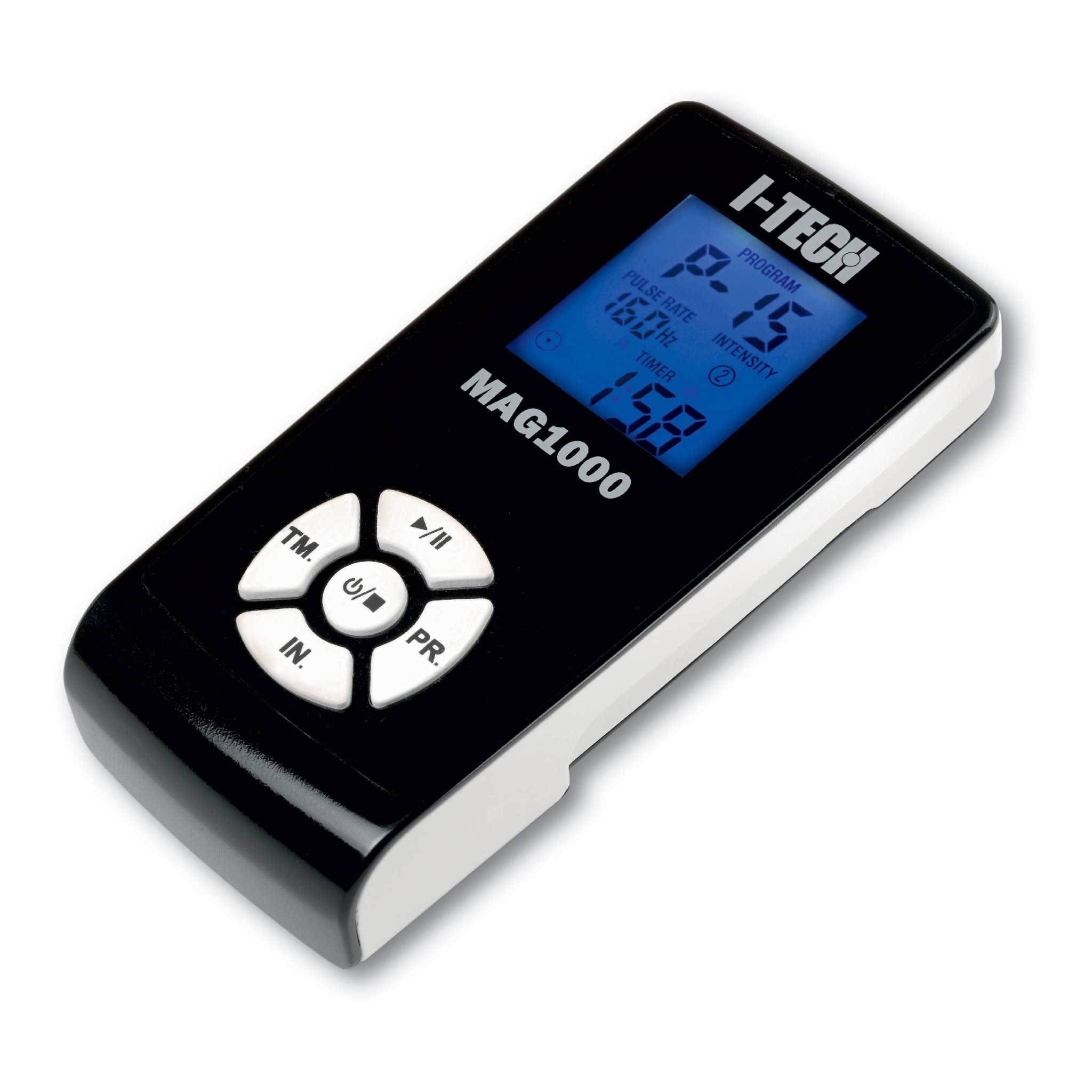
The MAG 1000 features a clear display and intuitive controls for easy operation.
- Display: Shows program number, frequency, and therapy duration.
- Power Button: To turn the device on or off.
- PR Button: For selecting pre-set programs.
- TM Button: For manually setting therapy duration.
- IN Button: For manually adjusting intensity.
- Start/Pause Button: To begin or temporarily stop a treatment session.
5. Setup
5.1 Initial Charging
- Connect the power adapter to the charging port on the MAG 1000 device.
- Plug the power adapter into a standard electrical outlet.
- Allow the device to charge for approximately 8 to 10 hours for a full charge. The device will not operate while it is connected to the charger.
5.2 Connecting the Applicator
- Ensure the device is turned off.
- Connect the applicator band's cable securely into the designated port on the MAG 1000 device.
6. Operating Instructions
6.1 Power On/Off
- To turn on: Press and hold the Power button until the display illuminates.
- To turn off: Press and hold the Power button until the display turns off.
6.2 Program Selection
- After powering on, use the 'PR' button to cycle through the 20 pre-set programs.
- Each program is designed for specific conditions (e.g., arthritis, fractures, tendinitis). Refer to the detailed program list in the full manual for specific indications.
6.3 Manual Settings
For custom treatments, you can adjust the duration and intensity:
- Duration (TM): Press the 'TM' button to set the desired therapy duration. Pre-set programs typically range from 45 minutes to 4 hours.
- Intensity (IN): Press the 'IN' button to adjust the intensity of the magnetic field. The device operates with frequencies between 8 and 640 Hz.
6.4 Starting and Pausing Therapy
- To start: Once a program or manual settings are selected, press the Start/Pause button.
- To pause: Press the Start/Pause button during a session. Press again to resume.
6.5 Applying the Applicator
Position the applicator band directly over the treatment area. The small size of the solenoid makes it suitable for limbs (arms, legs), but it may be less effective for larger body areas like the torso.
6.6 Simultaneous Use
If an additional applicator band is acquired, two bands can be used simultaneously for treating multiple areas or larger regions.
7. Maintenance
7.1 Cleaning
- Clean the device and applicator with a soft, slightly damp cloth.
- Do not use abrasive cleaners, solvents, or immerse the device in water.
- Ensure the device is turned off and unplugged before cleaning.
7.2 Storage
- Store the device in its original carrying case when not in use.
- Keep the device in a cool, dry place, away from direct sunlight and extreme temperatures.
7.3 Battery Care
- To prolong battery life, avoid complete discharge whenever possible.
- Recharge the device regularly, even if not in frequent use.
8. Troubleshooting
- Device not turning on: Ensure the device is fully charged. If the battery is completely depleted, the device may not show an immediate response when connected to the charger. Allow it to charge for a short period before attempting to power on.
- No magnetic field detected: Verify that the applicator band is correctly connected to the device. If the issue persists, the applicator band may be faulty. Contact customer support for assistance.
- Device turns off unexpectedly: Check the battery level. The device does not have a continuous battery indicator, only a low battery warning. Ensure sufficient charge for the duration of your selected program.
- Manual not in your language: A digital version of the manual in various languages may be available online from the manufacturer's official website.
9. Specifications
| Brand | I TECH |
| Manufacturer | IACER |
| Model | MAG 1000 |
| Package Dimensions | 29.2 x 20.6 x 7.6 cm |
| Product Weight | 3 kg |
| Number of Products | 1 |
| Batteries Included | No (Rechargeable batteries are internal) |
| Batteries Required | No (Internal rechargeable) |
| ASIN | B0081E2EJM |
10. Warranty and Support
For detailed warranty information, technical support, or service requests, please refer to the official documentation included with your I-TECH MAG 1000 device. You may also visit the official I-TECH website or contact their customer service directly. Please retain your purchase receipt for any warranty claims.


