
Jensen JIMS-195
Jensen JIMS-195 Docking Digital Music System for iPod User Manual
Model: JIMS-195
Introduction
This manual provides detailed instructions for the setup, operation, maintenance, and troubleshooting of your Jensen JIMS-195 Docking Digital Music System. Please read this manual thoroughly before using the device to ensure proper functionality and to maximize your listening experience.
The Jensen JIMS-195 is designed as a docking station and digital music system for various iPod models, including iPod with video, iPod nano, iPod with color display, and iPod mini. It also features an audio line-in for connecting other digital audio players like the iPod shuffle or MP3 players. The system includes built-in speakers, an FM PLL stereo receiver, and a multi-function backlit display.
Package Contents
Before beginning, ensure all items are present:
- Jensen JIMS-195 Docking Digital Music System
- AC Adaptor
- USB Cable
- S-Terminal Cable
- FM Antenna (detachable)
- Audio Cable
- Remote Control (with 1 x CR2025 lithium battery)
Setup
1. Power Connection
Connect the supplied AC adaptor to the DC IN jack on the back of the JIMS-195 unit and then plug the adaptor into a standard wall outlet. The unit can also be powered via USB (DC 5V) using the included USB cable.
2. Connecting the FM Antenna
Attach the detachable FM antenna to the FM ANT jack on the rear of the unit. Extend the antenna fully for optimal FM reception.
3. Docking an iPod
Gently pull out the retractable dock located on the top of the unit. Carefully place your compatible iPod (iPod with video, iPod nano, iPod with color display, iPod, iPod mini) onto the dock connector. Ensure it is seated firmly. The iPod will begin charging automatically.
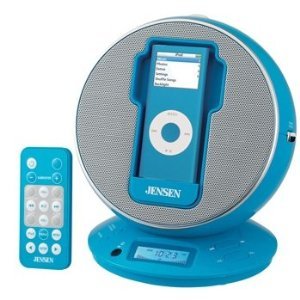
Image: Front view of the Jensen JIMS-195 with an iPod docked, showing the multi-function display and speakers.
4. Connecting Other Audio Devices (Audio Line-In)
For devices like iPod shuffle, MP3 players, or other digital audio players, use the supplied audio cable. Connect one end to the AUDIO IN jack on the JIMS-195 and the other end to the headphone or line-out jack of your external audio device.
5. Video Output (for compatible iPods)
If your iPod supports video output (iPod with video, iPod with color display), connect the supplied S-terminal cable from the VIDEO OUT jack on the JIMS-195 to the video input on your television. This allows you to view iPod video content on a larger screen.
Operating Instructions
1. Power On/Off
Press the POWER button on the unit or remote control to turn the system on or off.
2. Source Selection
Press the SOURCE button to cycle through available modes: iPod, FM Radio, and Audio Line-In.
3. Volume Control
Adjust the volume using the VOLUME + or VOLUME - buttons on the unit or remote control. The digital volume level will be shown on the backlit display.
4. FM Radio Operation
- Tuning: In FM mode, press the TUNE + or TUNE - buttons to manually tune to a station. Press and hold to auto-scan for the next available station.
- Presets: The system may support saving favorite stations. Refer to the on-screen prompts or remote control for specific preset functions.
5. iPod Playback
Once an iPod is docked and the source is set to iPod, playback can be controlled directly from the iPod or using the remote control for basic functions like Play/Pause, Skip Track, and Volume.
6. Clock and Alarm Functions
The JIMS-195 features a clock and alarm. Use the dedicated buttons on the unit or remote control (e.g., CLOCK SET, ALARM SET) to configure these settings. Instructions for setting time and alarms are typically found in the full printed manual.
Maintenance
- Cleaning: Use a soft, dry cloth to clean the exterior of the unit. Do not use abrasive cleaners or solvents.
- Dust: Keep the unit free from dust, especially around the speaker grilles and dock connector.
- Remote Control Battery: Replace the CR2025 lithium battery in the remote control when its range decreases or it stops responding. Ensure correct polarity when inserting the new battery.
- Storage: If storing the unit for an extended period, disconnect it from the power source and store it in a cool, dry place.
Troubleshooting
No Power
- Ensure the AC adaptor is securely plugged into both the unit and a working wall outlet.
- Check if the wall outlet is functional by plugging in another device.
- If using USB power, ensure the USB cable is connected to a powered USB port.
No Sound from iPod
- Verify the iPod is correctly docked and seated firmly.
- Ensure the system's source is set to "iPod".
- Check the volume level on both the JIMS-195 and the iPod.
- Ensure the iPod is playing music.
Poor FM Reception
- Extend and reposition the detachable FM antenna for better signal.
- Try moving the unit to a different location, away from potential interference sources (e.g., other electronic devices, metal objects).
Remote Control Not Working
- Check if the battery (CR2025) is inserted correctly with the correct polarity.
- Replace the battery if it is old or depleted.
- Ensure there are no obstructions between the remote control and the unit's IR sensor.
- Point the remote directly at the unit.
Specifications
| Brand | Jensen |
| Model Number | JIMS-195 |
| Compatible Devices | iPod with video, iPod nano, iPod with color display, iPod, iPod mini, iPod shuffle (via Audio Line-In), MP3 players (via Audio Line-In) |
| Audio Output | 2 x 2.5W speakers, 5W sub-woofer |
| Power Input | AC/DC Adaptable (AC adaptor included), DC 5V (USB cable included) |
| Remote Control Battery | 1 x CR2025 Lithium Battery |
| Dimensions (W x D x H) | 6.25 in x 5.5 in x 7 in |
| Hardware Interface | USB |
| UPC | 961613234414 |
Warranty and Support
For warranty information and technical support, please refer to the warranty card included with your product or visit the official Jensen website. Keep your purchase receipt as proof of purchase for warranty claims.
Note: Product specifications and features are subject to change without prior notice.
Related documentsJIMS-195


Ask a question about this manual
Ask about setup, troubleshooting, compatibility, parts, safety, or missing instructions. Manuals+ will review the question and use this page’s manual context to help answer it.