
APC 73128
APC Blanking Panel Kit 19" Black (AR8101BLK)
Instruction Manual
Product Overview
The APC Blanking Panel Kit (AR8101BLK) consists of metal panels designed to occupy unused rack space within server enclosures. These panels are crucial for maintaining optimal airflow and preventing the recirculation of hot air, thereby improving the overall cooling efficiency of your equipment.
The kit includes four blanking panels, suitable for use in vertical rails that feature either square or threaded holes. Their black finish ensures a consistent aesthetic with most rack systems.
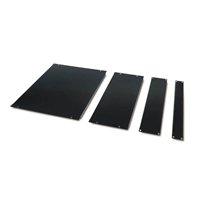
Image: The APC Blanking Panel Kit showing the four different sized panels included.
Setup and Installation
These blanking panels are designed for straightforward installation into standard 19-inch rack enclosures. They are compatible with vertical rails that have either square or threaded mounting holes.
Installation Steps:
- Identify Unused Rack Space: Locate any open U-spaces (rack units) within your server enclosure. Filling these spaces is essential for proper airflow management.
- Select Appropriate Panel Size: The kit includes panels of various sizes (1U, 2U, 4U, 8U). Choose the panel that matches the size of the open rack unit.
- Align Panel: Position the blanking panel against the front of the vertical rack rails, aligning its mounting holes with the corresponding holes on the rails.
- Secure Panel:
- For square-hole rails, use cage nuts and screws (typically supplied with the rack or panel, though not explicitly stated as included in this product description). Insert cage nuts into the rail holes, then secure the panel with screws.
- For threaded-hole rails, simply align the panel and secure it directly with appropriate rack screws.
- Verify Fit: Ensure the panel is securely fastened and sits flush with the rack's front, creating a sealed barrier to prevent air recirculation.
Proper installation of blanking panels is critical for directing cool air through active equipment and preventing hot exhaust air from re-entering the front of the rack.
Operation and Function
The APC Blanking Panels operate passively by physically blocking unused rack spaces. Their primary function is to optimize airflow within the rack enclosure. By preventing hot air from recirculating through empty spaces, they ensure that cooling air is efficiently directed over active IT equipment.
This leads to:
- Improved Cooling Efficiency: Cool air is forced through equipment, not around it.
- Reduced Hot Spots: Minimizes areas of elevated temperature within the rack.
- Lower Energy Consumption: Cooling systems do not have to work as hard to maintain desired temperatures.
Maintenance
The APC Blanking Panels require minimal maintenance. Regular inspection and cleaning will ensure their continued effectiveness.
Maintenance Guidelines:
- Cleaning: Periodically wipe the panels with a soft, damp cloth to remove dust and debris. Avoid abrasive cleaners that could damage the finish.
- Inspection: Annually, or as part of routine data center maintenance, inspect the panels for any signs of damage, bending, or loose fasteners. Ensure they remain securely attached and are effectively blocking airflow.
- Replacement: If a panel becomes damaged or no longer fits securely, replace it promptly to maintain optimal airflow management.
Troubleshooting
While blanking panels are simple components, issues can arise if they are not properly installed or maintained. Here are some common issues and their solutions:
| Problem | Possible Cause | Solution |
|---|---|---|
| Air Recirculation/Hot Spots: Despite panels, cooling is inefficient. |
|
|
| Panel Does Not Fit: Cannot align or secure the panel. |
|
|
Specifications
| Attribute | Detail |
|---|---|
| Product Name | Blanking Panel Kit 19" Black |
| Model Number | AR8101BLK (Manufacturer Part Number), 73128 (Item Model Number) |
| Brand | APC (American Power Conversion) |
| Product Type | Blanking Panel |
| Color | Black |
| Form Factor | 1 x 19 (refers to 19-inch rack compatibility) |
| Packaged Quantity | 4 panels |
| Compatibility | Vertical rack rails with square or threaded holes |
| Product Dimensions (L x W x H) | 14.5 x 23.5 x 1.5 inches (Shipping Dimensions) |
| Item Weight | 8.55 pounds (approx.) |
Warranty and Support
Specific warranty terms and support contact information for the APC Blanking Panel Kit (AR8101BLK) are typically provided with the product packaging or can be found on the official APC (American Power Conversion) website. Please refer to these resources for the most accurate and up-to-date details regarding product warranty, technical support, and customer service.
For general inquiries or to locate support resources, visit the official APC website or contact their customer service department directly.
Related documents73128


Ask a question about this manual
Ask about setup, troubleshooting, compatibility, parts, safety, or missing instructions. Manuals+ will review the question and use this page’s manual context to help answer it.