Introduction
This RM-Series remote control is specifically designed to serve as a direct replacement for the original LOGIK LOG19WHD17 remote control. It provides 100% functionality, ensuring all original key functions are available and operate as expected. This is a dedicated replacement, not a generic "universal" remote, meaning it requires no complex programming or setup.
Key features include:
- Full functionality of the original remote control.
- Specialized replacement, not a generic universal remote.
- Equipped with an LED indicator for signal transmission.
- No programming or installation required; works immediately out of the box.
- Superior quality construction for reliable performance.
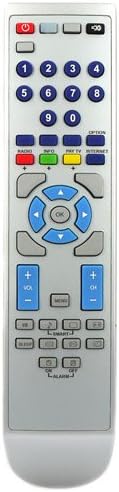
Figure 1: Front view of the RM-Series replacement remote control, showing all buttons and layout.
Setup
The RM-Series replacement remote control is designed for immediate use without any complex setup procedures. Simply insert the batteries, and it is ready to operate your LOGIK LOG19WHD17 television.
Battery Installation
- Locate the battery compartment on the back of the remote control.
- Slide the battery compartment cover downwards or in the direction indicated by an arrow to open it.
- Insert two AAA batteries (not included), ensuring the positive (+) and negative (-) terminals align correctly with the markings inside the compartment. Incorrect battery orientation can prevent the remote from functioning.
- Slide the battery compartment cover back into place until it clicks securely.
Once batteries are installed, the remote control is ready to be used with your LOGIK LOG19WHD17 television. No pairing or code entry is required.

Figure 2: Angled view of the remote control, illustrating its design and button arrangement.
Operating Instructions
This remote control replicates the full functionality of your original LOGIK LOG19WHD17 remote. Below are common functions and how to use them:
- Power Button (●): Located at the top, press to turn the television On or Off.
- Number Buttons (0-9): Use these to directly select channels or input numerical values.
- Volume Up/Down (VOL +/-): Adjusts the audio volume.
- Channel Up/Down (CH +/-): Changes the television channel sequentially.
- Navigation Buttons (Up, Down, Left, Right, OK): Used to navigate menus, select options, and confirm choices. The "OK" button typically confirms a selection.
- Menu Button: Accesses the television's main menu for settings and options.
- Source/Input Button: Switches between different input sources (e.g., HDMI, AV, USB).
- Mute Button: Toggles audio mute On or Off.
- Playback Controls (Play, Pause, Stop, Rewind, Fast Forward): If your television supports media playback, these buttons control media functions.
- Color Buttons (Red, Green, Yellow, Blue): These buttons often correspond to specific functions displayed on-screen within menus or interactive services.
Ensure there are no obstructions between the remote control and the television's infrared receiver for optimal performance. The remote operates using infrared (IR) signals.
Maintenance
Proper care and maintenance will extend the life of your remote control.
Battery Replacement
Replace batteries when the remote's response becomes sluggish or the LED indicator (if present and visible during operation) does not light up consistently. Always replace both batteries at the same time with new ones of the same type (AAA). Do not mix old and new batteries, or different types of batteries.
Cleaning
To clean the remote control, gently wipe its surface with a soft, dry cloth. For stubborn dirt, slightly dampen the cloth with water or a mild, non-abrasive cleaner. Avoid using harsh chemicals, abrasive cleaners, or excessive moisture, as these can damage the remote's electronics or finish.
Storage
Store the remote control in a cool, dry place away from direct sunlight, extreme temperatures, and high humidity. If the remote will not be used for an extended period, it is advisable to remove the batteries to prevent leakage and potential damage.
Troubleshooting
If you encounter issues with your RM-Series replacement remote control, refer to the following common troubleshooting steps:
- Remote is unresponsive:
- Check the batteries. Ensure they are inserted correctly with the correct polarity (+/-) and are not depleted. Replace with fresh batteries if necessary.
- Ensure there is a clear line of sight between the remote's IR emitter and the television's IR receiver. Obstructions can block the signal.
- Verify that the television is powered on and not in standby mode.
- Certain buttons do not work:
- This is rare for a direct replacement remote. Check if the button is physically stuck or damaged.
- Ensure the function you are trying to use is supported by your specific LOGIK LOG19WHD17 television model.
- Short operating range:
- Replace the batteries with new ones. Low battery power can reduce the remote's effective range.
- Ensure no strong light sources (like direct sunlight or bright fluorescent lights) are interfering with the IR signal.
If these steps do not resolve the issue, please refer to the support information provided with your purchase.
Specifications
| Attribute | Detail |
|---|---|
| Brand | RM-Series |
| Manufacturer | RM-Series |
| Model | LOGIK LOG19WHD17 |
| Part Number | LOGIK LOG19WHD17 |
| Compatible Devices | Television |
| Connector Type | Infrared |
| Item Model Number | LOGIK LOG19WHD17 |
| Product Dimensions | 22.71 x 5 x 2.39 cm; 86.18 g |
| ASIN | B007WDJXLA |
| First Available Date | January 15, 2020 |

Figure 3: Side view of the remote control, illustrating its physical dimensions.
Warranty and Support
This product is a replacement remote control. For specific warranty information, please refer to the documentation provided at the time of purchase or contact the seller directly. The standard return policy for this product is 30 days for refund or replacement.
For technical support or further assistance, please contact the seller: On-Line Audio and Electrical Ltd. You can typically find their contact information through your purchase history on the platform where the item was acquired.


