
1. Introduction
The IDANCE FREE30 Wired Over-Ear Headphones are designed for a clear audio experience across various devices. Featuring a comfortable over-ear design with aluminum brackets, these headphones include an integrated in-line microphone for communication and control. They are compatible with a wide range of devices including iPhone, iPad, iPod, tablets, and Android smartphones.
2. Package Contents
Please check that all items are present in the package:
- IDANCE FREE30 Wired Over-Ear Headphones
- Integrated Audio Cable with 3.5mm Jack and In-line Microphone/Controls
3. Product Overview

Figure 1: Front view of the IDANCE FREE30 Wired Over-Ear Headphones. This image displays the yellow headphones with their adjustable headband, cushioned earcups, and the integrated audio cable.
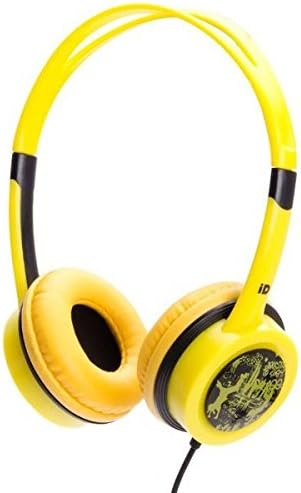
Figure 2: Angled view of the IDANCE FREE30 Wired Over-Ear Headphones. This image provides a different perspective, highlighting the design of the earcups and the aluminum brackets.
The IDANCE FREE30 headphones feature an adjustable overhead band, soft over-ear cushions, and durable aluminum brackets. The audio cable is permanently attached and includes an in-line control unit with a microphone.
4. Setup and Connection
4.1 Connecting to Your Device
- Locate the 3.5mm audio jack on your smartphone, tablet, laptop, MP3 player, or PC.
- Insert the 3.5mm connector from the headphone cable firmly into your device's audio jack.
- No additional drivers or software installation are required for basic audio playback and microphone functionality.
4.2 Device Compatibility
These headphones are designed for broad compatibility with devices featuring a standard 3.5mm audio output, including:
- iPhone, iPad, iPod (models with 3.5mm jack)
- Android Smartphones and Tablets
- Laptops and PCs
- MP3 Players
5. Operation
5.1 Adjusting Fit
Gently extend or retract the adjustable headband to ensure the earcups sit comfortably over your ears. A proper fit enhances sound quality and comfort during extended use.
5.2 Using In-Line Controls
The integrated in-line control unit allows for convenient management of audio and calls:
- Volume Control: Use the dedicated buttons or slider (depending on model variation) to adjust the audio volume.
- Call Management: Press the multi-function button to answer or end calls.
- Music Playback: Press the multi-function button to play or pause music. Double-press to skip to the next track.
- Mute Audio: Some models may feature a dedicated mute button for the microphone.
5.3 Microphone Usage
The built-in microphone is designed to pick up your voice clearly during calls or online meetings. Ensure the microphone is positioned appropriately for optimal voice capture.
6. Care and Maintenance
To ensure the longevity and optimal performance of your IDANCE FREE30 headphones, follow these care instructions:
- Cleaning: Use a soft, dry cloth to wipe the earcups and headband. Do not use harsh chemicals or abrasive cleaners.
- Storage: Store the headphones in a clean, dry place away from extreme temperatures and direct sunlight. Avoid tangling the cable.
- Durability: The headphones feature durable aluminum brackets. Handle them with care to prevent damage. Avoid excessive bending or twisting of the headband and cable.
- Liquid Exposure: Do not expose the headphones to water or other liquids.
7. Troubleshooting
If you encounter issues with your headphones, refer to the following common solutions:
- No Sound:
- Ensure the 3.5mm jack is fully inserted into your device.
- Check the volume level on your device and on the headphone's in-line control.
- Test the headphones with a different device to rule out a device-specific issue.
- Ensure the audio output setting on your device is directed to the connected headphones.
- Microphone Not Working:
- Ensure the 3.5mm jack is fully inserted, as some devices require a full connection for microphone functionality.
- Check your device's privacy settings to ensure the application has permission to access the microphone.
- Verify the microphone input selection in your device's sound settings.
- Test the microphone with a different application or device.
- Sound Distortion:
- Lower the volume on your device and headphones.
- Ensure the audio source is of good quality.
- Check for any damage to the cable or connector.
8. Specifications
| Model Name | FREE30 |
| Brand | IDANCE |
| Connectivity Technology | Wired |
| Headphones Jack | 3.5 mm Jack |
| Ear Placement | Over Ear |
| Form Factor | Over Ear |
| Material | Aluminum |
| Color | Yellow |
| Impedance | 32 Ohm |
| Item Weight | 7 ounces (approximately 198 grams) |
| Product Dimensions | 2 x 6 x 6 inches (approximately 5.08 x 15.24 x 15.24 cm) |
| Hardware Platform | Laptop, MP3 Player, PC, Smartphone, Tablet |
9. Warranty and Support
For warranty information or technical support, please refer to the documentation provided at the time of purchase or contact your retailer. Keep your proof of purchase for any warranty claims.