
Introduction
Thank you for purchasing the GPX Weatherx WR282B Weather and Alert Radio. This portable radio is designed to provide you with AM/FM radio reception and access to all 7 NOAA weatherband channels, ensuring you stay informed during various conditions. It offers flexible power options, operating on either AC power or D-size batteries, making it suitable for both indoor and outdoor use.
Please read this manual thoroughly before operating the device to ensure proper use and to maximize its performance and longevity.
Important Safety Information
- Read Instructions: All safety and operating instructions should be read before the product is operated.
- Retain Instructions: The safety and operating instructions should be retained for future reference.
- Heed Warnings: All warnings on the product and in the operating instructions should be adhered to.
- Follow Instructions: All operating and use instructions should be followed.
- Water and Moisture: Do not use this product near water (e.g., near a bathtub, washbowl, kitchen sink, laundry tub, in a wet basement, or near a swimming pool).
- Cleaning: Clean only with a dry cloth.
- Ventilation: Do not block any ventilation openings. Install in accordance with the manufacturer's instructions.
- Heat: Do not install near any heat sources such as radiators, heat registers, stoves, or other apparatus (including amplifiers) that produce heat.
- Power-Cord Protection: Protect the power cord from being walked on or pinched, particularly at plugs, convenience receptacles, and the point where they exit from the apparatus.
- Lightning: Unplug this apparatus during lightning storms or when unused for long periods of time.
- Servicing: Refer all servicing to qualified service personnel. Servicing is required when the apparatus has been damaged in any way, such as power-supply cord or plug is damaged, liquid has been spilled or objects have fallen into the apparatus, the apparatus has been exposed to rain or moisture, does not operate normally, or has been dropped.
Features
- AM/FM Radio Tuner
- Weatherband - All 7 NOAA Channels
- Swivel Telescopic Antenna
- Volume Control
- Audio Line Input (Auxiliary Input)
- Integrated Carry Handle
- Dual Power Options: AC/DC Adapter or 3 x 'D' Batteries
Package Contents
- GPX Weatherx WR282B Weather and Alert Radio
- AC/DC Power Adapter
- User Manual (this document)
Controls and Indicators
Familiarize yourself with the various controls and indicators on your WR282B radio.
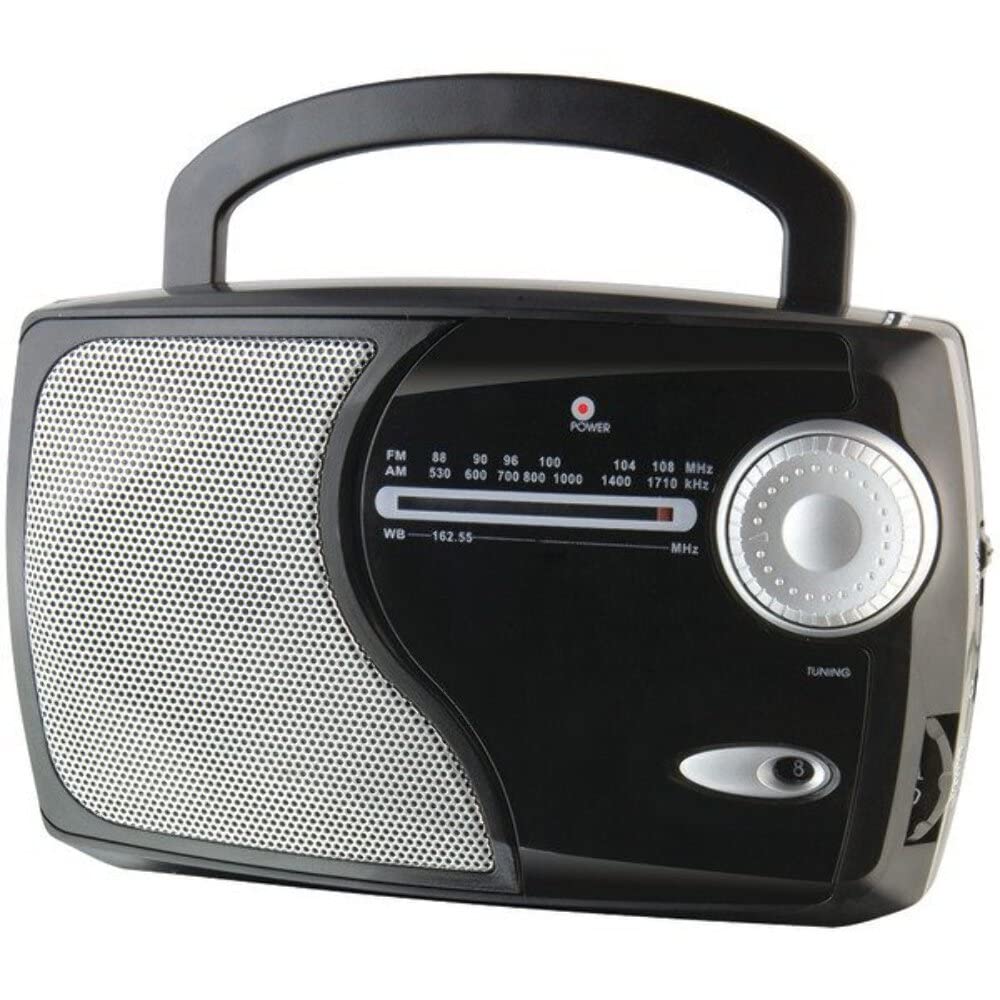
Image: Front view of the GPX Weatherx WR282B radio, showing the speaker, tuning dial, and control knobs.
- Power/Volume Knob: Turns the radio on/off and adjusts the audio output level.
- Band Selector Switch: Selects between AM, FM, and Weatherband (WB) modes.
- Tuning Knob: Adjusts the frequency to tune into desired radio stations or weather channels.
- Tuning Indicator: Illuminates when a strong signal is received.
- Frequency Dial: Displays the current radio frequency.
- Telescopic Antenna: Extendable antenna for improved FM and Weatherband reception.
- Auxiliary Input (AUX IN): 3.5mm jack for connecting external audio devices.
- AC Power Input: Jack for connecting the included AC/DC power adapter.
- Battery Compartment: Located on the back, holds 3 'D' size batteries.
- Carry Handle: For easy portability.
Setup
Powering the Radio
The WR282B radio can be powered using either the included AC/DC power adapter or three 'D' size batteries.
1. AC Power Operation
- Ensure the radio is turned off by rotating the Power/Volume knob counter-clockwise until it clicks.
- Insert the small plug of the AC/DC power adapter into the AC Power Input jack on the radio.
- Plug the other end of the AC/DC power adapter into a standard wall outlet (AC 120V~60Hz).
- The radio is now ready for use with AC power.
Note: When the AC adapter is connected, battery power is automatically disconnected.
2. Battery Power Operation
- Ensure the radio is turned off.
- Locate the battery compartment on the back of the radio.
- Open the battery compartment cover.
- Insert three (3) 'D' size batteries (not included) into the compartment, observing the correct polarity (+/-) as indicated inside the compartment.
- Close the battery compartment cover securely.
- The radio is now ready for use with battery power.
Important: Remove batteries if the radio will not be used for an extended period to prevent leakage and damage.
Operating Instructions
1. Turning On and Adjusting Volume
- Rotate the Power/Volume Knob clockwise to turn on the radio. Continue rotating to increase the volume to a comfortable listening level.
- To turn off the radio, rotate the Power/Volume Knob counter-clockwise until it clicks.
2. Selecting a Radio Band (AM/FM/Weatherband)
- Use the Band Selector Switch to choose your desired listening mode:
- AM: For Amplitude Modulation radio stations.
- FM: For Frequency Modulation radio stations.
- WB: For NOAA Weatherband channels.
3. Tuning to a Station or Channel
- Extend the Telescopic Antenna fully for optimal FM and Weatherband reception. For AM reception, the radio has a built-in antenna, and adjusting the radio's position may improve reception.
- Rotate the Tuning Knob to scan through frequencies on the Frequency Dial.
- When a strong signal is received, the Tuning Indicator light will illuminate.
- For Weatherband (WB) mode, tune to one of the 7 NOAA weather channels (162.400 MHz to 162.550 MHz).
4. Using the Auxiliary Input (AUX IN)
- Connect a 3.5mm audio cable (not included) from your external audio device (e.g., MP3 player, smartphone) to the Auxiliary Input (AUX IN) jack on the radio.
- Ensure the radio is turned on and the volume is adjusted.
- The audio from your external device will now play through the radio's speaker. Control playback and track selection from your external device.
Maintenance
- Cleaning: Wipe the exterior of the radio with a soft, dry cloth. Do not use abrasive cleaners, waxes, or solvents.
- Battery Replacement: Replace all three 'D' batteries when the radio's performance diminishes or if the unit will not be used for an extended period. Always replace with new batteries of the same type.
- Storage: When storing the radio for a long time, remove the batteries to prevent leakage. Store in a cool, dry place away from direct sunlight and extreme temperatures.
- Antenna Care: Handle the telescopic antenna gently to avoid bending or breaking.
Troubleshooting
| Problem | Possible Cause | Solution |
|---|---|---|
| No power |
|
|
| Poor radio reception |
|
|
| No sound from AUX IN |
|
|
Specifications
- Model: WR282B
- Radio Bands: AM, FM, Weatherband (7 NOAA channels)
- Power Source: AC 120V~60Hz (via included adapter) or 3 x 'D' Batteries (not included)
- Connectivity: 3.5mm Auxiliary Input
- Antenna: Telescopic (FM/WB), Built-in Ferrite Bar (AM)
- Product Dimensions: 8.86" L x 2.76" W x 5.51" H (approximately)
- Item Weight: 1.06 pounds (without batteries)
Warranty and Support
For detailed warranty information and customer support, please refer to the warranty card included with your product or visit the official GPX website. Keep your purchase receipt as proof of purchase for any warranty claims.
If you experience issues not covered in the troubleshooting section, please contact GPX customer service for assistance.


