
1. Introduction
This manual provides essential information for the safe and efficient installation, operation, and maintenance of your Fujitsu 800W Hot-Plug Redundant Power Supply. This power supply unit (PSU) is designed for use with Fujitsu PRIMERGY RX200 S7, RX300 S7, RX350 S7, TX200 S7, and TX300 S7 servers, offering reliable and redundant power delivery.
The Fujitsu Platinum Modular 800W power supply features a nominal power of 800 W and supports AC input voltages from 100 to 240 V at frequencies of 50-60 Hz. Its 80 PLUS Platinum certification ensures high energy efficiency.
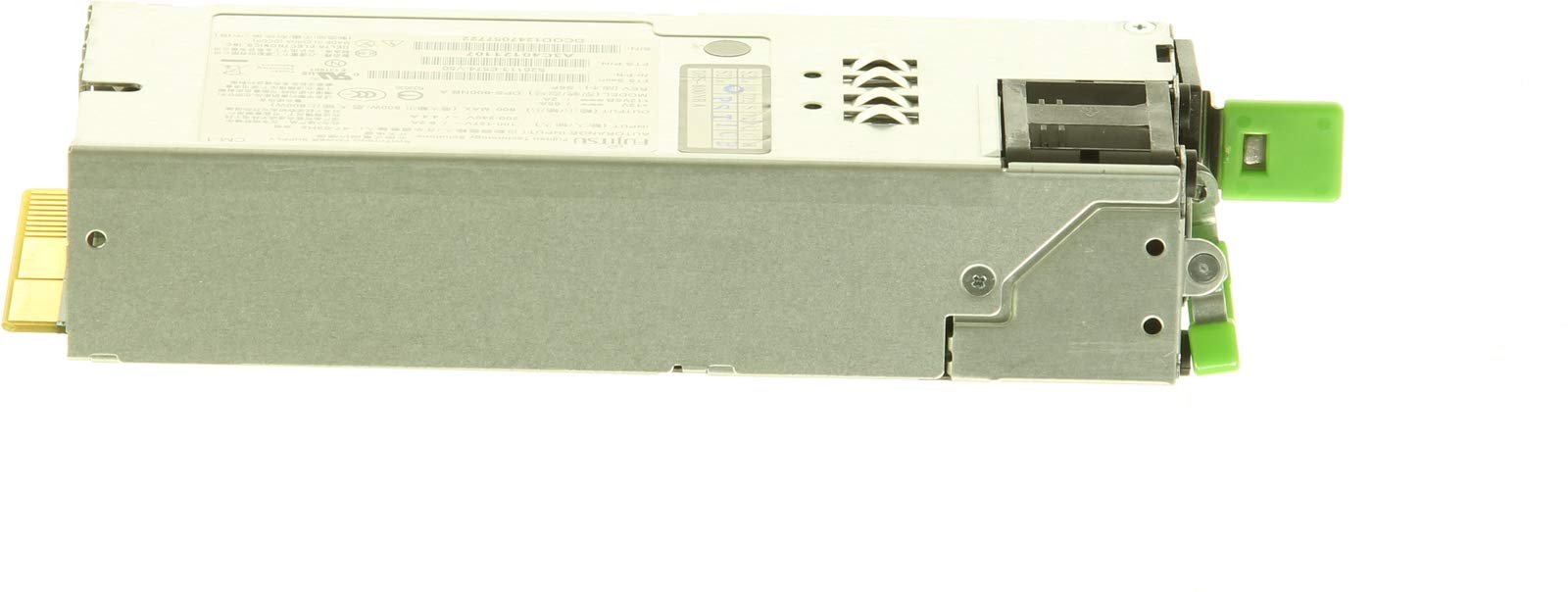
Figure 1: Fujitsu 800W Hot-Plug Redundant Power Supply. This image shows the front view of the power supply unit, highlighting its modular design and connectors.
2. Setup and Installation
2.1 Safety Precautions
- Ensure the server is powered off and disconnected from the main power source before installation or removal.
- Always handle the power supply unit by its casing, avoiding contact with internal components.
- Wear an anti-static wrist strap to prevent electrostatic discharge (ESD) damage to sensitive components.
- Refer to your server's specific documentation for detailed chassis access and component handling procedures.
2.2 Installation Procedure (Hot-Plug)
- Identify the Bay: Locate the empty power supply bay in your Fujitsu PRIMERGY server. If replacing an existing unit, ensure the faulty unit is identified.
- Remove Filler Panel (if applicable): If an empty bay is covered by a filler panel, gently remove it according to your server's instructions.
- Insert PSU: Align the new Fujitsu 800W Hot-Plug Redundant Power Supply with the bay. Slide the unit firmly into the bay until it clicks into place and the latch engages.
- Connect Power Cable: Connect the appropriate AC power cable to the power supply unit and then to a grounded power outlet.
- Verify Operation: Observe the indicator lights on the power supply unit. A green or amber light typically indicates proper operation or standby. Refer to the server's manual for specific indicator meanings.
Note: This power supply supports hot-plug functionality, meaning it can be installed or removed while the server is running, provided another operational power supply is present to maintain redundancy. Always follow server-specific procedures for hot-plug operations.
3. Operation
The Fujitsu 800W Hot-Plug Redundant Power Supply is designed to provide continuous and reliable power to your server. In a redundant configuration (with two or more PSUs), if one power supply fails, the other unit(s) will automatically take over the full load, ensuring uninterrupted server operation.
3.1 Power Indicators
Most server power supplies include LED indicators to show their status:
- Green/Solid: Indicates normal operation and power output.
- Amber/Flashing: May indicate a fault, warning, or standby mode. Consult your server's documentation for specific error codes or patterns.
- Off: Indicates no power input or a complete unit failure.
Ensure that all power cables are securely connected and that the server's power distribution unit (PDU) or wall outlet is supplying power.
4. Maintenance
Regular maintenance helps ensure the longevity and optimal performance of your power supply and server system.
- Dust Removal: Periodically inspect the server and power supply for dust accumulation. Use compressed air to gently clean vents and fan areas to ensure proper airflow and cooling. Ensure the server is powered off and unplugged before cleaning.
- Cable Inspection: Check all power cables for secure connections and signs of wear or damage. Replace any damaged cables immediately.
- Environmental Conditions: Ensure the server operates within recommended temperature and humidity ranges to prevent overheating and component stress.
- Hot-Swap Replacement: In case of a power supply failure in a redundant configuration, the faulty unit can be hot-swapped. Follow the server's documentation for the safe removal and replacement of hot-plug components.
5. Troubleshooting
If you encounter issues with your power supply, refer to the following common troubleshooting steps:
| Problem | Possible Cause | Solution |
|---|---|---|
| Power supply indicator light is off. | No power input, faulty cable, or unit failure. |
|
| Power supply indicator light is amber/flashing. | Warning, fault, or standby mode. |
|
| Server not powering on. | Multiple possible causes, including PSU failure. |
|
For more complex issues, refer to your server's comprehensive troubleshooting guide or contact Fujitsu technical support.
6. Specifications
The following table details the technical specifications for the Fujitsu 800W Hot-Plug Redundant Power Supply (Model S26113-F574-L10):
| Feature | Detail |
|---|---|
| Manufacturer | FUJITSU |
| Model Name | Platinum Modular 800W |
| Model Number | S26113-F574-L10 |
| Part Number | S26113-F574-L10, S26113F574L10 |
| Output Power | 800 Watts |
| Form Factor | ATX |
| AC Input Voltage | 100 - 240 Volts (AC) |
| AC Input Frequency | 50 - 60 Hz |
| 80 PLUS Certification | 80 PLUS Platinum |
| Cooling Method | Air |
| Compatible Devices | Server (PRIMERGY RX200 S7, RX300 S7, RX350 S7, TX200 S7, TX300 S7) |
| Connector Type | ATX, 20+4 pin |
| Item Dimensions (L x W x H) | 30 x 25 x 15 centimeters |
| Item Weight | 3.2 Pounds (approx. 1.45 kg) |
7. Warranty and Support
7.1 Return Policy
The product is subject to a 30-day refund/replacement return policy from the date of purchase. Please retain your proof of purchase for any return claims.
7.2 Technical Support
For technical assistance, warranty claims, or further inquiries regarding your Fujitsu 800W Hot-Plug Redundant Power Supply, please contact Fujitsu customer support or your authorized reseller. Have your product model number (S26113-F574-L10) and purchase information ready when contacting support.
You can find contact information for Fujitsu support on their official website: www.fujitsu.com/global/support/


