
1. Introduction
This manual provides comprehensive instructions for the Fastrack Analog-Digital Multi-Color Dial Men's Watch, model N4052PM01. Please read this manual carefully to ensure proper use, maintenance, and to understand all features of your watch. Keep this manual for future reference.
2. Product Overview
The Fastrack N4052PM01 is a stylish men's watch featuring both analog and digital time displays. It combines a multi-color dial with a durable metal band, designed for everyday wear.
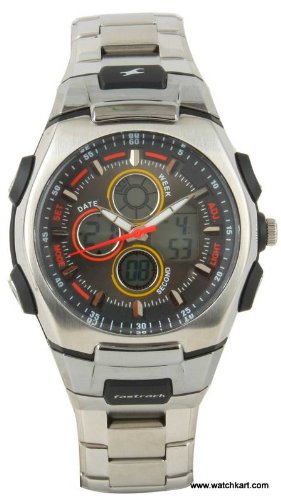
An image showing the Fastrack Analog-Digital Multi-Color Dial Men's Watch, model N4052PM01. The watch features a round case, a multi-color dial with both analog hands and a digital display, and a silver-colored metal band.
3. Setup
3.1 Setting Analog Time
- Pull the crown (the small knob on the side of the watch case) out to the first or second click position (refer to specific model instructions if multiple clicks are present).
- Rotate the crown to move the hour and minute hands to the correct time.
- Push the crown back into its normal position to start the analog timekeeping.
3.2 Setting Digital Time and Functions
Your watch features multiple buttons for digital functions. Typically, these buttons are used to:
- Mode Button: Cycles through different digital modes (e.g., Time, Date, Alarm, Stopwatch).
- Adjust Button: Used to enter and exit setting modes for digital functions.
- Set/Start Button: Used to change values or start/stop functions within a setting mode.
To set the digital time:
- Press the Mode button until the digital time display is shown.
- Press and hold the Adjust button until the digits begin to flash, indicating setting mode.
- Use the Set/Start button to change the flashing digits (hours, minutes, seconds).
- Press the Mode button to move to the next setting item (e.g., minutes, date, year).
- Once all settings are complete, press the Adjust button again to exit the setting mode.
4. Operating Instructions
4.1 Switching Between Modes
Use the Mode button to cycle through the available digital functions such as time, date, alarm, and stopwatch. The current mode will be indicated on the digital display.
4.2 Water Resistance
This watch has a water resistance rating of 3 meters. This means it is suitable for everyday use and can withstand splashes or brief immersion in water. It is not suitable for swimming, showering, or diving. Avoid operating buttons while the watch is wet to prevent water ingress.
5. Maintenance
5.1 Cleaning Your Watch
To maintain the appearance of your watch:
- Wipe the case and band regularly with a soft, dry cloth.
- For metal bands, a slightly damp cloth can be used, followed by immediate drying.
- Avoid using chemical cleaners, solvents, or abrasive materials, as these can damage the watch's finish.
5.2 Battery Replacement
The watch is powered by a quartz movement, which requires a battery. When the watch stops or the digital display fades, the battery may need replacement. It is recommended to have the battery replaced by an authorized service center to ensure proper sealing and water resistance.
5.3 Storage and Care
- Avoid exposing the watch to extreme temperatures (hot or cold) or sudden temperature changes.
- Keep the watch away from strong magnetic fields, as these can affect the accuracy of the quartz movement.
- Store the watch in a dry, safe place when not in use.
6. Troubleshooting
6.1 Watch Not Working / Hands Not Moving
- Check if the crown is pushed all the way in.
- The battery may be depleted. Refer to Section 5.2 for battery replacement.
6.2 Digital Display Fading or Blank
- This typically indicates a low battery. Replace the battery as per Section 5.2.
6.3 Incorrect Time
- Re-set the analog and digital time according to Section 3.
- Ensure the watch has not been exposed to strong magnetic fields.
6.4 Water Inside the Watch
- If water or condensation appears inside the watch, take it to an authorized service center immediately. Do not attempt to dry it yourself, as this can cause further damage.
7. Specifications
| Feature | Specification |
|---|---|
| Model Number | N4052PM01 |
| Display Type | Analog-Digital |
| Movement Type | Quartz |
| Dial Color | Multi-Color |
| Band Material | Metal |
| Band Color | Silver |
| Case Material | Metal |
| Case Shape | Round |
| Water Resistance Depth | 3 Meters |
| Item Weight | 500 g |
8. Warranty and Support
8.1 Warranty Information
Your Fastrack N4052PM01 watch comes with:
- 1 Year Manufacturing Warranty: Covers defects in materials and workmanship from the date of purchase.
- 6 Months Battery Warranty: Covers the original battery for a period of six months from the date of purchase.
Please retain your purchase receipt as proof of warranty. The warranty does not cover damage resulting from improper handling, accidents, unauthorized repairs, or normal wear and tear.
8.2 Customer Support
For warranty claims, service, or any other inquiries regarding your Fastrack watch, please contact Fastrack customer service or visit an authorized Fastrack service center. Contact details can typically be found on the official Fastrack website or your warranty card.