
Introduction
Thank you for choosing the Medeli MD600 61-Key Professional Keyboard. This manual provides essential information for the safe and efficient use of your instrument. Please read it thoroughly before operating the keyboard and retain it for future reference.
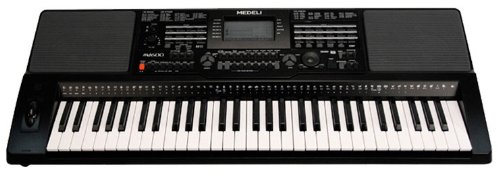
Image: The Medeli MD600 61-Key Professional Keyboard, showcasing its compact design and key layout.
Important Safety Information
- Power Supply: Use only the specified power adapter. Ensure the voltage matches your local power supply.
- Moisture: Do not expose the keyboard to rain, moisture, or excessive humidity. Avoid placing liquid containers on the instrument.
- Ventilation: Ensure adequate ventilation around the keyboard. Do not block ventilation openings.
- Placement: Place the keyboard on a stable, level surface. Avoid extreme temperatures, direct sunlight, or heat sources.
- Cleaning: Disconnect power before cleaning. Use a soft, dry cloth. Do not use liquid cleaners or aerosols.
- Servicing: Do not attempt to service the instrument yourself. Refer all servicing to qualified personnel.
Package Contents
Please check that all items are present in the package:
- Medeli MD600 61-Key Professional Keyboard
- Power Adapter
- Music Rest
- User Manual (this document)
Setup
1. Power Connection
- Ensure the keyboard's power switch is in the OFF position.
- Connect the power adapter cable to the DC IN jack on the rear panel of the keyboard.
- Plug the power adapter into a standard AC wall outlet.
2. Music Rest Installation
Insert the tabs of the music rest into the slots located on the top panel of the keyboard, behind the control panel.
3. Connecting Peripherals
- Headphones: Connect standard stereo headphones to the PHONES jack for private practice. This will mute the internal speakers.
- USB Connectivity: The MD600 features USB connectivity. Connect a USB cable (not included) from the keyboard's USB port to your computer for MIDI data transfer. Refer to your computer's operating system and music software documentation for specific setup instructions.
Operating Instructions
1. Power On/Off
- To turn on: Press the POWER button located on the control panel. The display will illuminate.
- To turn off: Press the POWER button again.
2. Volume Control
Adjust the overall output volume using the MASTER VOLUME knob or buttons on the control panel. Start with a low volume and increase gradually.
3. Selecting Voices (Tones)
The MD600 offers 559 different voices. To select a voice:
- Press the VOICE button.
- Use the numeric keypad or the +/- buttons to enter the desired voice number. Voice categories and numbers are listed in the Voice List appendix (not included in this manual, refer to full product documentation).
- Press ENTER to confirm your selection.
4. Selecting Styles (Accompaniment)
The MD600 includes 203 accompaniment styles. To select a style:
- Press the STYLE button.
- Use the numeric keypad or the +/- buttons to enter the desired style number. Style categories and numbers are listed in the Style List appendix.
- Press ENTER to confirm your selection.
- Press START/STOP to begin or end the accompaniment.
5. Touch Response
The keyboard features touch-sensitive keys, meaning the volume and timbre of the sound change based on how hard you strike the keys. This allows for expressive playing. The touch response sensitivity can often be adjusted in the keyboard's settings menu (refer to the full manual for detailed instructions).
Maintenance
Cleaning
To clean the keyboard, first disconnect the power adapter. Use a soft, dry, lint-free cloth to wipe the surfaces. Do not use abrasive cleaners, waxes, or solvents, as these can damage the finish. For stubborn dirt, a slightly damp cloth followed by a dry cloth may be used, ensuring no moisture enters any openings.
Storage
When not in use for extended periods, store the keyboard in a cool, dry place away from direct sunlight and extreme temperatures. If possible, cover the keyboard with a dust cover to prevent dust accumulation.
Troubleshooting
| Problem | Possible Cause | Solution |
|---|---|---|
| No sound from speakers/headphones. |
|
|
| Keys do not respond or sound incorrect. |
|
|
| Accompaniment not starting. |
|
|
If the problem persists after trying these solutions, please contact Medeli customer support or refer to the full product manual for more detailed troubleshooting.
Specifications
- Model: Medeli MD600
- Keys: 61, Touch Response
- Voices: 559
- Styles: 203
- Connectivity: USB
- Dimensions (L x W x H): Approximately 37 x 14 x 6 inches (94 x 35.5 x 15.2 cm)
- Weight: Approximately 15 Pounds (6.8 kg)
- Power Supply: DC 12V (via included AC adapter)
- Manufacturer: Medeli
Specifications are subject to change without notice for product improvement.
Warranty and Support
The Medeli MD600 61-Key Professional Keyboard comes with a One year warranty from date of purchase against manufacturer defects. Please retain your proof of purchase for warranty claims.
For technical support, service, or further inquiries, please contact your authorized Medeli dealer or visit the official Medeli website for contact information.