
1. Introduction
Thank you for purchasing the Medeli M30 61-Key Professional Keyboard. This instrument is designed to provide a rich musical experience with its touch-sensitive keys, extensive voice library, and versatile accompaniment styles. This manual will guide you through the setup, operation, and maintenance of your new keyboard.
Package Contents
- Medeli M30 61-Key Professional Keyboard
- Power Adapter
- Music Rest
- User Manual (this document)
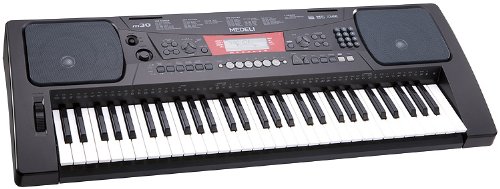
Figure 1: Medeli M30 61-Key Professional Keyboard. This image shows the keyboard from a front-angle view, highlighting its 61 keys, control panel, and display.
2. Safety Instructions
- Power Supply: Use only the specified power adapter. Ensure the voltage matches your local power supply.
- Water and Moisture: Do not expose the keyboard to water or moisture. Avoid placing liquids near the instrument.
- Ventilation: Do not block ventilation openings. Ensure adequate airflow around the keyboard.
- Heat Sources: Keep the keyboard away from heat sources such as radiators, heat registers, stoves, or other apparatus (including amplifiers) that produce heat.
- Cleaning: Clean only with a dry cloth. Do not use liquid cleaners or aerosols.
- Servicing: Do not attempt to service this product yourself. Refer all servicing to qualified service personnel.
3. Setup
3.1 Unpacking
Carefully remove all components from the packaging. Retain the packaging for future transport or storage.
3.2 Power Connection
- Ensure the keyboard's power switch is in the "OFF" position.
- Connect the power adapter to the DC IN jack on the rear panel of the keyboard.
- Plug the power adapter into a standard AC outlet.
- Turn the power switch to the "ON" position to power on the keyboard.
3.3 Music Rest Installation
Insert the music rest into the designated slots on the top panel of the keyboard. Ensure it is securely seated.
4. Operating Instructions
4.1 Basic Playback
- Power On: Press the [POWER] button to turn on the keyboard.
- Volume Adjustment: Use the [MASTER VOLUME] knob to adjust the overall sound level.
- Playing the Keys: The M30 features 61 touch-sensitive keys. The harder you press, the louder the sound.
4.2 Selecting Voices
The M30 offers 359 different voices (instrument sounds).
- Press the [VOICE] button.
- Use the numeric keypad or the [+] / [-] buttons to select a voice number.
- The selected voice name will appear on the display.
4.3 Selecting Styles
The keyboard includes 150 accompaniment styles.
- Press the [STYLE] button.
- Use the numeric keypad or the [+] / [-] buttons to select a style number.
- Press [START/STOP] to begin the accompaniment.
- Adjust the style volume using the [ACCOMPANIMENT VOLUME] button (if available, or general volume).
4.4 Playing Songs
The M30 has 100 built-in songs and 2 demo songs.
- Press the [SONG] button.
- Use the numeric keypad or the [+] / [-] buttons to select a song number.
- Press [PLAY/PAUSE] to start or pause the song.
- Press [STOP] to stop the song.
5. Connectivity
5.1 USB Connection
The Medeli M30 features a USB port for connecting to a computer. This allows for MIDI data transfer, enabling the keyboard to be used as a MIDI controller or to connect with music software.
- Connect a standard USB cable (Type B to Type A, not included) from the keyboard's USB port to your computer's USB port.
- Your computer should automatically recognize the keyboard as a MIDI device.
- Refer to your music software's documentation for instructions on setting up MIDI input devices.
6. Maintenance
6.1 Cleaning
- Wipe the keyboard's surface with a soft, dry cloth.
- For stubborn dirt, slightly dampen the cloth with water and a mild detergent, then wipe dry immediately.
- Do not use abrasive cleaners, waxes, or solvents.
6.2 Storage
- When not in use for extended periods, disconnect the power adapter.
- Store the keyboard in a cool, dry place, away from direct sunlight and extreme temperatures.
- Consider using a dust cover to protect the keys and control panel.
7. Troubleshooting
| Problem | Possible Cause | Solution |
|---|---|---|
| No sound | Volume is too low or muted. | Increase the [MASTER VOLUME] knob. |
| Keyboard does not power on | Power adapter not connected or faulty. | Ensure power adapter is securely connected and plugged into a working outlet. Check power switch position. |
| Keys are not responding | Keyboard may be in a specific mode (e.g., demo mode). | Try powering off and on again. Refer to the operating section for specific mode exits. |
8. Specifications
| Feature | Detail |
|---|---|
| Keys | 61, Touch-Sensitive |
| Voices | 359 |
| Styles | 150 |
| Songs | 100 (plus 2 Demo Songs) |
| Connectivity | USB (MIDI) |
| Dimensions (L x W x H) | 93.98 x 35.56 x 15.24 cm |
| Weight | 6.8 kg |
| Model Number | M30 |
| UPC/GTIN | 857285003529 |
9. Warranty and Support
For warranty information and technical support, please refer to the warranty card included with your product or visit the official Medeli website. Keep your proof of purchase for any warranty claims.
Manufacturer: Medeli
Website: www.medeli.com (Note: This is a placeholder URL, please refer to actual product documentation for correct support contact.)


