Introduction
This manual provides detailed instructions for the safe and effective use of your Waterpik Ultra Cordless Water Flosser, Model WP-450. Please read all instructions before initial use and retain this manual for future reference.

Image: Waterpik Ultra Cordless Water Flosser WP450, showing the main unit with a flossing tip attached and the water reservoir.
Important Safety Information
Observe the following safety precautions to reduce the risk of electric shock, burns, fire, or injury:
- Keep away from children.
- Do not use if you have certain medical conditions without consulting a healthcare professional.
- Follow all electrical safety guidelines provided with the product.
- Do not immerse the unit in water.
- Do not operate if the cord or plug is damaged.
- Use this product only for its intended use as described in this manual.
Product Features
- Cordless and Portable: Compact, rechargeable design ideal for travel and small bathrooms.
- Effective Plaque Removal: Removes up to 99.9% of plaque from treated areas and improves gum health.
- Dual-Pressure Control: Choose between low and high settings for comfortable, customized cleaning.
- Versatile Use: Safe and effective for braces, implants, crowns, and other dental work.
- Multiple Tips Included: Comes with different tips for personalized oral care routines.
Setup and Initial Use
Follow these steps to prepare your Waterpik Ultra Cordless Water Flosser for first use:
- Charge the Unit: Before initial use, charge the Waterpik Ultra Cordless Water Flosser for 24 hours. Ensure the ON/OFF switch is in the OFF position. Insert the power cord into the unit. Note: The unit will not charge if the switch is in the ON position. Subsequent charges typically take 12 hours.
- Attach the Tip: Select your desired flossing tip. Insert the tip into the center of the handle until it clicks into place. To remove the tip, press the tip eject button and pull the tip out. Do not press the tip eject button during use.
- Fill the Reservoir: Open the reservoir cap and fill the 1-ounce (30 ml) water reservoir with warm water. Close the cap securely.
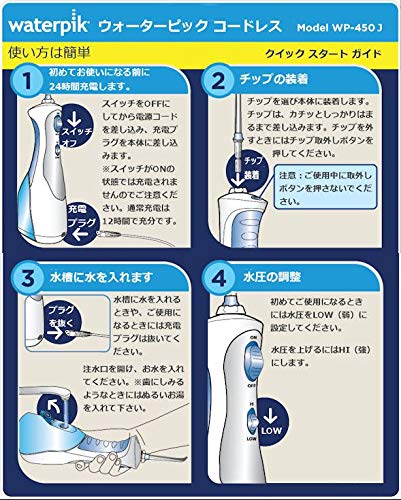
Image: Visual guide for charging the unit, attaching a flossing tip, and filling the water reservoir.
Operating Instructions
Once the unit is charged and the reservoir is filled, you can begin flossing:
- Select Pressure Setting: For first-time users, set the pressure to LOW. You can increase to HI for a stronger clean as you become accustomed to the device.
- Position the Tip: Lean over a sink. Place the flosser tip into your mouth, aiming it at the gumline at a 90-degree angle. Close your lips slightly to prevent splashing, but allow water to flow from your mouth into the sink.
- Start Flossing: Turn on the Waterpik Ultra Cordless Water Flosser. Glide the tip along the gumline and between teeth, pausing briefly between each tooth. Ensure the water stream reaches all areas of your mouth, including the back teeth and inner surfaces.
- Maintain Posture: Keep the unit upright during use to ensure continuous water flow.
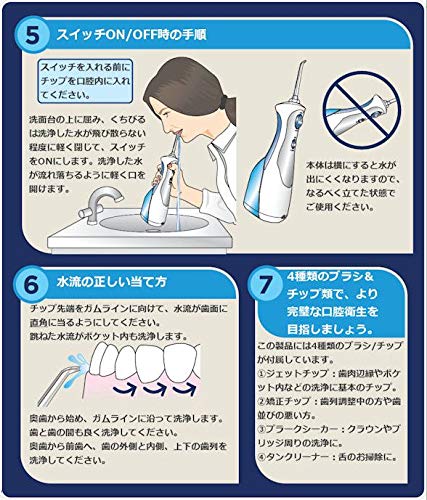
Image: Visual guide demonstrating proper flossing technique, including positioning over a sink and aiming the tip at the gumline.
Maintenance
Proper maintenance ensures the longevity and hygiene of your Waterpik flosser:
- After Each Use: Empty any remaining water from the reservoir. Clean the flosser tip under running water. Store the tip in the included tip cover.
- Cleaning the Unit: Wipe the exterior of the unit with a soft, damp cloth. Do not use abrasive cleaners or immerse the unit in water.
- Drying: Allow the unit to air dry completely before storing or recharging.
Troubleshooting
If you encounter issues with your Waterpik Ultra Cordless Water Flosser, refer to the following common solutions:
- Unit Not Turning On: Ensure the unit is fully charged. Check that the ON/OFF switch is in the ON position.
- Weak Water Pressure: Ensure the reservoir is adequately filled. Check for any blockages in the flossing tip. The unit may require recharging if the battery is low.
- Charging Issues: Verify that the power cord is securely connected to both the unit and a working electrical outlet. Ensure the ON/OFF switch is in the OFF position during charging. If the charger or adapter appears damaged, discontinue use and contact customer support.
- Water Leakage: Ensure the flossing tip is securely inserted and the reservoir cap is properly closed.
For persistent issues not resolved by these steps, please contact Waterpik customer support.
Specifications
| Feature | Detail |
|---|---|
| Model Number | WP-450 |
| Brand | Waterpik |
| Power Source | Electric (Rechargeable) |
| Product Dimensions | 9.7 x 7.1 x 6 inches |
| Item Weight | 0.01 ounces (Note: This weight may refer to packaging or a component, not the full unit.) |
| UPC | 073950293204 |
| Special Feature | Non-Slip Grip |
| Product Benefits | Removes Plaque |
Warranty and Support
For warranty information, product registration, or customer support, please refer to the documentation included with your product packaging or visit the official Waterpik website. Keep your purchase receipt as proof of purchase for warranty claims.
Manufacturer: Water Pik, Inc.


