1. Introduction
This manual provides instructions for the Cable Matters Cat6 Ethernet Patch Cable, Model 160001-BLK-100. This cable is designed for universal connectivity in wired home and office networks, connecting various network components such as computers, servers, routers, switch boxes, network printers, network attached storage (NAS) devices, VoIP phones, and Power over Ethernet (PoE) devices.
The Cable Matters Cat6 cable is engineered for reliable, high-speed data transfer, supporting up to 10-Gigabit Ethernet and frequencies up to 550 MHz. It features 100% bare copper wire construction, ensuring compliance with UL Code 444 for communication cables and superior performance compared to copper clad aluminum (CCA) wires.

Image: The Cable Matters Cat6 Ethernet cable connecting a laptop, gaming console, NAS, and TV, illustrating its versatile application in a 10Gbps network environment.
2. Setup
Setting up your Cable Matters Cat6 Ethernet Patch Cable is a straightforward process. Ensure all devices are powered off before making connections to prevent potential damage.
- Unpack the Cable: Carefully remove the cable from its packaging.
- Identify Ports: Locate the RJ45 Ethernet ports on the devices you wish to connect (e.g., router, computer, network switch).
- Connect First End: Insert one end of the Cat6 Ethernet cable into an available RJ45 port on your first device. Ensure it clicks securely into place.
- Connect Second End: Insert the other end of the Cat6 Ethernet cable into an available RJ45 port on your second device. Ensure it also clicks securely into place.
- Power On Devices: Once both ends are securely connected, power on your devices. The network connection should establish automatically.

Image: A close-up view of the Cat6 Ethernet cable securely plugged into a router's LAN port, indicating a stable network connection with 10-Gigabit speed and 550MHz rating.
3. Operating Instructions
The Cable Matters Cat6 Ethernet Patch Cable provides a reliable and high-speed wired network connection. Once connected, the cable operates passively, facilitating data transfer between your devices.
- High-Speed Data Transfer: This Cat6 cable supports data transfer speeds up to 10 Gigabits per second (10Gbps) and bandwidth up to 550 MHz, making it suitable for demanding applications such as online gaming, 4K/8K video streaming, cloud computing, and server applications.
- Universal Compatibility: The cable is compatible with all devices featuring an RJ45 Ethernet port, including older Cat5e and Cat5 standards.
- Power over Ethernet (PoE) Support: The 100% bare copper conductors enhance PoE capability, allowing the cable to deliver both data and power to compatible devices like IP cameras and VoIP phones.

Image: Two PoE cameras mounted on a wall, connected and powered by an Ethernet cable, demonstrating the cable's ability to provide both data and power.

Image: A person working on a laptop, which is connected to a network via the Cable Matters Ethernet cable, highlighting its use as a reliable wired network solution.
4. Maintenance
The Cable Matters Cat6 Ethernet Patch Cable is designed for durability and requires minimal maintenance. Following these guidelines will help ensure its longevity and optimal performance:
- Avoid Sharp Bends: Do not bend the cable at sharp angles, as this can damage the internal conductors and reduce performance. Maintain gentle curves when routing the cable.
- Protect Connectors: The RJ45 connectors feature snagless molds and strain-relief boots to protect the cable integrity. Avoid pulling the cable by the wire; always grasp the connector housing when plugging or unplugging.
- Keep Clean: Keep the cable and its connectors free from dust and debris. Use a soft, dry cloth to wipe the cable if necessary.
- Storage: When not in use, coil the cable loosely and store it in a dry, cool place away from direct sunlight or extreme temperatures.

Image: A detailed view of the Cat6 RJ45 connector, highlighting its gold-plated contacts for improved signal integrity and strain-relief boots for cable protection.
5. Troubleshooting
If you encounter issues with your network connection, consider the following troubleshooting steps:
- No Network Connection:
- Ensure both ends of the Ethernet cable are securely plugged into their respective ports. Listen for a click.
- Check the status indicator lights on your network devices (router, switch, computer Ethernet port). If they are off, try reseating the cable or using a different port.
- Test the cable with another device or use a different Ethernet cable to rule out a faulty cable or port.
- Restart your network devices (modem, router, computer).
- Slow Network Speed:
- Verify that all connected devices (router, network card) support Cat6 or higher speeds to fully utilize the cable's capabilities.
- Ensure the cable is not excessively bent or damaged, as this can degrade performance.
- Check for other network bottlenecks, such as an overloaded router, outdated network drivers, or internet service provider (ISP) limitations.
- Intermittent Connection:
- Ensure the cable is not near sources of strong electromagnetic interference (EMI), such as power lines or large electrical appliances.
- Inspect the RJ45 connectors for any bent pins or damage.
6. Specifications
| Feature | Specification |
|---|---|
| Brand | Cable Matters |
| Model Number | 160001-BLK-100 |
| Cable Type | Cat6 Ethernet Patch Cable |
| Connector Type | RJ45 (Male-to-Male) |
| Data Transfer Rate | Up to 10 Gigabits Per Second |
| Frequency (Bandwidth) | Up to 550 MHz |
| Wire Gauge | 24 AWG |
| Conductor Material | 100% Bare Copper |
| Compliance | UL Listed, TIA/EIA 568-C.2 Standard |
| Special Features | Gold-plated contacts, Molded strain-relief boots, Snagless design, Future-proof |
| Color | Black |
| Length | 100 Feet |
| Compatible Devices | PC, Printer, Router, Server, Smartphone, VoIP phones, PoE devices |
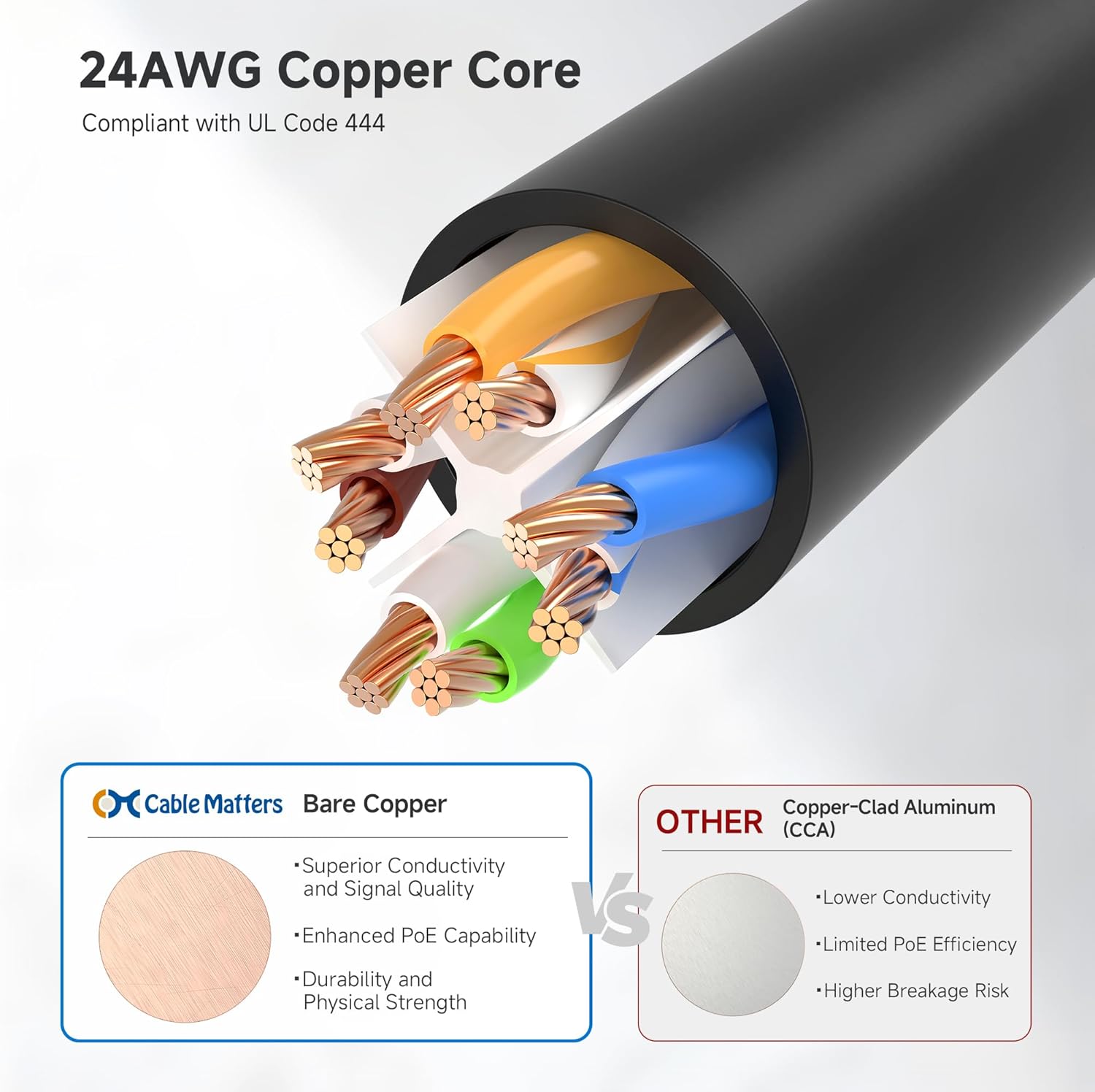
Image: A cross-section diagram illustrating the 24AWG bare copper core of the Cable Matters cable compared to a copper-clad aluminum (CCA) core, highlighting superior conductivity and signal quality.

Image: Several Cat6 Ethernet cables neatly connected to a network switch, demonstrating their suitability for data centers and server room environments.
7. Warranty and Support
Cable Matters products are designed for reliability and performance. For specific warranty information, please refer to the documentation included with your purchase or visit the official Cable Matters website.
If you require technical assistance or have questions regarding your Cat6 Ethernet Patch Cable, please contact Cable Matters customer support through their official channels. Keep your purchase receipt and model number (160001-BLK-100) handy for faster service.


