Product Overview
The Casio Edifice EF-521SP-1AVDF is a sophisticated chronograph watch designed for men, featuring a robust stainless steel construction and precise quartz movement. This manual provides detailed instructions for setting up, operating, and maintaining your watch to ensure optimal performance and longevity.
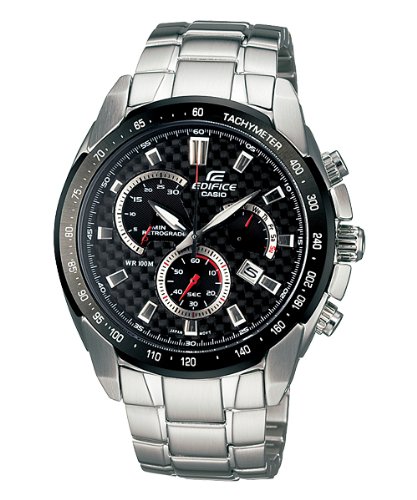
This image displays the Casio Edifice EF-521SP-1AVDF watch. It features a black dial with a carbon fiber pattern, three sub-dials for chronograph functions, and a date display. The watch has a silver-tone stainless steel case and bracelet. The bezel includes a tachymeter scale. Two pushers flank the crown on the right side of the case.
Key Features
- Multi-Color Dial with Round Case Shape
- Synthetic Band Material with Multi-Color Band
- Quartz Movement Type
- Analog Display Type
- Chronograph Functionality
- Tachymeter Bezel
- Water Resistance: 100 Meters (WR 100M)
Setup
Initial Setup
- Setting the Time:
Pull the crown out to the second click. Rotate the crown to set the hour and minute hands. Push the crown back in to the normal position to start timekeeping.
- Setting the Date:
Pull the crown out to the first click. Rotate the crown to adjust the date display. Push the crown back in to the normal position.
Adjusting the Bracelet
The watch bracelet may require adjustment for a comfortable fit. It is recommended to have this adjustment performed by a qualified jeweler or watch technician to prevent damage to the bracelet or watch.
Operating the Watch
Basic Timekeeping
The watch continuously displays the current time (hours, minutes, seconds) and date in its normal operating mode.
Using the Chronograph
The chronograph function allows for precise measurement of elapsed time.
- Starting the Chronograph:
Press the upper pusher (A) to start the chronograph measurement. The chronograph second hand will begin to move.
- Stopping the Chronograph:
Press the upper pusher (A) again to stop the chronograph. The elapsed time will be indicated by the chronograph hands.
- Resetting the Chronograph:
After stopping the chronograph, press the lower pusher (B) to reset all chronograph hands to their zero positions.
Tachymeter Function
The tachymeter scale on the bezel can be used to measure speed (km/h or mph) over a known distance (e.g., 1 km or 1 mile) or to calculate production rates per hour. To use, start the chronograph when passing the starting point, and stop it when passing the end point. The number on the tachymeter scale corresponding to the chronograph second hand's position indicates the speed or rate.
Maintenance
- Cleaning: Regularly wipe the watch case and bracelet with a soft, dry cloth to remove dirt and moisture. For stubborn dirt, use a slightly damp cloth and then dry thoroughly.
- Water Resistance (WR 100M): This watch is water resistant to 100 meters. It is suitable for swimming and snorkeling but not for scuba diving. Ensure the crown is fully pushed in before any contact with water. Avoid operating pushers or the crown while the watch is wet.
- Battery Replacement: The watch is powered by a quartz movement requiring a battery. When the battery runs low, the watch may exhibit irregular operation. Battery replacement should be performed by an authorized service center to maintain water resistance and ensure proper function.
- Avoiding Magnetic Fields: Keep the watch away from strong magnetic fields (e.g., speakers, refrigerators, mobile phones) as they can affect the accuracy of the quartz movement.
Troubleshooting
| Problem | Possible Cause | Solution |
|---|---|---|
| Watch stops or runs inaccurately | Low battery; Exposure to strong magnetic fields; Impact | Replace battery; Move away from magnetic sources; Consult service center for inspection |
| Date does not change at midnight | AM/PM setting incorrect | Advance the time by 12 hours |
| Chronograph hands do not reset to zero | Requires chronograph zero position adjustment | Refer to the full Casio module manual for specific zero position adjustment procedures, or consult a service center. |
Specifications
| Feature | Detail |
|---|---|
| Model Number | EF-521SP-1AVDF (ED301) |
| Movement Type | Quartz |
| Display Type | Analog |
| Case Diameter | 46 mm |
| Band Material Type | Synthetic |
| Band Color | Multi-Color |
| Water Resistance | 100 Meters (WR 100M) |
| Item Weight | 0.5 Kilograms (500 g) |
| Manufacturer | Casio |
Warranty Information
This Casio Edifice watch comes with a 2 Years Domestic Warranty. The warranty covers manufacturing defects under normal use. Please retain your purchase receipt as proof of purchase for warranty claims. The warranty does not cover damage resulting from improper handling, accidents, unauthorized repairs, or normal wear and tear.
For detailed terms and conditions, please refer to the warranty card included with your product or visit the official Casio website.
Support
For further assistance, technical support, or service inquiries regarding your Casio Edifice EF-521SP-1AVDF watch, please contact Casio customer support or visit their official website:
When contacting support, please have your watch model number (EF-521SP-1AVDF) and purchase details readily available.


