
Drive Medical PROWLER3410MG22CS
Drive Medical Prowler 4-Wheel Heavy Duty Mobility Scooter User Manual
Model: PROWLER3410MG22CS
Introduction
This manual provides essential instructions for the safe and effective operation, maintenance, and troubleshooting of your Drive Medical Prowler 4-Wheel Heavy Duty Mobility Scooter. Please read this manual thoroughly before using your scooter to ensure proper understanding and to prevent injury or damage.
The Prowler Mobility Scooter is designed for individuals requiring assistance with mobility, offering robust performance and comfort for both indoor and outdoor use. Its 4-wheel configuration, full suspension, and pneumatic tires provide stability and a smooth ride over various terrains.
Safety Information
Your safety is paramount. Adhere to all safety warnings and instructions provided in this manual. Failure to do so may result in personal injury or damage to the scooter.
General Safety Precautions:
- Always operate the scooter on stable, level surfaces. Avoid steep inclines or uneven terrain that could cause tipping.
- Ensure the battery is fully charged before each use to prevent unexpected power loss.
- Do not exceed the maximum weight capacity specified in the specifications section.
- Use caution when operating near traffic, pedestrians, or in crowded areas.
- Always engage the brakes when stopping or parking the scooter.
- Keep hands and feet clear of moving parts.
- Consult a healthcare professional to determine if this device is appropriate for your specific mobility needs.
Emergency Stop:
In an emergency, release the throttle control to engage the electromagnetic brakes. For additional braking, use the hand-operated drum brake.
Setup and Initial Assembly
The Drive Medical Prowler Mobility Scooter requires some assembly upon delivery. It is recommended that two people assist with unpacking and initial setup due to the weight and size of the unit.
Unpacking:
- Carefully remove the scooter from its packaging. Retain all packaging materials for future transport or service.
- Inspect the scooter for any signs of damage incurred during shipping. Report any damage immediately to your dealer.
Component Identification:

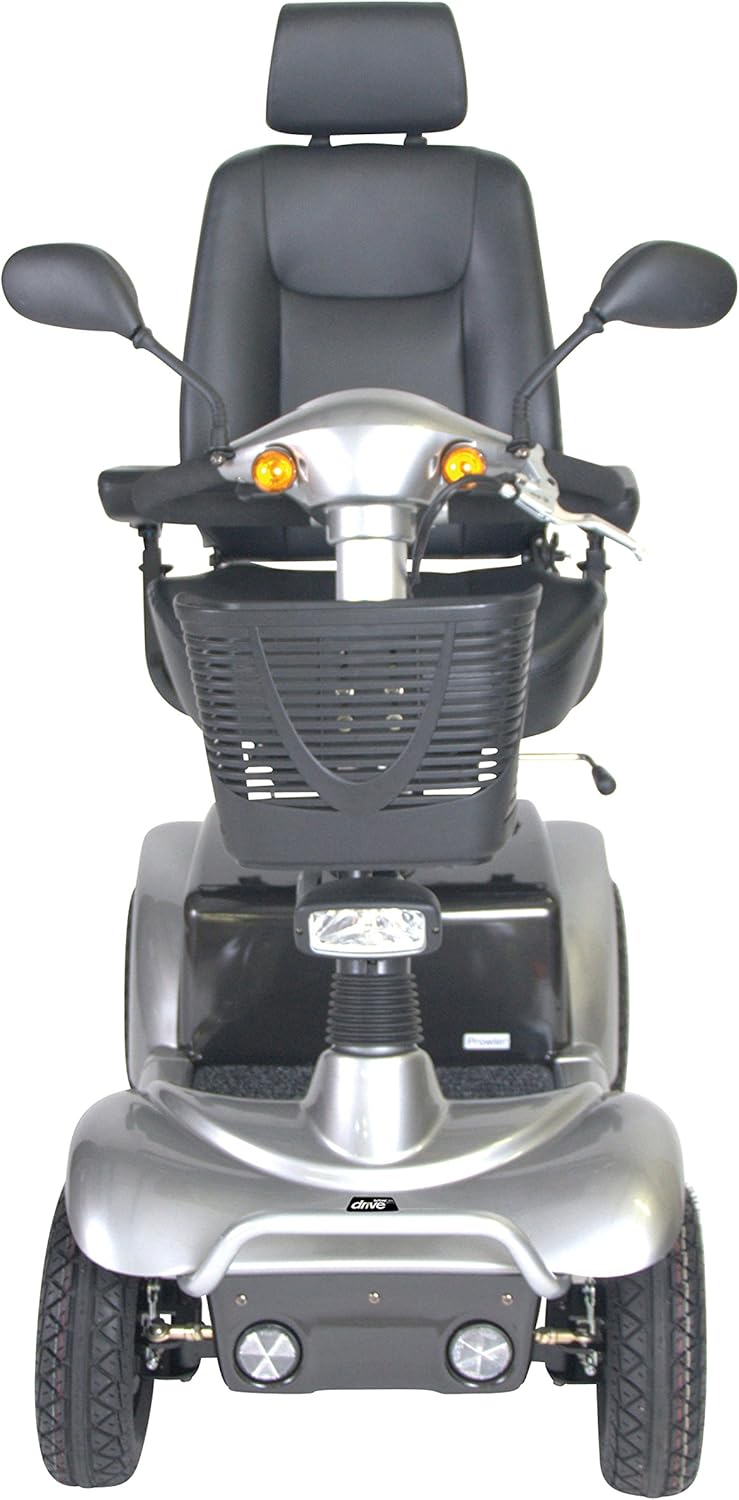


Assembly Steps:
- Install the Seat: Align the seat post with the receiver on the main chassis. Lower the seat into place until it locks securely. Adjust the seat height and depth as desired using the levers beneath the seat.
- Attach Armrests: Slide the padded flip-up armrests into their respective slots on the seat frame. Adjust their height and width for comfort.
- Position the Tiller: Raise the tiller to an upright position. Secure it using the tiller adjustment lever. Adjust the angle of the tiller for comfortable reach to the controls.
- Connect Battery: Ensure the battery pack is properly seated and connected. Refer to the battery compartment for specific connection instructions.
- Install Basket: Attach the front carry basket to the designated mounting points on the tiller.
- Initial Charge: Before first use, fully charge the scooter's batteries. Connect the charger to the charging port and a standard wall outlet. The charging indicator will show when charging is complete.
Operating Instructions
Familiarize yourself with the controls before operating the scooter.
Controls Overview:
- Key Switch: Turns the scooter power on/off.
- Throttle Control: Lever or paddle for forward and reverse movement. Push one side for forward, the other for reverse.
- Speed Adjustment Dial: Controls the maximum speed of the scooter.
- Battery Gauge: Displays the approximate remaining battery charge.
- Headlight/Tail Light Switch: Activates the scooter's lighting system.
- Turn Signal/Hazard Light Switch: Engages turn signals or hazard lights.
- Horn Button: Activates the horn.
- Hand-Operated Drum Brake: Provides additional braking control.
Starting the Scooter:
- Ensure you are seated comfortably and securely.
- Insert the key into the key switch and turn it to the "ON" position.
- Check the battery gauge to confirm sufficient charge.
- Set the speed adjustment dial to a low speed for initial operation.
Driving:
- Gently press the throttle control to move forward or backward. Release the throttle to engage the automatic electromagnetic brakes.
- Steer the scooter using the tiller. Turn the tiller in the desired direction.
- Adjust your speed as needed using the speed adjustment dial.
- Use turn signals when changing direction and the horn to alert others if necessary.
Charging the Battery:
- Turn the scooter off using the key switch.
- Locate the charging port, typically on the tiller or battery compartment.
- Connect the charger cable to the charging port and then plug the charger into a standard wall outlet.
- Allow the battery to charge fully. Charging times may vary. Do not interrupt the charging cycle.
- Once fully charged, disconnect the charger from the wall outlet first, then from the scooter.
Maintenance
Regular maintenance ensures the longevity and safe operation of your Prowler Mobility Scooter.
Daily Checks:
- Check battery charge level.
- Inspect tires for proper inflation and wear.
- Verify all lights and signals are functioning.
Weekly Checks:
- Clean the scooter with a damp cloth. Avoid using abrasive cleaners or direct water spray.
- Check all fasteners for tightness.
- Inspect brake function.
Battery Care:
- Always charge batteries fully after each use.
- Do not allow batteries to fully discharge.
- Store the scooter in a cool, dry place when not in use, and ensure batteries are charged periodically if stored for extended periods.
Troubleshooting
This section addresses common issues you might encounter with your scooter. For problems not listed here, contact customer support.
| Problem | Possible Cause | Solution |
|---|---|---|
| Scooter does not power on. | Key not in "ON" position, battery not connected, low battery charge, circuit breaker tripped. | Ensure key is "ON". Check battery connections. Charge battery. Reset circuit breaker (if applicable). |
| Scooter moves slowly or lacks power. | Low battery charge, speed dial set too low, motor issue. | Charge battery fully. Adjust speed dial. If problem persists, contact support. |
| Brakes are not engaging properly. | Brake adjustment needed, brake cable issue. | Inspect brake cables. Do not attempt to adjust electromagnetic brakes yourself; contact qualified service personnel. |
| Unusual noises during operation. | Loose components, motor issue, suspension issue. | Check for loose parts. If noise persists or is severe, discontinue use and contact support. |
Specifications
The following specifications are for the Drive Medical Prowler 4-Wheel Heavy Duty Mobility Scooter (Model: PROWLER3410MG22CS).
- Model Number: PROWLER3410MG22CS
- Product Dimensions: 45 x 21 x 22 inches (packaged); 65.75"D x 34"H (assembled)
- Item Weight: 256 Pounds
- Color: Black (as per product details, though product images often show a silver variant)
- Style: Heavy Duty, Adjustable
- Manufacturer: Drive Medical
- Features: Programmable controller, ergonomic throttle, delta tiller, height-adjustable swivel seat with reclining backrest and adjustable headrest, pneumatic tires, full suspension, hand-operated drum brake, anti-tip wheels, headlight, rearview mirrors, turn signals/hazard lights, large plastic carry basket.
- Max Cruising Range: Up to 23 miles (manufacturer stated)
- Max Speed: Up to 7 MPH (manufacturer stated)
Warranty and Support
Warranty Information:
Specific warranty details are typically provided with your purchase documentation. Please refer to the warranty card or contact Drive Medical directly for comprehensive warranty terms and conditions.
Note: Returns are subject to the seller's policy. For purchases made through Amazon, refer to the "Legal Disclaimer" in the product information, which states: "No return will be accepted after 14 calendar days from the purchase date and without a valid RMA#. Returns are subject to a 15% restock fee plus the cost of outbound & inbound shipping costs. Any return request after the 14 day period will be decided on a case to case basis depending on the product & circumstances & is subject to a restocking fee up to 60%."
Customer Support:
For technical assistance, parts, or service inquiries, please contact Drive Medical customer support. Contact information can usually be found on the manufacturer's website or in your product packaging.
You may also refer to the seller, SpinLife Wheelchairs & Scooters, for support related to your purchase.
Related documentsPROWLER3410MG22CS


Ask a question about this manual
Ask about setup, troubleshooting, compatibility, parts, safety, or missing instructions. Manuals+ will review the question and use this page’s manual context to help answer it.