
Go Power GP-PWM-30-UL
Go Power! GP-PWM-30-UL Solar Controller User Manual
30 Amp Digital Solar Charge Controller
Introduction
This manual provides comprehensive instructions for the installation, operation, and maintenance of your Go Power! GP-PWM-30-UL Solar Controller. This 30 Amp digital solar controller is designed to accept 80-600 watts of solar input and protect the life of your solar battery, whether it's Lithium, AGM, or Lead Acid. It is an essential component of your photovoltaic (PV) system, maintaining battery life by preventing overcharging through current limitation from your solar array.
Setup and Installation
Proper installation is crucial for the optimal performance and longevity of your solar controller. Please follow these steps carefully.
Safety Precautions
- Always disconnect the battery and solar panels before installation or maintenance.
- Ensure all wiring is correctly polarized to prevent damage to the controller or battery.
- Install the controller in a dry, well-ventilated area, away from direct sunlight and heat sources.
- Use appropriate wire gauges for all connections to prevent overheating.
Mounting the Controller
The GP-PWM-30-UL controller should be mounted vertically on a non-combustible surface. Allow sufficient space around the unit for air circulation.
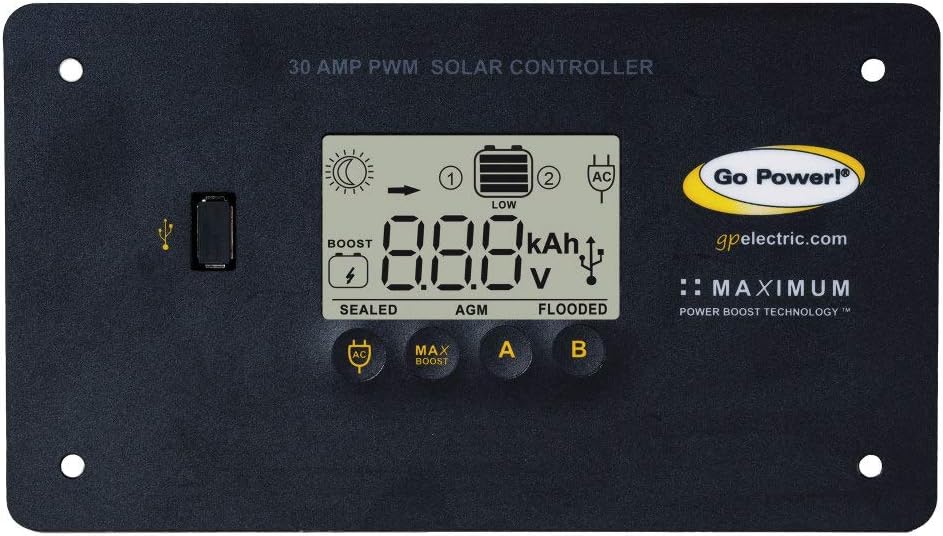
Image: Front view of the Go Power! GP-PWM-30-UL Solar Controller, showing the digital display, USB port, and control buttons.
The controller dimensions are approximately 8.25 x 1.75 x 4.5 inches. Ensure the mounting location can accommodate these dimensions and provides access for wiring.
Wiring Connections
Connect the components in the following order: battery, then solar panels. Disconnect in the reverse order.
- Battery Connection: Connect the positive and negative terminals of your battery to the corresponding battery terminals on the controller. Ensure a secure connection.
- Solar Panel Connection: Connect the positive and negative leads from your solar array to the corresponding solar panel terminals on the controller.
- Load Connection (Optional): If using a DC load directly from the controller, connect it to the load terminals. Note that this controller is primarily for battery charging.
The controller is designed to handle up to 30 amps and 570 watts of solar input. Verify your solar array's specifications are within these limits.
Operating Instructions
Once installed, the GP-PWM-30-UL controller will automatically begin charging your battery. The digital display provides real-time information about your system's status.
Display and Buttons
The controller features a backlit LCD display and three control buttons (AC, MAX BOOST, A, B) for navigation and settings adjustment.
- Display: Shows voltage, amperage, battery percentage of charge, and battery type settings.
- Buttons: Used to cycle through display modes, adjust settings, and initiate specific functions like equalization.
The display provides critical information such as current battery voltage, charging current (amperage), and the battery's state of charge as a percentage. This allows for easy monitoring of your solar system's performance.
Battery Type Selection
The controller is adjustable for Lithium, Wet Cell, AGM, and Gel batteries. Selecting the correct battery type is essential for proper charging and battery longevity.
- Press and hold the 'A' button to enter battery type selection mode.
- Use the 'B' button to cycle through the available battery types (Lithium, Wet Cell, AGM, Gel).
- Press the 'A' button again to confirm your selection.
The controller provides a full 4-stage battery charging process: bulk, absorption, float, and an equalize stage for wet cell batteries.
Maintenance
Regular maintenance ensures the continued efficiency and safety of your solar charging system.
- Cleaning: Periodically clean the controller's exterior with a dry cloth. Do not use liquid cleaners.
- Connections: Annually inspect all wiring connections for tightness and corrosion. Loose connections can lead to power loss or overheating.
- Ventilation: Ensure the area around the controller remains clear of obstructions to allow for proper airflow and heat dissipation.
- Battery Health: Monitor your battery's health and water levels (for wet cell batteries) as per the battery manufacturer's recommendations.
Troubleshooting
This section addresses common issues you might encounter with your GP-PWM-30-UL Solar Controller.
| Problem | Possible Cause | Solution |
|---|---|---|
| No display or power | Loose battery connection; Battery voltage too low; Blown fuse. | Check battery wiring and ensure secure connections. Charge battery if voltage is below 8V. Check inline fuse on battery positive cable. |
| No solar charging | No sunlight; Loose solar panel connection; Reversed polarity of solar panels. | Ensure panels are in direct sunlight. Check solar panel wiring for secure connections and correct polarity. |
| Battery not fully charged | Incorrect battery type setting; Insufficient solar input; Battery degradation. | Verify correct battery type is selected in settings. Increase solar panel capacity or ensure optimal sun exposure. Test battery health. |
| Display flickering or random resets | Unstable power supply; Loose connections; Internal fault. | Check all wiring connections, especially battery connections, for tightness. If issue persists, contact Go Power! support. |
For issues not covered here, please refer to the support section or contact customer service.
Specifications
Key technical specifications for the Go Power! GP-PWM-30-UL Solar Controller:
- Model: GP-PWM-30-UL
- Rated Charge Current: 30 Amps
- System Voltage: 12 Volts
- Max Solar Input: 570 Watts (at 12V)
- Battery Types: Lithium, Wet Cell, AGM, Gel
- Charging Port Type: MC4 (or similar solar charging port type)
- Display Type: LCD
- Operating Temperature: Up to 85°C (185°F)
- Dimensions: 8.25 x 1.75 x 4.5 inches
- Weight: 14.3 ounces
- Manufacturer: Go Power!
- Country of Origin: China
- UPC: 839085002506
Warranty and Support
Warranty Information
Go Power! products are designed for reliability and performance. For specific warranty details regarding your GP-PWM-30-UL Solar Controller, please refer to the warranty card included with your product or visit the official Go Power! website. Keep your proof of purchase for warranty claims.
Customer Support
If you require further assistance, technical support, or have questions not covered in this manual, please contact Go Power! customer service. You can find contact information on the Go Power! website: gpelectric.com.
For additional resources, you may also check the official user manual PDF provided by the manufacturer: User Manual (PDF).
Related documentsGP-PWM-30-UL


Ask a question about this manual
Ask about setup, troubleshooting, compatibility, parts, safety, or missing instructions. Manuals+ will review the question and use this page’s manual context to help answer it.