
Shure MX153T/O-TQG
Shure Microflex MX153 Earset Headworn Microphone User Manual
Model: MX153T/O-TQG
1. Product Overview
The Shure Microflex MX153 is a professional subminiature earset microphone designed for clear speech capture in various applications. Its low-profile and discreet placement make it suitable for corporate presentations, houses of worship, A/V conferencing, and live sound reinforcement, offering improved gain before feedback compared to traditional lavalier microphones.
Key Features:
- Subminiature Omnidirectional Cartridge: Provides superior clarity and enhanced plosive protection without proximity effect.
- TQG / TA4F Connector: Designed for direct compatibility with Shure wireless bodypack transmitters.
- Ultra-lightweight Design: Comfortable, flexible, and stable for placement over either ear.
- CommShield Technology: Guards against interference from cellular RF devices and digital bodypack transmitters.
- Durable Cable: Features a Kevlar-reinforced soft flex cable for enhanced longevity.

Image 1.1: The Shure Microflex MX153 earset microphone, showcasing its compact and discreet design.
2. Package Contents
Upon unboxing your Shure Microflex MX153, please verify that all the following components are included:
- Shure Microflex MX153 Earset Microphone
- Protective Storage Pouch
- 3 Windscreens
- Collar Clip
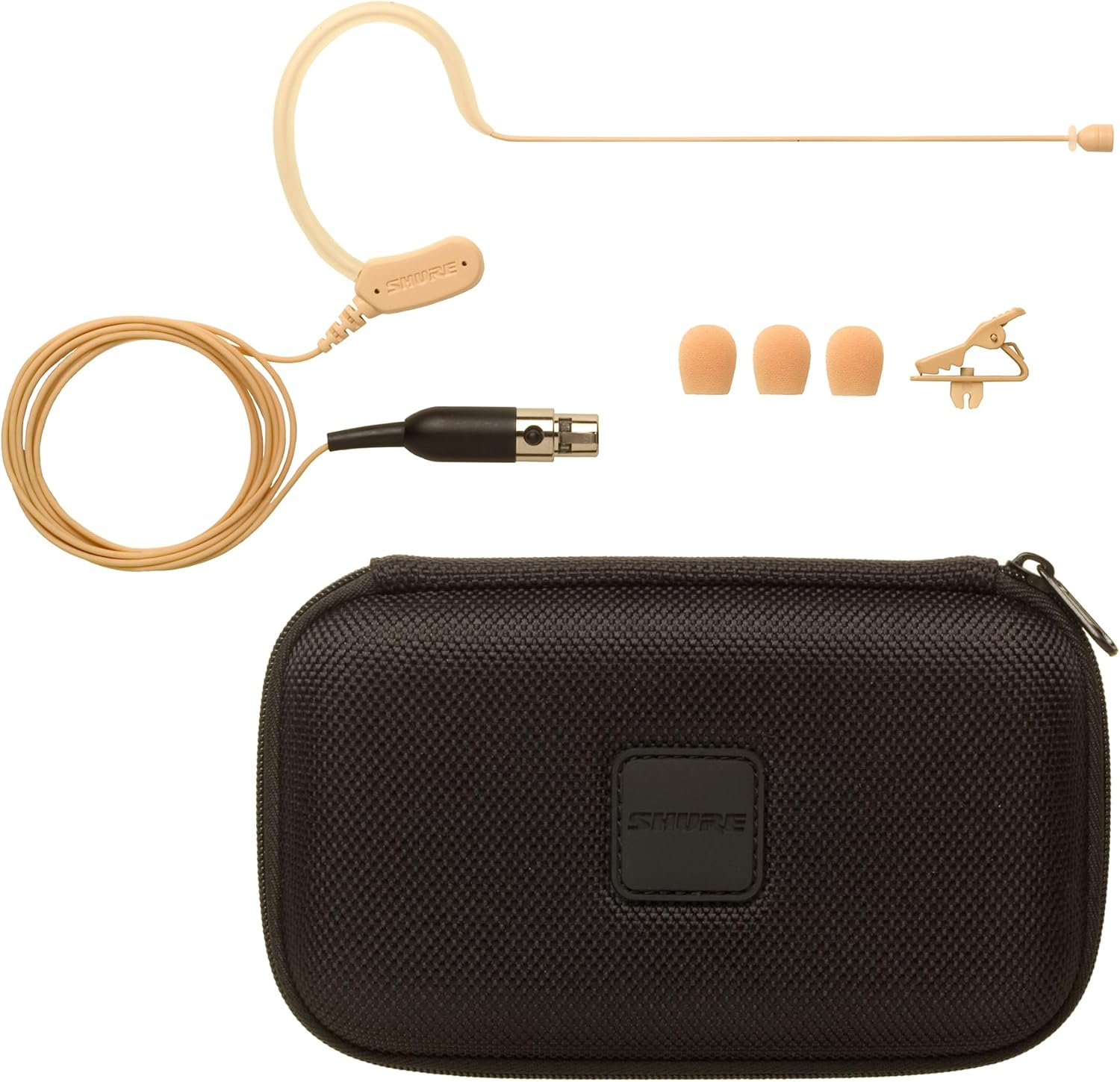
Image 2.1: The MX153 microphone along with its protective storage pouch, windscreens, and collar clip.

Image 2.2: Close-up of the protective storage pouch, designed to keep the microphone and accessories safe.
3. Setup and Connection
3.1 Wearing the Microphone
The MX153 is designed to be worn comfortably over either ear. Gently loop the earset frame over your ear, ensuring the microphone boom extends towards the corner of your mouth. Adjust the boom for optimal positioning, typically about 1-2 cm from the mouth, to capture clear audio while minimizing breath sounds.

Image 3.1: Illustration of proper earset microphone placement for optimal sound capture and comfort.
3.2 Connecting to a Wireless Bodypack Transmitter
The MX153 features a TQG / TA4F connector, specifically designed for direct compatibility with Shure wireless bodypack transmitters. Align the connector with the input port on your Shure bodypack and push firmly until it clicks into place. To disconnect, press the release button on the connector and pull it out.
3.3 Power Requirements
As a condenser microphone, the MX153 requires phantom power to operate. When connected to a Shure wireless bodypack, the bodypack typically supplies the necessary power. If connecting to a device other than a Shure wireless bodypack, ensure the device provides a regulated +5 V DC (130 µA minimum) to the TQG connector for proper functionality.
3.4 Using the Collar Clip and Windscreens
- Collar Clip: Use the included collar clip to secure the microphone cable to your clothing, reducing cable noise and ensuring the cable remains tidy and out of the way during use.
- Windscreens: Attach one of the provided windscreens to the microphone capsule to reduce plosive sounds (e.g., "p" and "b" sounds) and minimize wind noise in outdoor or breezy environments.
4. Operating the Microphone
4.1 Optimal Microphone Placement
For the best audio quality, position the microphone capsule consistently near the corner of your mouth. Experiment with slight adjustments to find the sweet spot that captures your voice clearly without picking up excessive breath sounds or ambient noise. The omnidirectional polar pattern means it picks up sound equally from all directions, offering flexibility in placement but also requiring attention to background noise.
4.2 CommShield Technology
The MX153 incorporates CommShield Technology, which provides enhanced protection against interference from cellular RF devices and digital bodypack transmitters. This technology helps maintain a clean audio signal, even in environments with high radio frequency activity.
4.3 Gain Adjustment
Adjust the gain settings on your connected wireless bodypack transmitter or audio mixer to achieve an appropriate signal level. Aim for a strong signal without clipping (distortion). Perform a sound check before any performance or presentation to ensure proper levels.
5. Maintenance and Care
5.1 Cleaning
- Gently wipe the microphone body and cable with a soft, dry cloth.
- For stubborn dirt, a slightly damp cloth can be used, but ensure no moisture enters the microphone capsule or connector.
- Windscreens can be gently hand-washed with mild soap and water, then air-dried completely before reattaching.
- Do not use harsh chemicals, solvents, or abrasive cleaners.
5.2 Storage
Always store the MX153 in its protective storage pouch when not in use. This protects the delicate microphone capsule and cable from dust, dirt, and physical damage. Avoid tightly coiling the cable to prevent internal wire damage, especially near the earset where the cable bends.
5.3 Cable Care
While the cable is Kevlar-reinforced, repeated sharp bends or excessive pulling can still cause damage. Handle the cable gently, especially at connection points and where it bends around the earset frame. Avoid stepping on or rolling chairs over the cable.
6. Troubleshooting
This section addresses common issues you might encounter with your Shure MX153 microphone.
| Problem | Possible Cause | Solution |
|---|---|---|
| No Sound or Low Output |
|
|
| Static or Interference |
|
|
| Poor Sound Quality (Muffled, Distorted) |
|
|
| Microphone Feels Unstable on Ear |
|
|
7. Specifications
| Specification | Detail |
|---|---|
| Model Name | MX153 |
| Item Model Number | MX153T/O-TQG |
| Microphone Form Factor | Microphone Only (Headworn) |
| Polar Pattern | Omnidirectional |
| Connectivity Technology | TQG |
| Connector Type | TQG Connector (TA4F) |
| Frequency Response | 20 Hz - 20 kHz |
| Signal-to-Noise Ratio | 90 dB |
| Power Source | Phantom Power (+5 V DC, 130 µA minimum) |
| Item Weight | 6.7 ounces (0.19 Kilograms) |
| Product Dimensions (L x W x H) | 3 x 7.5 x 5.2 inches |
| Color | Tan |
| Material | Frame |
| Manufacturer | Shure |
| UPC | 042406236140 |
| First Available Date | April 11, 2012 |
8. Warranty and Support
8.1 Warranty Information
For detailed warranty terms and conditions, please refer to the official Shure Warranty document. A PDF version of the warranty information is available for download:
Additionally, extended protection plans may be available for purchase. Please check with your retailer for options such as 3-Year or 4-Year Protection Plans.
8.2 Further Support
Should you require further assistance or have questions not covered in this manual, please utilize the following resources:
- User Manual (PDF): For a comprehensive guide, download the official user manual: Download User Manual (PDF)
- User Guide (PDF): An additional user guide is also available: Download User Guide (PDF)
- Shure Official Store: Visit the official Shure store for product information, FAQs, and contact details: Shure Store on Amazon
Related documentsMX153T/O-TQG


Ask a question about this manual
Ask about setup, troubleshooting, compatibility, parts, safety, or missing instructions. Manuals+ will review the question and use this page’s manual context to help answer it.