
Introduction
Thank you for choosing the Artis S-6655 5.1 Multimedia Speakers. This system is designed to provide an immersive audio experience for various entertainment needs. This manual provides essential information for setting up, operating, and maintaining your speaker system. Please read it thoroughly before use.
Product Components
The Artis S-6655 5.1 Multimedia Speaker system includes the following components:
- 1 x Subwoofer (main unit)
- 5 x Satellite Speakers (4 satellites + 1 center satellite)
- 1 x Remote Control
- 1 x Audio Input Cable
- User Manual (this document)
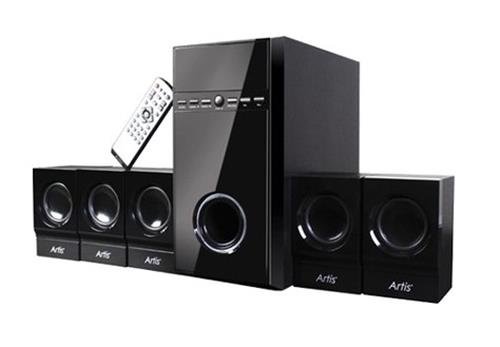
Figure 1: Artis S-6655 5.1 Multimedia Speaker System. This image displays the central subwoofer unit, five satellite speakers, and the remote control. The subwoofer is a tall, black rectangular unit with a front-facing speaker and control panel. Four smaller satellite speakers are arranged in front of it, and one is typically used as a center channel. A white remote control is visible resting on one of the satellite speakers.
Setup Instructions
- Placement: Position the subwoofer on a stable, flat surface, preferably on the floor. Place the satellite speakers around your listening area for optimal surround sound. The center satellite should be placed directly in front of the listener, typically above or below the display.
- Connect Satellite Speakers: Connect each of the five satellite speakers to the corresponding output ports on the rear panel of the subwoofer unit. Ensure correct polarity (positive to positive, negative to negative) if applicable.
- Connect Audio Source: Use the provided audio input cable to connect the subwoofer to your audio source (e.g., DVD player, TV, PC, smartphone).
- For 5.1 channel input, connect the corresponding cables (Front L/R, Rear L/R, Center/Subwoofer) from your source to the subwoofer's input ports.
- For 2.0 channel input (e.g., from a smartphone or PC), connect the stereo cable to the designated input on the subwoofer. The system features PRO-LOGIC function for simulated surround sound.
- Power Connection: Plug the subwoofer's power cord into a standard electrical outlet.
- Power On: Turn on the main power switch located on the subwoofer unit. The LED display should illuminate.
Operating Instructions
Using the Remote Control
The remote control allows convenient operation of all speaker functions. Ensure the remote has working batteries and is pointed towards the subwoofer's sensor.
- Power: Turns the system on or off (standby mode).
- Volume +/-: Adjusts the master volume level.
- Mode: Switches between input sources (AUX, USB, SD Card, FM).
- Mute: Silences the audio output.
- Play/Pause: For USB/SD card playback.
- Previous/Next: Skips tracks for USB/SD card playback, or changes FM stations.
- Channel +/-: For FM radio tuning.
- 5.1/2.1: Switches between 5.1 channel and 2.1 channel output modes, or activates PRO-LOGIC.
Input Modes
- USB Playback: Insert a USB flash drive into the USB port on the subwoofer. The system will automatically switch to USB mode and begin playing compatible audio files. Use the remote control for playback functions.
- SD Card Playback: Insert an SD card into the SD card slot on the subwoofer. The system will automatically switch to SD card mode and begin playing compatible audio files. Use the remote control for playback functions.
- FM Radio: Switch to FM mode using the "Mode" button on the remote or subwoofer. The system will automatically scan and store available FM stations. Use the "Previous/Next" or "Channel +/-" buttons to navigate stations.
- AUX/Line-in: Connect your audio device (e.g., smartphone, MP3 player) to the AUX input on the subwoofer using the audio input cable. Select AUX mode using the "Mode" button.
Maintenance
- Cleaning: Use a soft, dry cloth to clean the speaker surfaces. Do not use liquid cleaners or abrasive materials, as they may damage the finish.
- Ventilation: Ensure the subwoofer and satellite speakers have adequate ventilation. Do not block any vents.
- Environment: Avoid exposing the speakers to direct sunlight, high temperatures, humidity, or dust.
- Power Off: When not in use for extended periods, turn off the main power switch and unplug the system from the power outlet.
Troubleshooting
| Problem | Possible Cause | Solution |
|---|---|---|
| No power | Power cord not connected; Power switch off; Power outlet faulty. | Check power cord connection; Turn on power switch; Test power outlet with another device. |
| No sound | Volume too low; Mute function active; Incorrect input source selected; Audio cables loose/incorrectly connected. | Increase volume; Deactivate mute; Select correct input mode; Check all audio cable connections. |
| Distorted sound | Volume too high; Poor audio source quality; Loose speaker connections. | Reduce volume; Try a different audio source; Ensure all speaker wires are securely connected. |
| Remote control not working | Batteries depleted; Obstruction between remote and sensor; Remote not pointed correctly. | Replace batteries; Remove obstructions; Point remote directly at the subwoofer's sensor. |
| USB/SD card not playing | Incorrect file format; USB/SD card faulty; USB/SD card not inserted correctly. | Ensure audio files are in a compatible format; Try a different USB/SD card; Reinsert the USB/SD card firmly. |
Specifications
- Model: S-6655
- Speaker Type: 5.1 Channel Multimedia Speaker System (Satellite, Subwoofer, Surround Sound)
- Material: Wood (Chassis)
- Connectivity: USB, SD Card, FM Radio, AUX (Line-in)
- Audio Output Mode: Surround
- Surround Sound Channel Configuration: 5.1
- Signal-to-Noise Ratio: 70 dB
- Power Output (PMPO): 4400 Watts
- Control Method: Remote Control
- Special Features: LED Display, PRO-LOGIC function
- Compatible Devices: DVD Player, Laptop, MP3 Player, Smartphone, Tablet, Television
- Number of Items: 6 (1 Subwoofer, 5 Satellite Speakers)
Warranty and Support
For warranty information and technical support, please refer to the warranty card included with your product or visit the official Artis website. Keep your purchase receipt as proof of purchase.
Manufacturer: Artis
ASIN: B007IRL66A