
1. Introduction
This manual provides essential information for the safe and efficient installation, operation, and maintenance of the Schneider Electric ATV12H075M2 AC Drive. This device is designed to control the speed and torque of three-phase asynchronous motors, offering a reliable solution for various industrial applications. Please read this manual thoroughly before attempting any procedures to ensure proper usage and to prevent potential hazards.
2. Safety Information
WARNING: Electrical shock hazard. Only qualified personnel should install, operate, or service this equipment. Failure to follow these instructions can result in death or serious injury.
- Always disconnect all power before working on the drive or motor.
- Ensure proper grounding of the drive and motor.
- Do not touch electrical components when power is applied.
- Protect against accidental startup.
- Use appropriate personal protective equipment (PPE).
- Verify that the supply voltage matches the drive's specifications.
3. Product Overview
The Schneider Electric ATV12H075M2 is a compact variable speed AC drive designed for simple machines. It operates on a single-phase 230V input and provides a three-phase 230V output for controlling a 1 HP (0.75 kW) motor. Its robust design and integrated functions make it suitable for various applications requiring precise motor control.
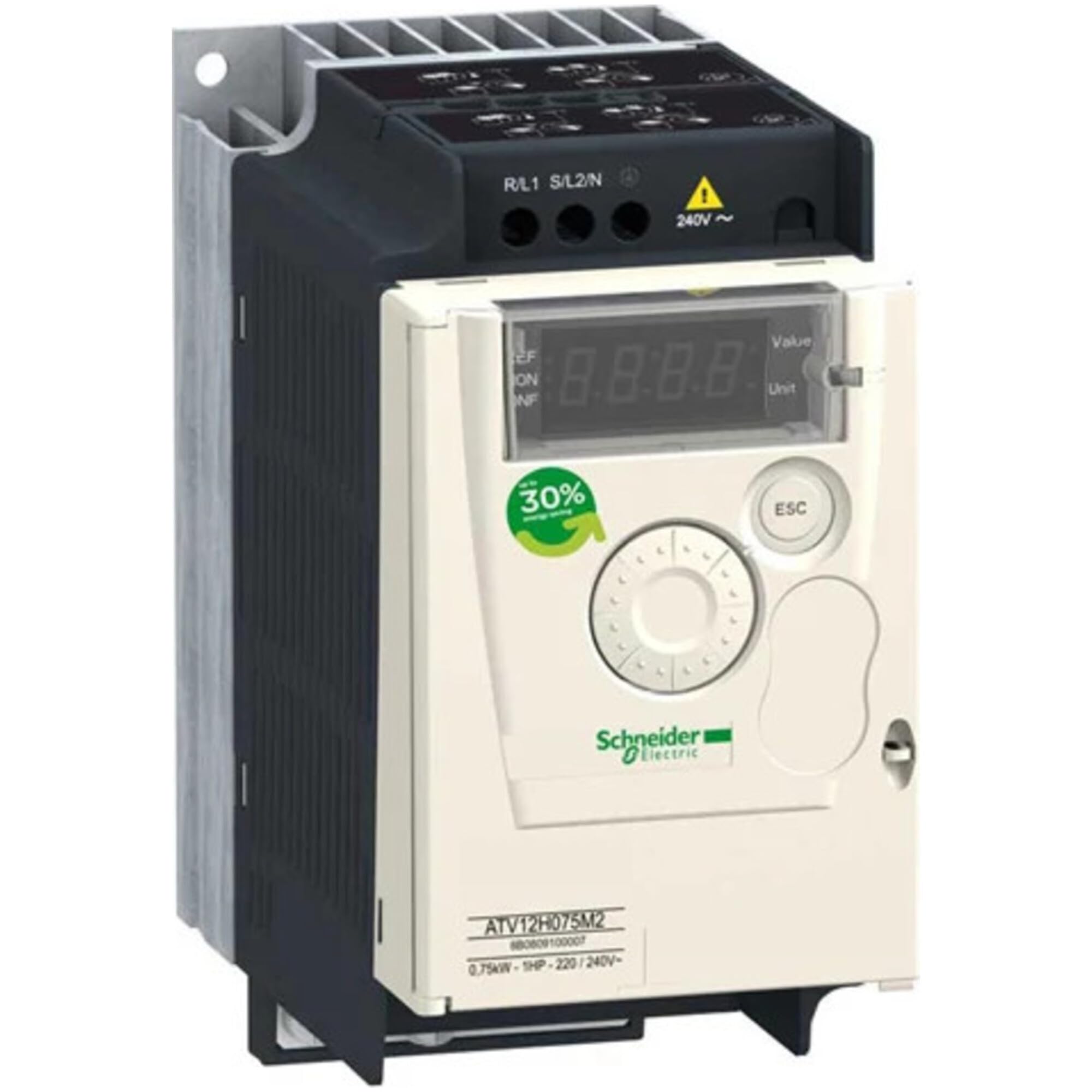
Figure 3.1: Front view of the Schneider Electric ATV12H075M2 AC Drive. This image highlights the compact design and the user interface panel.
4. Installation
4.1. Mounting
Mount the drive vertically on a flat, vibration-free surface. Ensure adequate clearance around the unit for proper ventilation (minimum 50mm above and below, 10mm on sides). Avoid mounting in direct sunlight or near heat sources. The ambient temperature should be within the specified operating range (typically 0°C to 50°C).
4.2. Environmental Considerations
- Temperature: Ensure the operating environment temperature is within 0°C to 50°C (32°F to 122°F).
- Humidity: Relative humidity should be between 5% and 95%, non-condensing.
- Vibration: Mount in an area with minimal vibration.
- Dust/Corrosive Gases: Protect the drive from excessive dust, metallic particles, and corrosive gases.
5. Wiring
All wiring must comply with local and national electrical codes. Use appropriate wire gauges and insulation ratings for the specified voltage and current.
5.1. Power Wiring
- Input Power (L1, L2): Connect the single-phase 230V AC supply to the L1 and L2 terminals.
- Ground (PE): Connect the protective earth ground to the PE terminal.
- Motor Output (U, V, W): Connect the three-phase motor leads to the U, V, and W terminals. Ensure correct phase rotation for the desired motor direction.
5.2. Control Wiring
Refer to the drive's terminal diagram for specific control input/output connections. This typically includes terminals for run/stop commands, speed references (analog or digital), fault relays, and communication interfaces.
6. Operation
6.1. Initial Power-Up
- After completing all wiring and safety checks, apply power to the drive.
- The display should illuminate, indicating the drive is powered.
- Observe for any error codes or abnormal behavior.
6.2. Parameter Settings
The drive's functionality is configured through various parameters. These include motor data (rated power, voltage, current, frequency), acceleration/deceleration times, minimum/maximum speeds, and control modes. Access and adjust parameters using the integrated keypad and display, or via communication software if available.
6.3. Control Modes
The ATV12H075M2 typically supports various control modes, such as:
- Local Control: Using the drive's keypad.
- Terminal Control: Using digital inputs for run/stop and analog inputs for speed reference.
- Serial Communication: Control via Modbus or other supported protocols.
7. Maintenance
Regular maintenance ensures optimal performance and extends the lifespan of the AC drive. Always disconnect power before performing any maintenance.
- Cleaning: Periodically clean the drive's heatsink and ventilation openings to prevent dust buildup, which can impede cooling. Use compressed air or a soft brush.
- Connections: Check electrical connections for tightness and signs of corrosion. Retighten if necessary.
- Environmental Check: Monitor the operating environment for excessive temperature, humidity, or contaminants.
- Capacitor Life: Electrolytic capacitors have a finite lifespan. Consider replacement after 5-10 years of continuous operation, depending on environmental conditions.
8. Troubleshooting
This section provides solutions to common issues. For persistent problems, contact technical support.
| Problem | Possible Cause | Solution |
|---|---|---|
| Drive does not power on | No input power; Blown fuse; Incorrect wiring | Check power supply; Replace fuse; Verify wiring connections |
| Motor does not run | No run command; Incorrect speed reference; Motor fault; Drive fault | Check control inputs; Verify speed reference signal; Inspect motor; Check drive fault codes |
| Overcurrent fault | Motor overload; Short circuit in motor wiring; Incorrect motor parameters | Reduce load; Check motor wiring; Verify motor parameters |
| Overvoltage fault | High input voltage; Regenerative braking without braking resistor | Check input voltage; Install braking resistor if required |
Consult the drive's specific error code list in the full technical documentation for detailed fault diagnostics.
9. Specifications
Key technical specifications for the Schneider Electric ATV12H075M2 AC Drive:
- Manufacturer: Schneider Electric
- Part Number: ATV12H075M2
- Item Model Number: ATV12H075M2
- Input Voltage: 230V AC, 1 Phase
- Output Voltage: 230V AC, 3 Phase
- Motor Power: 1 HP (0.75 kW)
- Item Weight: 2.55 pounds (approx. 1.16 kg)
- Product Dimensions: 7.4 x 7.3 x 4.5 inches (approx. 18.8 x 18.5 x 11.4 cm)
- Material: Copper (internal components)
- Item Package Quantity: 1
10. Warranty and Support
Schneider Electric products are covered by a standard manufacturer's warranty. For specific warranty terms and conditions, please refer to the documentation included with your purchase or visit the official Schneider Electric website. For technical assistance, troubleshooting, or service inquiries, please contact Schneider Electric customer support through their official channels.
You can find more information and support resources on the Schneider Electric Store on Amazon.


