
1. Introduction
This manual provides essential information for the safe and efficient installation, operation, and maintenance of the Schneider Electric ATV12H037M2 AC Drive. This device is designed to control the speed and torque of electric motors, offering precise control for various industrial applications. Please read this manual thoroughly before attempting to install or operate the drive.
2. Safety Information
WARNING: Electrical shock hazard. Only qualified personnel should install, operate, and maintain this equipment. Failure to follow these instructions can result in death or serious injury.
- Disconnect all power before working on the drive or connected equipment.
- Ensure proper grounding of the drive and motor.
- Do not touch electrical components when power is applied.
- Verify correct voltage and current ratings before connecting power.
- Protect against accidental startup.
- Follow all local and national electrical codes.
3. Product Overview
The Schneider Electric ATV12H037M2 is a compact AC drive designed for simple machines. It features a 0.5 horsepower (HP) rating, accepting a 230-volt single-phase input and providing a 230-volt output. This drive is suitable for applications requiring variable speed control for motors.
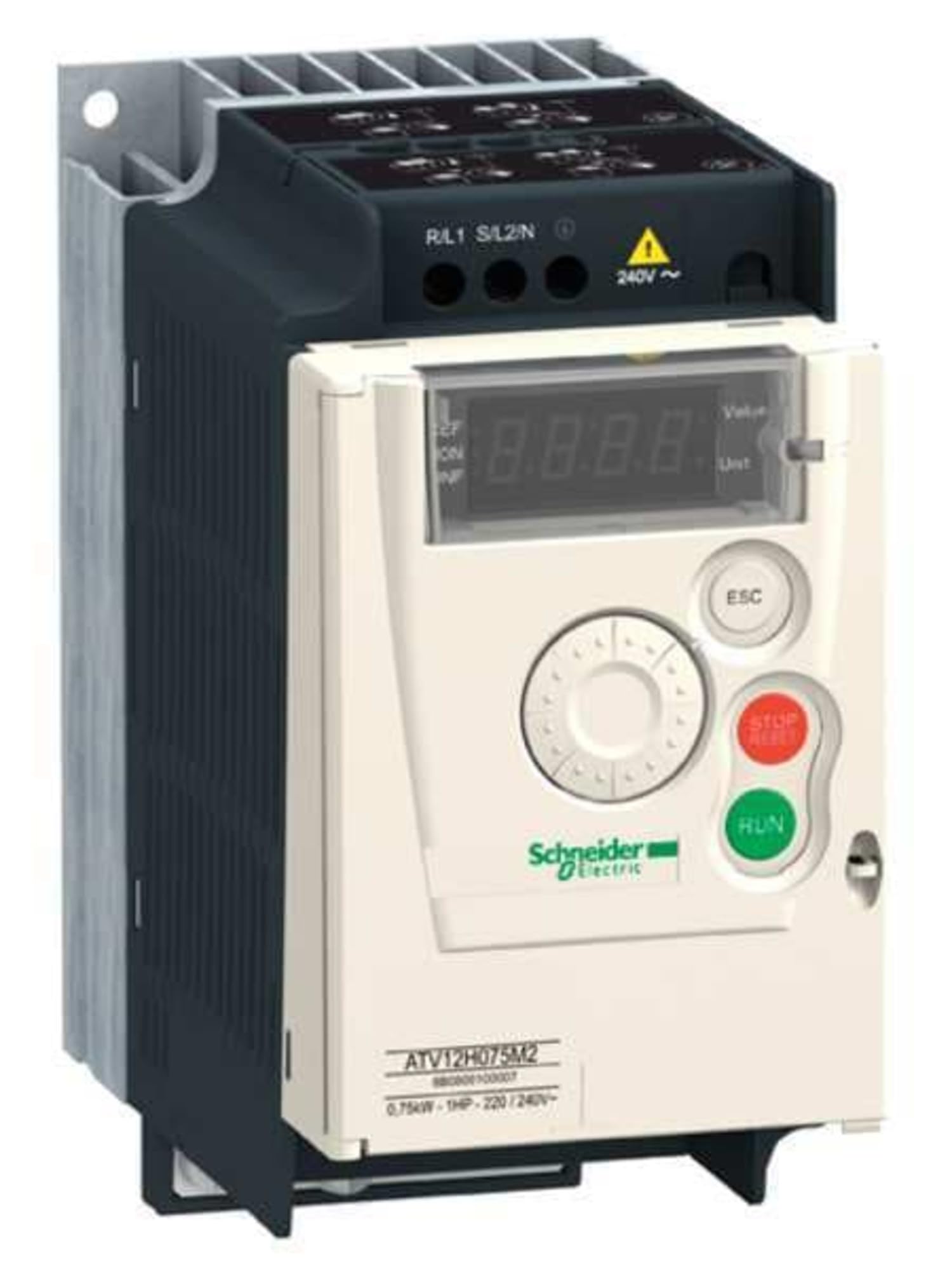
Figure 3.1: Front view of the Schneider Electric ATV12H037M2 AC Drive. This image shows the compact design of the drive, typically featuring control buttons, a display, and connection terminals for power input and motor output.
Key Features:
- 0.5 HP (0.37 kW) motor control capability.
- 230-Volt single-phase input.
- 230-Volt three-phase output for motor.
- Compact design for easy integration.
4. Setup and Installation
Proper installation is crucial for the safe and reliable operation of the AC drive. Refer to the detailed wiring diagrams provided with the product packaging for specific connections.
4.1. Mounting
- Mount the drive vertically on a flat, stable surface, ensuring adequate ventilation.
- Maintain specified clearances around the drive for proper heat dissipation.
- Avoid mounting in direct sunlight or areas with excessive dust, moisture, or corrosive gases.
4.2. Wiring
- Power Input: Connect the 230V single-phase power supply to the designated input terminals (L1, L2).
- Motor Output: Connect the motor to the output terminals (U, V, W). Ensure correct phase sequence.
- Grounding: Connect the protective earth (PE) terminal of the drive to a reliable ground point.
- Control Wiring: Connect control signals (e.g., start/stop, speed reference) to the appropriate control terminals as per your application requirements.
- Use shielded cables for control wiring to minimize electromagnetic interference.
5. Operating Instructions
After successful installation and wiring, the drive can be configured and operated.
5.1. Initial Power-Up
- Before applying power, double-check all wiring connections.
- Apply power to the drive. The display should illuminate.
- Observe for any error codes or unusual behavior.
5.2. Parameter Settings
The drive has various parameters that need to be set according to the motor and application requirements. These typically include:
- Motor nominal voltage, current, frequency, and speed.
- Acceleration and deceleration ramps.
- Control mode (e.g., V/F control).
- Input/output assignments.
Refer to the detailed programming manual for a complete list of parameters and their functions. Use the drive's keypad and display to navigate and adjust parameters.
5.3. Starting and Stopping the Motor
The motor can be started and stopped via the drive's control terminals (e.g., digital inputs) or through the local keypad, depending on the configuration.
- Start: Activate the designated start input or press the 'Run' button on the keypad.
- Stop: Deactivate the start input or press the 'Stop' button on the keypad.
6. Maintenance
Regular maintenance ensures the longevity and optimal performance of the AC drive.
- Cleaning: Periodically clean the drive's exterior and cooling fins to prevent dust buildup, which can impede heat dissipation. Use compressed air or a soft brush. Ensure power is disconnected before cleaning.
- Inspection: Regularly inspect wiring connections for tightness and signs of wear or damage. Check for any discoloration or unusual odors.
- Fan Check: If the drive has a cooling fan, ensure it operates freely and is not obstructed.
- Environmental Conditions: Verify that the operating environment remains within the specified temperature and humidity ranges.
7. Troubleshooting
This section provides general guidance for common issues. For detailed fault codes and solutions, refer to the comprehensive product documentation.
| Problem | Possible Cause | Solution |
|---|---|---|
| Drive does not power on. | No input power; Blown fuse; Incorrect wiring. | Check power supply; Replace fuse; Verify wiring connections. |
| Motor does not start. | Incorrect parameter settings; No start command; Motor fault. | Check motor parameters; Verify start signal; Inspect motor. |
| Drive trips on overcurrent. | Motor overload; Short circuit in motor wiring; Incorrect acceleration time. | Reduce load; Check motor and wiring; Increase acceleration time. |
| Drive trips on overvoltage. | High input voltage; Rapid deceleration. | Check input voltage; Increase deceleration time or add braking resistor. |
8. Specifications
| Parameter | Value |
|---|---|
| Model Number | ATV12H037M2 |
| Brand | Schneider Electric |
| Horsepower (HP) | 0.5 HP |
| Input Voltage | 230V AC, 1 Phase |
| Output Voltage | 230V AC, 3 Phase |
| Item Dimensions (L x W x H) | 7.6 x 7.6 x 4.7 inches |
| Item Weight | 2.3 Pounds |
| Manufacturer Part Number | ATV12H037M2 |
| UPC | 785901871392 |
9. Warranty and Support
Schneider Electric products are designed and manufactured to high-quality standards. For specific warranty terms and conditions, please refer to the documentation included with your product or visit the official Schneider Electric website. For technical support, service, or spare parts, contact your local Schneider Electric representative or authorized distributor. Always provide the model number (ATV12H037M2) when seeking support.
Official Website: www.se.com


