
1. Safety Information
WARNING: Improper installation, adjustment, alteration, service, or maintenance can cause property damage, injury, or death. Read these instructions thoroughly before installing or servicing this equipment. Installation and service must be performed by a qualified installer, service agency, or gas supplier.
- Always disconnect electrical power to the furnace before installing or servicing the induced draft blower.
- Wear appropriate personal protective equipment, including gloves and eye protection.
- Ensure all wiring connections are secure and comply with local electrical codes.
- Do not operate the furnace if the induced draft blower is damaged or not functioning correctly.
- This blower operates at 115 Volts. Verify power supply compatibility.
2. Product Overview
The Packard Induced Draft Furnace Blower, model 48331, is a critical component designed to draw combustion gases from the furnace heat exchanger and vent them safely out of the system. This ensures proper combustion and prevents the buildup of harmful gases within your heating system. It is a replacement part compatible with various furnace models.
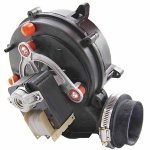
Image 1: The Packard Induced Draft Furnace Blower, model 48331, a component designed for furnace systems.
3. Package Contents
Verify that all components are present and undamaged before beginning installation:
- Induced Draft Blower Motor Assembly (Model 48331)
- Ground Wire
- Rubber Gasket
- Hose Clamp
4. Setup and Installation
4.1 Pre-Installation Checklist
- Ensure the furnace is completely powered off at the main breaker.
- Confirm the new blower (Model 48331) is the correct replacement part for your furnace.
- Gather necessary tools: screwdrivers, wrenches, wire strippers, multimeter.
4.2 Installation Steps
- Disconnect Power: Turn off all electrical power to the furnace at the service panel. Verify power is off using a multimeter.
- Access Blower: Locate and carefully remove the access panels to expose the existing induced draft blower.
- Disconnect Wiring: Label and disconnect all electrical wires connected to the old blower. Take photos for reference if needed.
- Remove Old Blower: Disconnect any hoses or pipes (e.g., pressure switch hose) and unbolt the old blower from its mounting. Carefully remove it.
- Install New Gasket: Clean the mounting surface. Place the new rubber gasket provided with the Packard 48331 blower onto the furnace opening.
- Mount New Blower: Position the new Packard 48331 blower onto the gasket and secure it with the original mounting bolts. Ensure it is seated firmly.
- Connect Wiring: Reconnect the electrical wires to the new blower, matching them to the labels or photos taken earlier. Ensure the new ground wire is properly connected.
- Reconnect Hoses: Reattach any hoses or pipes that were disconnected, securing them with the new hose clamp if necessary.
- Restore Power: Replace all access panels. Restore electrical power to the furnace.
5. Operating Instructions
5.1 Initial Startup
After installation, initiate a heating cycle on your thermostat. The induced draft blower should start immediately, creating a draft before the main burner ignites. Observe for any unusual noises or vibrations.
5.2 Normal Operation
During normal operation, the induced draft blower will activate at the beginning of each heating cycle. It will run continuously while the main burner is active and for a short period after the burner shuts off to clear residual combustion gases. The blower should operate smoothly and relatively quietly.
6. Maintenance
Regular maintenance helps ensure the longevity and efficient operation of your induced draft blower.
6.1 Annual Inspection
- Power Disconnection: Always disconnect power before inspection.
- Visual Check: Inspect the blower for any signs of physical damage, corrosion, or loose connections.
- Gasket Integrity: Check the rubber gasket for cracks or deterioration. Replace if necessary to prevent leaks.
- Hose Connections: Ensure all hoses (e.g., to the pressure switch) are securely attached and free of cracks.
- Cleanliness: Remove any dust, debris, or lint that may have accumulated on or around the blower motor and fan blades.
6.2 Cleaning
Use a soft brush or vacuum cleaner with a brush attachment to gently clean the exterior of the blower and fan blades. Avoid using harsh chemicals or excessive moisture.
7. Troubleshooting
If your furnace is experiencing issues related to the induced draft blower, consult the table below for common problems and solutions.
| Problem | Possible Cause | Solution |
|---|---|---|
| Blower does not start | No power to furnace; Faulty wiring; Pressure switch issue; Blower motor failure | Check circuit breaker; Verify wiring connections; Inspect pressure switch hose/switch; Consult a qualified technician for motor replacement. |
| Blower is noisy | Loose mounting; Debris in fan; Worn bearings | Tighten mounting bolts; Clean fan blades; If bearings are worn, blower replacement may be necessary. |
| Furnace cycles on and off rapidly (short cycling) | Blocked flue; Pressure switch issue; Blower not generating enough draft | Inspect flue for obstructions; Check pressure switch and hose; Ensure blower is operating at full speed. |
| Blower hums but does not spin | Motor seized; Capacitor failure (if applicable) | Disconnect power and attempt to manually spin fan (if accessible and safe); Consult a qualified technician for diagnosis and repair/replacement. |
If troubleshooting steps do not resolve the issue, contact a qualified HVAC technician for further assistance.
8. Specifications
| Feature | Detail |
|---|---|
| Part Number | 48331 |
| Voltage | 115 Volt |
| Item Weight | 4.8 ounces |
| Package Dimensions | 11.46 x 11.38 x 6.97 inches |
| Item Package Quantity | 1 |
9. Warranty and Support
9.1 Warranty Information
This Packard Induced Draft Furnace Blower is covered by a manufacturer's warranty against defects in materials and workmanship. The specific duration and terms of the warranty may vary. Please retain your proof of purchase for warranty claims. For detailed warranty information, refer to the documentation included with your purchase or contact Packard customer service.
9.2 Customer Support
For technical assistance, troubleshooting guidance, or warranty inquiries, please contact Packard customer support. Contact information can typically be found on the product packaging or the official Packard website.