1. Introduction
This manual provides essential information for the safe and effective installation, operation, and maintenance of the Dayton Duplex Alternating Control Panel, Model 2PZG7. This control panel is designed for managing motor and pump operations in various applications, ensuring reliable and alternating control of two pumps.
Please read this manual thoroughly before attempting any installation, operation, or maintenance procedures. Retain this manual for future reference.
2. Safety Information
WARNING: ELECTRICAL SHOCK HAZARD
- Always disconnect all power sources before servicing or performing any work on the control panel.
- Failure to disconnect power sources can result in serious injury or death.
- Installation and maintenance should only be performed by qualified personnel in accordance with all local and national electrical codes.
- Ensure proper grounding of the control panel.
- Do not operate the control panel with damaged wiring or components.
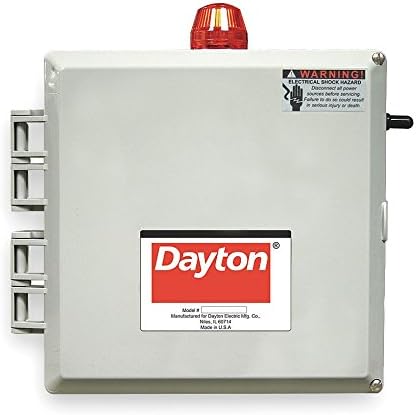
Figure 1: Front view of the Dayton Duplex Alternating Control Panel, Model 2PZG7. The panel features a gray enclosure, a red warning light on top, and a prominent "Dayton" logo. An electrical shock hazard warning label is visible on the upper right side.
3. Setup and Installation
The Dayton Duplex Alternating Control Panel requires professional installation to ensure safe and correct operation. Refer to the detailed wiring diagrams and installation instructions provided with the physical product for specific connections and mounting procedures.
3.1 Pre-Installation Checks
- Verify that the power supply voltage and frequency match the specifications of the control panel and connected pumps.
- Ensure the installation location is suitable, protected from environmental elements, and allows for adequate ventilation.
- Confirm all necessary tools and safety equipment are available.
3.2 Mounting
Mount the control panel securely to a stable surface using appropriate fasteners. Ensure the panel is level and accessible for future servicing.
3.3 Electrical Connections
All electrical wiring must comply with local and national electrical codes. Connect incoming power, pump motors, and level sensors (if applicable) to the designated terminals within the control panel. Double-check all connections for tightness and correct polarity.
4. Operating Instructions
The Dayton Duplex Alternating Control Panel is designed for automatic operation of two pumps, typically alternating their run cycles to ensure even wear and extend pump life. It also provides backup operation if one pump fails or cannot keep up with demand.
4.1 Initial Power-Up
- After completing all electrical connections and safety checks, restore power to the control panel.
- Observe the indicator lights and listen for any unusual noises. The red warning light on top (as shown in Figure 1) may illuminate during certain alarm conditions.
4.2 Automatic Operation
In automatic mode, the control panel will activate pumps based on input from level sensors or other control signals. The system will alternate between Pump 1 and Pump 2 for primary operation. If the primary pump cannot handle the load, or if an alarm condition is met, the secondary pump will engage as a backup.
4.3 Manual Override (If Applicable)
Some models may include a manual override switch. Consult your specific product documentation for details on manual operation. Use manual mode only for testing or specific maintenance tasks, and always return to automatic mode for normal operation.
5. Maintenance
Regular maintenance ensures the longevity and reliable operation of your Dayton Duplex Alternating Control Panel. Always disconnect power before performing any maintenance.
- Monthly: Inspect the enclosure for any signs of damage, corrosion, or moisture ingress. Check all wiring connections for tightness.
- Quarterly: Test the functionality of all indicator lights and alarm systems. Verify the proper operation of level sensors and pump alternation.
- Annually: Have a qualified electrician inspect the internal components, contactors, and overload relays for wear or damage. Clean any dust or debris from inside the enclosure.
6. Troubleshooting
This section provides basic troubleshooting steps for common issues. For complex problems, contact a qualified service technician.
| Problem | Possible Cause | Solution |
|---|---|---|
| Panel has no power. | Blown fuse or tripped circuit breaker; disconnected power supply. | Check fuses/breakers in the main electrical panel. Verify power supply connections. |
| Pump not running. | Pump overload tripped; faulty level sensor; pump motor issue. | Reset pump overload. Check level sensor operation. Inspect pump motor. |
| Alarm light illuminated. | High water level; pump failure; sensor malfunction. | Investigate the cause of the alarm (e.g., check water level, inspect pumps). Address the underlying issue. |
| Pumps not alternating. | Control circuit malfunction; faulty relay. | Consult a qualified technician for diagnosis and repair. |
7. Specifications
The following specifications are for the Dayton Duplex Alternating Control Panel, Model 2PZG7:
- Model Number: 2PZG7
- Manufacturer: Dayton
- Item Weight: 16 pounds
- Item Package Quantity: 1
- Batteries Required: No
- ASIN: B007IB65I0
- Date First Available: May 28, 2020
Note: For detailed electrical ratings (voltage, amperage, phase), refer to the product label on the control panel or the specific wiring diagram provided with the unit.
8. Warranty and Support
For specific warranty information regarding your Dayton Duplex Alternating Control Panel, Model 2PZG7, please refer to the documentation included with your purchase or contact the manufacturer directly. Warranty terms and conditions may vary.
For technical support, service, or replacement parts, please contact Dayton customer service or an authorized Dayton dealer. Ensure you have your model number (2PZG7) and serial number (if applicable) ready when contacting support.


