Introduction
This manual provides detailed instructions for the operation and maintenance of your Casio DBC-611-1DF Men's Silver Tone 25 Memory Calculator Databank Watch. Please read this manual thoroughly to ensure proper use and to fully utilize all features of your watch.

Front view of the Casio DBC-611-1DF Databank Watch, displaying the digital time and calculator keypad.
Setup
Setting the Time and Date
- In Timekeeping Mode, press the ADJUST button (top left) until the seconds start to flash. This indicates the setting mode.
- Press the MODE button (bottom left) to cycle through the settings: seconds, hour, minutes, year, month, day.
- Use the numeric keypad (calculator buttons) to input the correct values for each setting. For example, to set the hour, press the corresponding number on the keypad.
- To switch between 12-hour and 24-hour format, press the PM button (bottom left of keypad) while the hour setting is flashing.
- Once all settings are adjusted, press the ADJUST button again to exit the setting mode.
Adjusting the Band
The watch features an adjustable metal band. To adjust the length, locate the clasp and use a small flathead tool to lift the locking tab. Slide the clasp along the band to the desired position, then press the tab down firmly to secure it. Ensure the clasp is securely fastened before wearing.
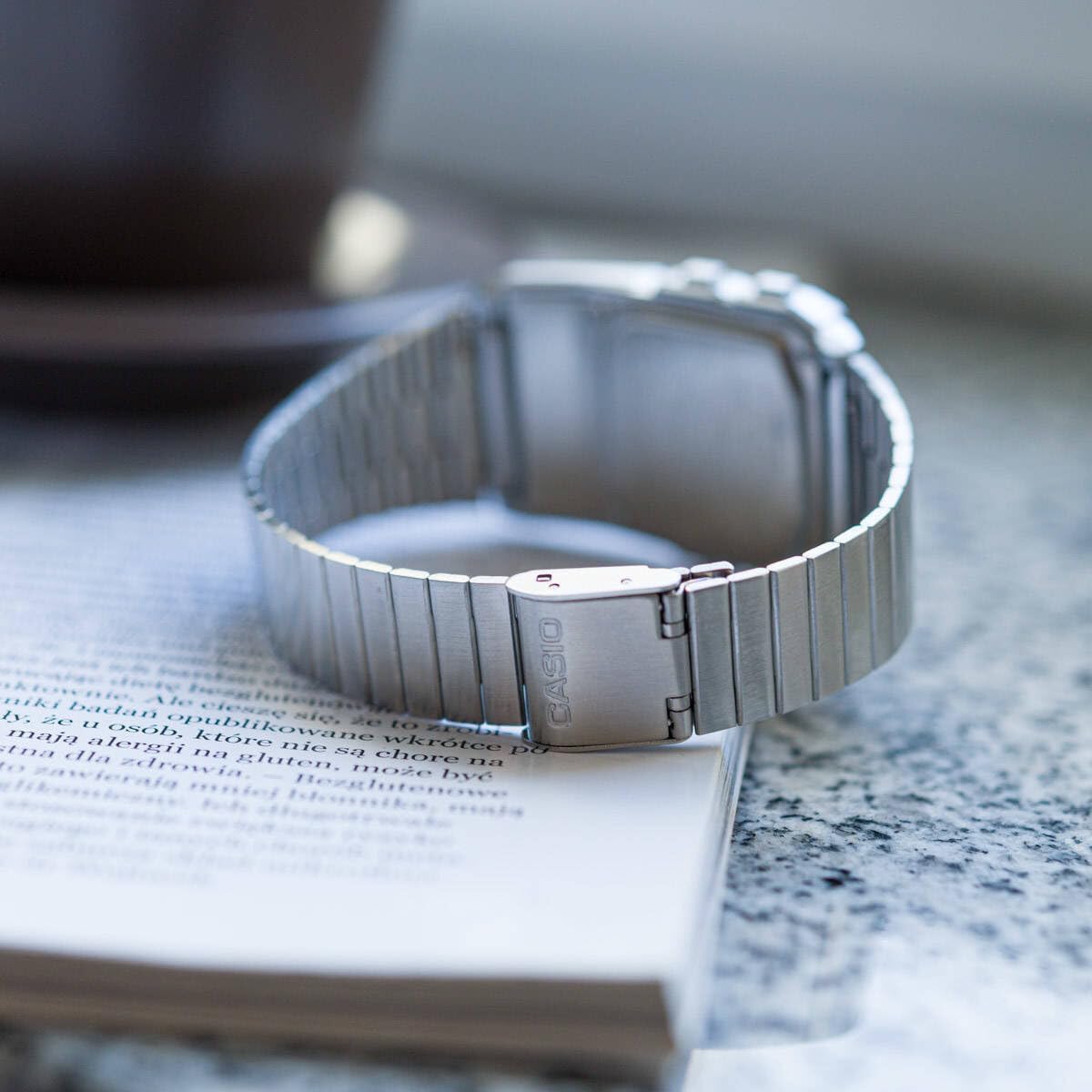
Rear view of the watch, showing the adjustable metal clasp for band sizing.
Operating Instructions
Mode Navigation
Press the MODE button (bottom left) to cycle through the different modes:
- Timekeeping Mode: Displays current time, date, and day of the week.
- Telememo Mode: Stores up to 25 sets of name and telephone number data.
- Calculator Mode: Performs basic arithmetic calculations.
- Stopwatch Mode: Measures elapsed time, split times, and 1st-2nd place times.
- Dual Time Mode: Displays the current time in a different time zone.
- Alarm Mode: Sets up to 5 daily alarms and an hourly time signal.
Using the Calculator
In Calculator Mode, use the numeric keypad to input numbers and perform operations. The display supports 8 digits. Press the AC button (top right of keypad) to clear the current entry.
Telememo Function
To enter or recall data in Telememo Mode:
- Navigate to Telememo Mode.
- Press the ADJUST button to enter data input mode.
- Use the numeric keypad to enter numbers. Use the SPACE button for spaces.
- Press ADJUST to save the entry.
- Use the TEL/FWD and REV/TIME buttons to scroll through stored entries.
Stopwatch Function
In Stopwatch Mode:
- Press START/STOP (bottom right of keypad) to start and stop the stopwatch.
- Press LAP/RESET (bottom left of keypad) to record lap times or reset the stopwatch when stopped.
Alarms and Hourly Time Signal
In Alarm Mode:
- Use the MODE button to select one of the 5 alarms or the hourly time signal.
- Press ADJUST to set the alarm time. Use the numeric keypad to input the hour and minutes.
- Press ALM ON/OFF (top left of keypad) to toggle the selected alarm on or off.
- Press SIG ON/OFF (middle right of keypad) to toggle the hourly time signal on or off.
Auto LED Light
The watch features an Auto LED light. This function automatically illuminates the display when the watch is tilted towards your face in a dark environment. To activate or deactivate this feature, refer to the detailed instructions in the full module manual (Module No. 437, 438, 3208).

Angled view of the Casio Databank Watch, highlighting the display and keypad.
Maintenance
General Care
- Clean the watch regularly with a soft, dry cloth.
- Avoid exposing the watch to extreme temperatures, direct sunlight for prolonged periods, or strong magnetic fields.
- While the watch is water-resistant, avoid direct contact with water to prolong its lifespan, especially for the calculator buttons.
Battery Replacement
The watch uses 1 CR123A battery. Battery life is approximately 5 years. When the display becomes dim or functions become erratic, it is time to replace the battery. Battery replacement should ideally be performed by a qualified technician to ensure water resistance is maintained.
Troubleshooting
- Display is blank or dim: Check the battery. If recently replaced, ensure it is installed correctly.
- Buttons are unresponsive: Ensure the watch is not in a locked mode (if applicable, refer to full manual). If the issue persists, a reset may be required (consult a technician).
- Time is inaccurate: Re-set the time and date as per the "Setting the Time and Date" section.
Specifications
| Brand | Casio |
| Model Number | DBC-611-1DF |
| Product Dimensions | 2.44 x 4.09 x 3.62 inches |
| Item Weight | 1.69 ounces |
| Battery Type | 1 CR123A (included) |
| Special Features | 25 pages of Telememo, 1/100-second stopwatch, Dual time, 5 alarms, Auto LED light |
| Water Resistance | Water Resistant (general daily use, not for swimming or diving) |
| Date First Available | March 22, 2012 |
Official Product Video
Official product video showcasing the features and design of the Casio Databank Watch.
Warranty and Support
For warranty information and customer support, please refer to the warranty card included with your product or visit the official Casio website. The module number for this watch is 437, 438, or 3208, which can be used to find specific support documents online.
For additional assistance, you may contact Casio customer service directly.