Introduction
The BAOFENG UV-5R is a compact, handheld dual-band transceiver designed for reliable two-way communication. It operates in the frequency ranges of 136-174 MHz (VHF) and 400-480 MHz (UHF), providing 4 watts of power. This versatile radio also includes a special VHF receive band from 65-108 MHz for FM broadcast reception. Key features include dual watch and dual reception capabilities, up to 128 memory channels, selectable wide/narrow bandwidth, battery save function, VOX, DCS/CTCSS encode, key lock, and a built-in flashlight.
Product Overview
Familiarize yourself with the components and controls of your BAOFENG UV-5R radio.

Figure 1: Front view of the BAOFENG UV-5R with key components labeled, including the antenna, power/volume knob, LCD display, VFO/MR button, LED indicator, speaker/microphone port, A/B button for frequency display, and the numeric keypad.

Figure 2: Side view of the BAOFENG UV-5R highlighting the side keys: SK-side key1 (CALL/radio alarm), PTT (Push-to-Talk) key, and SK-side key2 (MONI/flashlight/monitor), along with the speaker and microphone ports.
What's in the Box:
- BAOFENG UV-5R Dual Band Two Way Radio (Black)
- 1 Lithium-Ion Battery (7.4V 1500mAh)
- Antenna (SMA-J Flexible Antenna)
- Belt Clip
- Wrist Strap
- AC Adapter (8.4V 600mA)
- Drop-in Charging Tray

Figure 3: The BAOFENG UV-5R radio with its removable Li-ion battery pack.
Setup
1. Battery Installation
- Align the battery pack with the grooves on the back of the radio.
- Slide the battery upwards until it clicks securely into place.
- To remove, press the battery release latch (usually at the bottom of the battery) and slide the battery downwards.
2. Antenna Attachment
- Screw the flexible antenna clockwise onto the antenna connector at the top of the radio until it is finger-tight. Do not overtighten.
3. Charging the Battery
- Connect the AC adapter to the charging tray.
- Plug the AC adapter into a standard wall outlet.
- Place the radio (with battery installed) into the charging tray. Ensure the charging contacts on the radio align with those in the tray.
- The LED indicator on the charger will typically show red during charging and turn green when the battery is fully charged.
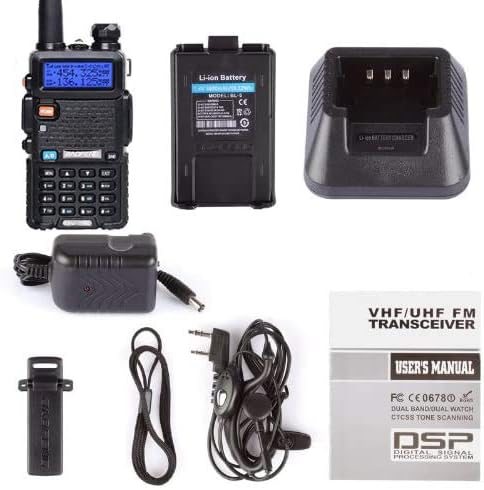
Figure 4: The BAOFENG UV-5R radio in its charging cradle.
Operating Instructions
1. Power On/Off and Volume Control
- To power on, rotate the Knob (On/Off/Volume) clockwise.
- To power off, rotate the Knob (On/Off/Volume) counter-clockwise until it clicks.
- Adjust the volume by rotating the same knob.
2. Frequency and Channel Mode (VFO/MR)
- Press the VFO/MR button to switch between Frequency Mode (VFO) and Channel Mode (MR).
- In VFO mode, you can manually enter frequencies.
- In MR mode, you can select pre-programmed channels.
3. Selecting Frequencies/Channels
- Use the numeric keypad to directly enter frequencies in VFO mode.
- Use the UP/DOWN arrow keys to navigate through frequencies or channels.
- Press the A/B button to switch between the upper and lower frequency displays for dual watch operation.
4. Transmitting (PTT Key)
- To transmit, press and hold the PTT (Push-to-Talk) key on the left side of the radio.
- Speak clearly into the microphone.
- Release the PTT key to stop transmitting and return to receive mode.
5. High/Low Power Settings
- The radio supports selectable RF power output at 4 Watts (High) or 1 Watt (Low). Refer to the full user manual for specific menu navigation to change this setting.
6. Advanced Features
- VOX (Voice Operated Transmit): Allows hands-free transmission when voice is detected.
- DCS/CTCSS Encode: Digital Coded Squelch / Continuous Tone-Coded Squelch System for selective calling.
- Key Lock: Prevents accidental key presses.
- Built-in Flashlight: Activated via a side key (SK-side key2/MONI).
- Programming: For advanced channel management and customization, the radio requires a programming cable (e.g., USB-02) and compatible software like CHIRP. This allows for efficient setup of channel names, boot display, and other parameters.
Maintenance
1. Cleaning
- Wipe the radio's surface with a soft, damp cloth. Do not use harsh chemicals or abrasive cleaners.
- Ensure the radio is dry before use or charging.
2. Battery Care
- Avoid overcharging or completely draining the Li-ion battery.
- Store the battery in a cool, dry place when not in use for extended periods.
- If the radio becomes warm during prolonged transmission, allow it to cool down to prevent display issues.
3. Storage
- When storing the radio for a long time, remove the battery.
- Store in a dry environment, away from direct sunlight and extreme temperatures.
Troubleshooting
| Problem | Possible Cause / Solution |
|---|---|
| Radio does not power on. | Battery is not installed correctly or is depleted. Ensure battery is properly seated and charged. |
| Cannot transmit or receive. |
|
| Poor audio quality or static. |
|
| LCD display turns black or becomes unreadable during prolonged use. | The radio may be overheating from extended transmission. Allow the radio to cool down. The display should return to normal. |
| Difficulty programming channels. |
|
| Dual Watch (TDR) function misses conversations. | The TDR function scans between two VFOs and may miss short transmissions. This is inherent to the design and not a malfunction. |
Specifications
| Feature | Detail |
|---|---|
| Model Number | UV-5R |
| Frequency Range | VHF: 136-174 MHz (Rx/Tx), UHF: 400-520 MHz (Rx/Tx), FM Broadcast: 65-108 MHz (Rx only) |
| Power Output | 4W / 1W Selectable |
| Number of Channels | 128 |
| Battery | 1500mAh Li-ion (7.4V) |
| Selectable Frequency Steps | 2.5, 5, 6.25, 10, 12.5, 25 KHz |
| Bandwidth | Broadband (Wide) 25KHz / Narrowband (Narrow) 12.5KHz Selectable |
| Dimensions (Product) | 8 x 4 x 5 inches (approx. 20.3 x 10.2 x 12.7 cm) |
| Item Weight | 14.8 ounces (approx. 420g) |
| Water Resistance Level | Not Water Resistant |
Safety Information
This device complies with part 15 of the FCC Rules. Operation is subject to the condition that this device does not cause harmful interference. It is restricted to occupational use to satisfy FCC RF exposure limits. Refer to the full user manual for detailed operating requirements and safety guidelines.
Warranty and Support
For information regarding product warranty, please refer to the documentation included with your purchase or contact the seller directly. For technical support or further assistance, please reach out to BAOFENG customer service through their official channels or the retailer from whom the product was purchased.


