
Introduction
Thank you for choosing the Acctim Alarm Clock Analogue, Model 14284. This clock combines classic design with modern features, including Smartlite technology for automatic dial illumination and a silent sweep seconds hand. This manual provides detailed instructions to ensure optimal performance and longevity of your device.
Setup
1. Battery Installation
The Acctim Alarm Clock requires 3 x AA batteries (not included) for operation. Ensure correct polarity when inserting batteries.
- Locate the battery compartment cover on the back of the clock.
- Remove the cover by sliding or lifting it.
- Insert three new AA batteries, matching the (+) and (-) terminals as indicated inside the compartment.
- Replace the battery compartment cover securely.
Note: Always use fresh batteries and replace all three simultaneously for best performance. Remove batteries if the clock will not be used for an extended period.
2. Setting the Time
To set the current time:
- Locate the Time Set knob on the back of the clock.
- Rotate the knob clockwise or counter-clockwise until the hour and minute hands display the correct time.
3. Setting the Alarm
To set your desired alarm time:
- Locate the Alarm Set knob on the back of the clock.
- Rotate the knob until the alarm hand points to your desired wake-up time.
- To activate the alarm, slide the Alarm ON/OFF switch (usually on the side or back) to the 'ON' position.
Operating Instructions
Smartlite Technology
This clock features Smartlite technology, which automatically illuminates the dial for easy night-time viewing. A built-in light sensor detects ambient light levels and adjusts the dial's illumination accordingly. This feature ensures the time is visible in low-light conditions without manual intervention.
Silent Sweep Seconds Hand
The clock is equipped with a silent non-ticking sweep seconds hand, providing a quiet environment free from distracting ticking noises.
Everglow Adjustable Brightness
The dial illumination, powered by Smartlite technology, offers Everglow adjustable brightness. This allows you to fine-tune the intensity of the night-time illumination to your preference, ensuring comfort without excessive brightness.
Crescendo Alarm with Snooze and Backlight
The alarm features a crescendo sound, starting softly and gradually increasing in volume to gently wake you. When the alarm sounds, you have the option to:
- Snooze: Press the large Snooze/Light button (typically on top of the clock) to temporarily silence the alarm. The alarm will sound again after a short interval (e.g., 5-10 minutes).
- Backlight: Pressing the Snooze/Light button also activates a temporary backlight for enhanced visibility in the dark.
- Turn Off Alarm: Slide the Alarm ON/OFF switch to the 'OFF' position to disable the alarm completely until you reactivate it.

Figure 1: Front view of the Acctim Alarm Clock Analogue, Model 14284. This image displays the red casing and the white analog dial with black numbers and hands, including the red alarm hand.

Figure 2: A close-up view of the clock's dial, highlighting the 'acctim' branding, the silent sweep seconds hand, and the clear numbering for easy time reading.

Figure 3: Detail of the top of the clock, showing the prominent 'SNOOZE-LIGHT' button. This button is used to activate the snooze function and temporarily illuminate the dial.
Maintenance
Cleaning
To clean your clock, use a soft, dry cloth. Avoid abrasive cleaners, solvents, or chemical sprays, as these can damage the casing or dial. Do not immerse the clock in water.
Battery Replacement
When the clock's display dims, the alarm weakens, or the clock stops functioning, it is time to replace the batteries. Follow the battery installation steps outlined in the Setup section.
Troubleshooting
- Clock not working: Ensure batteries are inserted correctly with the right polarity and are not depleted. Replace with fresh batteries if necessary.
- Alarm not sounding: Verify that the Alarm ON/OFF switch is in the 'ON' position. Check battery levels.
- Dial illumination not working: Ensure batteries are fresh. The Smartlite technology relies on ambient light; ensure the clock is not in an excessively bright area if you expect it to illuminate automatically in dim conditions.
- Inaccurate timekeeping: Replace batteries. If the issue persists, contact customer support.
Specifications
| Feature | Description |
|---|---|
| Brand | Acctim |
| Model Number | 14284 |
| Display Type | Analog |
| Color | Red |
| Material | Plastic |
| Dimensions (W x H) | 4.72" x 4.45" (120 x 113 mm) |
| Power Source | 3 x AA Batteries (not included) |
| Special Features | Smartlite Technology, Silent Sweep Seconds Hand, Everglow Adjustable Brightness, Crescendo Alarm, Snooze, Backlight |
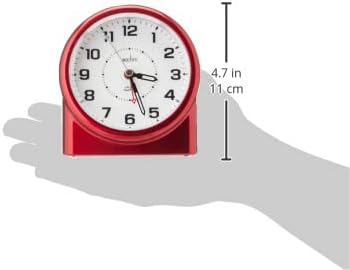
Figure 4: Image illustrating the dimensions of the Acctim Alarm Clock, showing its height and width measurements.
Warranty and Support
Acctim clocks are backed by a 1-year guarantee. For any issues, questions, or support needs, please refer to the manufacturer's official website or contact their customer service directly. Keep your purchase receipt as proof of purchase for warranty claims.


