
Introduction
This manual provides essential information for the installation, operation, and maintenance of the Intermatic WG1574-10D Timer Clock Motor. This motor is designed as a replacement component for various Intermatic time clock series, including T100, T170, T100R201, T1400, T100-20, and WH Series. The WG1574-10D is a 208-277V, 50Hz motor featuring high torque for reliable performance within compatible timer systems.
Please read these instructions carefully before proceeding with installation or maintenance to ensure proper function and safety.
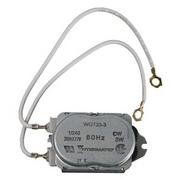
Figure 1: Intermatic WG1574-10D Timer Clock Motor. This image displays the compact motor unit with two gray wires extending from it, each terminating in a ring terminal connector. The motor casing is metallic gray, with specifications like "WG1574-10D", "208-277V", and "50Hz" printed on its surface. The fixed tab connectors are visible, designed for easy attachment to timer connection poles.
Setup and Installation
The Intermatic WG1574-10D motor is designed for straightforward replacement within compatible Intermatic timer clock units. Installation should only be performed by qualified personnel, adhering to all local electrical codes and safety regulations.
Safety Precautions:
- Always disconnect power to the timer unit at the circuit breaker before attempting any installation or maintenance.
- Verify that the replacement motor's voltage and frequency (208-277V, 50Hz) match the requirements of your timer unit.
- Wear appropriate personal protective equipment (PPE), such as safety glasses and insulated gloves.
Installation Steps:
- Power Disconnection: Ensure the main power supply to the timer is completely off.
- Access Timer: Open the timer enclosure to access the existing motor. Refer to your specific timer model's manual for enclosure access instructions.
- Disconnect Old Motor: Carefully disconnect the wires from the old motor and unmount it from its position. Note the orientation and wiring connections for the new motor.
- Install New Motor: Position the Intermatic WG1574-10D motor in the designated slot. The fixed tab connectors are designed to easily slip over the timer connection poles.
- Connect Wiring: Reconnect the motor wires to the timer connection poles. Ensure connections are secure and match the original wiring configuration.
- Secure Motor: Secure the motor in place using any original mounting hardware.
- Close Enclosure: Close and secure the timer enclosure.
- Restore Power: Restore power to the timer unit at the circuit breaker.
- Test Functionality: Verify that the timer operates correctly after motor replacement.
Operating Principles
The Intermatic WG1574-10D is a synchronous motor designed to drive the timing mechanism within compatible Intermatic time clocks. It does not have direct user-operable controls. Its function is to provide the rotational force necessary for the timer's gears to advance, thereby maintaining accurate timekeeping and enabling the timer to execute programmed switching operations.
Once installed and powered, the motor continuously rotates, ensuring the timer's internal clock functions as intended. Any programming or setting adjustments for the timer itself are performed via the timer's specific controls, not through the motor.
Maintenance
The Intermatic WG1574-10D Timer Clock Motor is a sealed unit and requires minimal maintenance. Regular inspection of the timer unit it powers is recommended.
Recommended Maintenance Checks:
- Visual Inspection: Periodically inspect the motor and its wiring connections for any signs of wear, damage, or corrosion.
- Cleanliness: Ensure the timer enclosure and motor area are free from dust, debris, and moisture, which can affect performance and lifespan.
- Secure Connections: Verify that all electrical connections remain tight and secure.
Do not attempt to disassemble the motor unit. If the motor is faulty, it should be replaced with a new Intermatic WG1574-10D unit.
Troubleshooting
If the timer clock is not functioning correctly after motor installation or during normal operation, consider the following troubleshooting steps:
- No Power to Timer:
- Check the circuit breaker for the timer's circuit.
- Verify all power connections to the timer unit.
- Timer Not Advancing:
- Ensure the motor is securely connected to the timer's internal mechanism.
- Inspect the motor wiring for loose or damaged connections.
- If the motor is receiving power but not rotating, it may be faulty and require replacement.
- Incorrect Timekeeping:
- Verify that the motor's frequency (50Hz) matches the power supply frequency.
- Ensure the timer's gears are not obstructed or damaged.
- Unusual Noise from Timer:
- Disconnect power and inspect the motor and gears for any foreign objects or signs of mechanical interference.
- A persistent grinding or buzzing noise from the motor may indicate an internal fault, requiring replacement.
If troubleshooting steps do not resolve the issue, contact a qualified electrician or Intermatic customer support for further assistance.
Specifications
| Feature | Detail |
|---|---|
| Model Number | WG1574-10D |
| Voltage | 208-277V |
| Frequency | 50Hz |
| Product Type | Electronic Component (Timer Clock Motor) |
| Compatibility | Intermatic T100, T170, T100R201, T1400, T100-20, & WH Series Time Clocks |
| Dimensions (Approx.) | 7 x 7 x 7 inches (Product Dimensions from JSON, likely package dimensions) |
| Weight (Approx.) | 3.2 ounces |
| Country of Origin | United States |
Note: Product dimensions listed may refer to packaging. Actual motor dimensions are compact for internal timer installation.
Warranty Information
Specific warranty details for the Intermatic WG1574-10D Timer Clock Motor are not provided in the product data. For warranty information, please refer to the documentation included with your purchase or contact Intermatic directly through their official website or customer service channels.
Support and Contact
For technical assistance, replacement parts, or further inquiries regarding the Intermatic WG1574-10D Timer Clock Motor, please visit the official Intermatic website or contact their customer support department.
Intermatic Official Website: www.intermatic.com
When contacting support, please have your product model number (WG1574-10D) and any relevant purchase information available.


