
Danfoss RET230CO3 (Model 087N7032)
Danfoss Electronic Thermostat 230 Hot/Cold RET 230 CO3 User Manual
Model: RET230CO3 (087N7032)
1. Introduction
This user manual provides comprehensive instructions for the installation, operation, and maintenance of your Danfoss RET electronic thermostat. Designed for 230V fan coil units, this thermostat offers precise temperature control with hot/cold switching capabilities.
Please read this manual carefully before installation and use to ensure safe and efficient operation of the device.
2. Product Overview
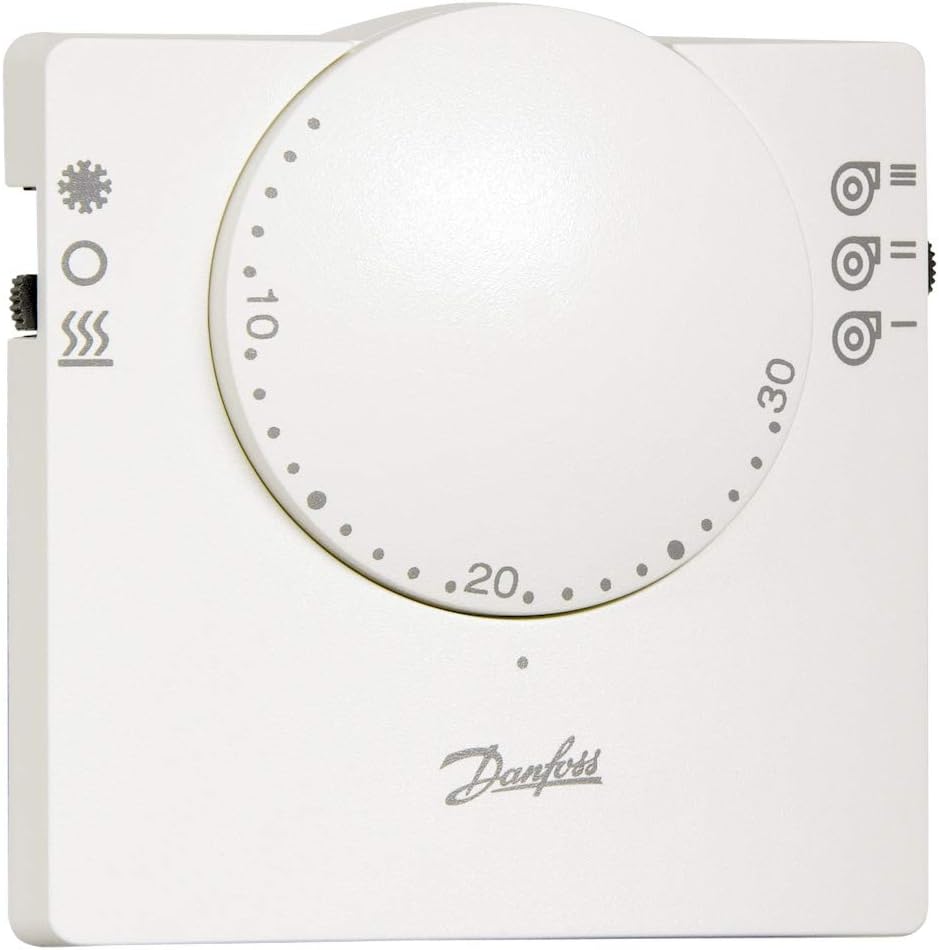
Figure 2.1: Danfoss RET Electronic Thermostat
This image displays the front of the Danfoss RET electronic thermostat. It features a prominent central rotary dial for setting the desired temperature, marked with numerical values (e.g., 10, 20, 30) and small dots indicating intermediate settings. To the left of the dial, there are symbols for heating (snowflake/star), off (circle), and fan speed (three wavy lines). To the right, there are symbols for fan speed control (three fan icons with horizontal lines). The Danfoss logo is visible at the bottom center. The thermostat is white with grey markings.
Key Features:
- Designed for 3-speed fan coil units.
- Powered output for 230V speed control and electrothermal head.
- Integrated Hot / Off / Cold switch for mode selection.
- Model Type: RET230CO3.
- Power Supply: 230V AC Mains.
3. Technical Specifications
| Feature | Specification |
|---|---|
| Brand | Danfoss |
| Model Number | 087N7032 (RET230CO3) |
| Voltage | 230 Volts |
| Backlight | Yes |
| ASIN | B007C1SAA2 |
| International Article Code (EAN) | 05013567873272 |
4. Installation and Setup
Important: Installation must be carried out by a qualified electrician and in accordance with all local electrical codes and regulations. Ensure the main power supply is disconnected before commencing any installation work.
4.1 Mounting Location
- Mount the thermostat on an interior wall, approximately 1.5 meters (5 feet) above the floor.
- Avoid locations near heat sources (e.g., direct sunlight, lamps, appliances) or drafts (e.g., windows, doors, air vents) that could affect temperature readings.
- Ensure adequate air circulation around the thermostat.
4.2 Wiring Instructions
Refer to the wiring diagram provided with the product packaging for specific connections. General wiring steps include:
- Disconnect power to the fan coil unit circuit at the main breaker.
- Remove the front cover of the thermostat.
- Connect the 230V AC mains supply to the designated terminals (L and N).
- Connect the fan speed control wires (typically Low, Medium, High) and the electrothermal head control wire to their respective terminals as per the diagram.
- Secure all wiring connections firmly.
- Reattach the front cover.
- Restore power to the circuit.
5. Operation
5.1 Mode Selection (Hot / Off / Cold Switch)
The thermostat features a three-position switch on the side or front for selecting the operating mode:
- Hot (Heating Mode): Select this position for heating. The thermostat will activate the heating function when the room temperature falls below the setpoint.
- Off: Select this position to turn off both heating and cooling functions. The fan may still operate depending on the fan speed setting.
- Cold (Cooling Mode): Select this position for cooling. The thermostat will activate the cooling function when the room temperature rises above the setpoint.
5.2 Temperature Adjustment
Adjust the desired room temperature using the large central rotary dial. Rotate the dial clockwise to increase the setpoint temperature and counter-clockwise to decrease it. The numbers on the dial indicate temperature in degrees Celsius.
5.3 Fan Speed Control
The thermostat allows control of the fan coil unit's fan speed. Use the fan speed selector (usually a switch or buttons) to choose between:
- Low Speed
- Medium Speed
- High Speed
- Auto (if available): The thermostat automatically adjusts fan speed based on the temperature difference.
6. Maintenance
The Danfoss RET thermostat requires minimal maintenance. Regular cleaning can help ensure optimal performance.
6.1 Cleaning
- Before cleaning, ensure the power supply to the thermostat is disconnected.
- Wipe the exterior of the thermostat with a soft, damp cloth.
- Do not use abrasive cleaners, solvents, or chemical sprays, as these can damage the surface or internal components.
- Ensure no moisture enters the thermostat's internal components.
6.2 Sensor Care
Keep the thermostat's vents and openings clear of dust and debris to ensure accurate temperature sensing. Do not obstruct the airflow around the unit.
7. Troubleshooting
If you experience issues with your Danfoss RET thermostat, refer to the following common problems and solutions:
| Problem | Possible Cause | Solution |
|---|---|---|
| Thermostat not powering on. | No power supply; loose wiring; tripped circuit breaker. | Check circuit breaker. Ensure wiring is secure. Consult a qualified electrician if issues persist. |
| Heating/Cooling not activating. | Incorrect mode selected (Hot/Off/Cold); temperature setpoint not met; fan coil unit issue. | Verify mode switch position. Adjust setpoint. Check fan coil unit's power and operation. |
| Inaccurate temperature reading. | Thermostat located near heat source/draft; obstructed sensor. | Relocate thermostat if possible. Clear any obstructions around the unit. |
| Fan not operating at selected speed. | Incorrect fan speed setting; fan coil unit fan motor issue. | Ensure correct fan speed is selected. Consult fan coil unit manual or technician. |
If the problem persists after attempting these solutions, please contact Danfoss customer support or a qualified service technician.
8. Warranty and Support
Specific warranty information for the Danfoss RET230CO3 thermostat is typically provided with the product packaging or can be found on the official Danfoss website. Please retain your proof of purchase for warranty claims.
For technical support, spare parts, or service inquiries, please visit the official Danfoss website or contact their customer service department. Contact details can usually be found on the product packaging or the Danfoss website.
Related documentsRET230CO3 (Model 087N7032)


Ask a question about this manual
Ask about setup, troubleshooting, compatibility, parts, safety, or missing instructions. Manuals+ will review the question and use this page’s manual context to help answer it.