1. Introduction
This manual provides detailed instructions for the safe and effective use of your Samsung DV300F Dual View Smart Camera. Please read this manual thoroughly before operating the device to ensure optimal performance and to prevent damage. Keep this manual for future reference.
The Samsung DV300F is a compact digital camera featuring a unique dual-view LCD for easy self-portraits and group shots, along with built-in Wi-Fi connectivity for instant sharing and backup.
2. Package Contents
Verify that all items are present in your product package:
- Samsung DV300F Camera
- Lithium-ion Battery
- USB Cable
- AC Adapter
- Wrist Strap
- Quick Start Guide (this manual serves as the full guide)
3. Camera Overview
Front View

Figure 3.1: Front view of the Samsung DV300F camera, highlighting the main lens, front display, and flash unit.
Rear View

Figure 3.2: Rear view of the Samsung DV300F camera, displaying the primary LCD screen and navigation controls.
Top View
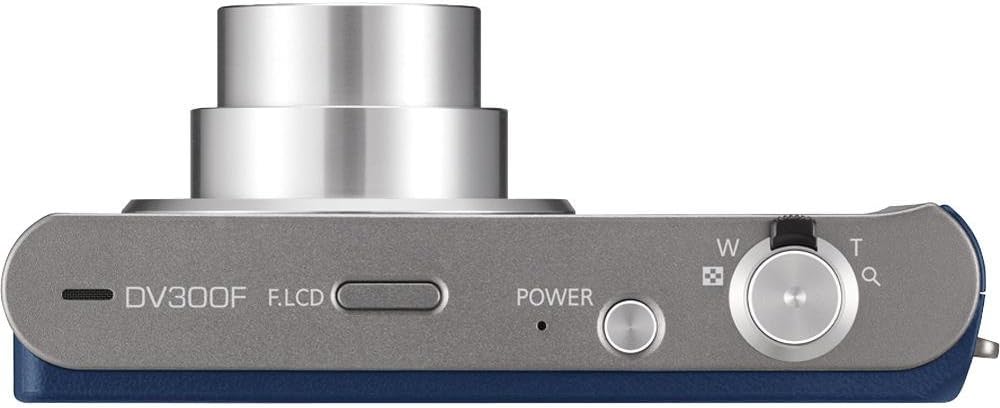
Figure 3.3: Top view of the Samsung DV300F camera, illustrating the power button, shutter release, and zoom control.
4. Setup
4.1. Installing the Battery
- Open the battery compartment cover located on the bottom of the camera.
- Insert the supplied lithium-ion battery, ensuring the contacts align correctly.
- Close the battery compartment cover until it clicks securely.
4.2. Charging the Battery
- Connect the USB cable to the camera's USB port.
- Connect the other end of the USB cable to the AC adapter, then plug the adapter into a wall outlet.
- The charging indicator light will illuminate. Charging is complete when the light turns off or changes color (refer to camera display for exact status).
4.3. Inserting a Memory Card
The DV300F supports microSD, SDHC, and SDXC memory cards.
- Open the memory card slot cover, usually located near the battery compartment.
- Insert the memory card with the gold contacts facing the correct direction (refer to the diagram inside the slot). Push gently until it clicks into place.
- Close the memory card slot cover.
4.4. Initial Power On
Press the POWER button on the top of the camera. The main LCD screen will turn on. Follow any on-screen prompts for initial setup, such as setting the date and time.
5. Operating the Camera
5.1. Basic Photography
- Turn on the camera by pressing the POWER button.
- Frame your shot using the main LCD screen.
- Use the zoom lever (W/T) to adjust the optical zoom (5x optical zoom).
- Press the shutter button halfway down to focus. The focus frame will turn green when focus is achieved.
- Press the shutter button fully to capture the image.
5.2. Using the Dual View LCD
The DV300F features a 1.5-inch front LCD screen, ideal for self-portraits and group photos where you want to see yourself in the frame.
- To activate the front LCD, press the F.LCD button on the top of the camera.
- The front screen will display a live preview, allowing subjects to compose themselves.
- Press the F.LCD button again to turn it off.
5.3. Recording Videos
- Switch the camera to video recording mode (usually via a mode dial or menu option).
- Press the shutter button to start recording.
- Press the shutter button again to stop recording.
- The camera records video in 720p resolution (MP4 format).
5.4. Wi-Fi Connectivity
The DV300F's built-in Wi-Fi allows for easy sharing and backup of your photos and videos.
- Press the Wi-Fi button or access the Wi-Fi menu option.
- Select your desired Wi-Fi function (e.g., MobileLink, Social Sharing, Email, Cloud Service, Auto Backup).
- Follow the on-screen instructions to connect to a Wi-Fi network and perform the selected action.
- Supported services include direct upload to social networks, email, and cloud services like Microsoft Skydive.
5.5. Playback Mode
- Press the Playback button (often indicated by a play icon) to view your captured images and videos.
- Use the directional buttons to navigate through your media.
- Press the OK button to view options for the selected media, such as delete, protect, or slideshow.
6. Maintenance
6.1. Cleaning the Camera
- Camera Body: Wipe with a soft, dry cloth. For stubborn dirt, use a slightly damp cloth and then dry thoroughly. Avoid harsh chemicals.
- Lens: Use a lens brush to remove dust, then gently wipe with a lens cleaning cloth. Do not touch the lens with your fingers.
- LCD Screens: Use a soft, lint-free cloth. Avoid pressing hard on the screens.
6.2. Battery Care
- Store the battery in a cool, dry place when not in use.
- Avoid fully discharging the battery frequently to prolong its lifespan.
- If storing for an extended period, charge the battery to about 50% capacity.
6.3. Storage
When not in use, store the camera in a protective case in a dry, dust-free environment, away from extreme temperatures and direct sunlight.
7. Troubleshooting
| Problem | Possible Cause / Solution |
|---|---|
| Camera does not turn on. | Battery may be depleted. Charge the battery. Ensure battery is inserted correctly. |
| Images are blurry. | Lens may be dirty. Clean the lens. Ensure proper focus by pressing the shutter button halfway. Check lighting conditions. |
| Wi-Fi connection fails. | Ensure you are within range of a Wi-Fi network. Check network password. Restart the camera and try again. |
| Memory card error. | Ensure the memory card is inserted correctly. The card may be full or corrupted; try formatting it (this will erase all data). Use a compatible card (microSD, SDHC, SDXC). |
8. Specifications
| Feature | Detail |
|---|---|
| Model Name | DV300F |
| Effective Still Resolution | 16 MP |
| Photo Sensor Technology | CCD |
| Optical Zoom | 5x |
| Minimum Focal Length | 4.5 Millimeters |
| Maximum Focal Length | 25 Millimeters |
| Image Stabilization | Electronic |
| Screen Size | 3 Inches (Main LCD) |
| Front LCD Screen | 1.5 Inches |
| Display Type | LCD |
| Connectivity Technology | Wi-Fi |
| Supported File Format | JPEG, RAW |
| Video Resolution | 720p |
| Video Capture Format | MP4 |
| Flash Memory Type | microSD, SDHC, SDXC |
| Power Source | Lithium-ion Battery |
| Item Weight | 0.68 Pounds (approx. 308 grams) |
| Model Number | EC-DV300FBPUUS |
| UPC | 044701016830 |
9. Warranty and Support
For warranty information and technical support, please refer to the warranty card included with your product or visit the official Samsung support website. You can also contact Samsung customer service directly for assistance with your DV300F camera.
Online Support: www.samsung.com/us/support/


