
1. Introduction
Thank you for purchasing the GPX Portable Top-Loading CD Boombox, Model BC112B. This device offers versatile audio playback options including a top-loading CD player, AM/FM radio, and a 3.5mm auxiliary line-in for connecting external audio devices. Designed for portability and ease of use, this boombox can be powered by AC current or batteries, making it suitable for various environments. This manual provides comprehensive instructions to help you set up, operate, and maintain your new audio system.
2. Package Contents
Please ensure all items listed below are included in your package:
- GPX Portable Top-Loading CD Boombox (Model BC112B)
- AC Power Cable
- User's Guide
- Warranty Card
Note: 6 "C" batteries are required for portable operation and are sold separately.
3. Product Overview
Familiarize yourself with the components and controls of your boombox.

Figure 3.1: Front view of the GPX Portable CD Boombox, showing the top-loading CD compartment, control buttons, and dual speakers.

Figure 3.2: Labeled diagram of the GPX CD Boombox, highlighting the foldable handle, CD player, AM/FM radio, and program/shuffle/play controls.
Controls and Features:
- Top-Loading CD Player: Supports CD and CD-R/RW discs with 20-track programmable memory.
- AM/FM Radio: Direct tune radio with telescopic FM antenna and built-in AM antenna.
- 3.5mm Audio Line Input: Connect external MP3 players or other audio devices.
- Built-in Speakers: Integrated stereo speakers for audio output.
- 2-Digit Red LED Display: Shows track number or radio frequency.
- Foldable Handle: For easy portability.
- Power Options: Operates with included AC power cable or 6 "C" batteries (sold separately).
4. Setup
4.1 Power Connection
- Ensure the unit is switched OFF.
- Insert the included AC power cable into the AC power input jack on the back of the unit.
- Plug the other end of the AC power cable into a standard wall outlet.
Note: Disconnect the AC power cable when using batteries.
4.2 Battery Installation
For portable use, install 6 "C" size batteries (not included).
- Locate the battery compartment on the bottom of the unit.
- Open the battery compartment cover.
- Insert 6 "C" size batteries, ensuring correct polarity (+/-) as indicated inside the compartment.
- Close the battery compartment cover securely.
Caution: Do not mix old and new batteries. Do not mix alkaline, standard (carbon-zinc), or rechargeable (nickel-cadmium) batteries. Remove batteries if the unit is not used for an extended period.
Video 4.1: This video demonstrates the battery installation process and highlights the portability of the GPX CD Boombox. It also shows the AC power connection and the AM/FM switch on the back of the unit.
5. Operation
5.1 CD Playback
- Slide the function switch (located on the back) to the "CD/LINE IN" position.
- Open the top-loading CD compartment by gently lifting the lid.
- Place a CD or CD-R/RW disc onto the spindle with the label side facing up.
- Close the CD compartment lid securely. The display will show "00" or the number of tracks.
- Press the Play/Pause (►⏸) button to begin playback. The track number will appear on the LED display.
- Use the Skip Forward (►►) or Skip Back (◄◄) buttons to navigate between tracks.
- Press the Stop (■) button to stop playback.
- To program tracks, press the Program (P) button while the CD is stopped. Select tracks using the Skip buttons and press Program again to confirm each track. Press Play to start the programmed sequence.
5.2 AM/FM Radio
- Slide the function switch (located on the back) to the "FM" or "AM" position.
- Extend the telescopic FM antenna for optimal FM reception. For AM reception, the unit has a built-in antenna.
- Rotate the Tuning dial (located on the side) to select your desired radio station.
- Adjust the Volume dial to your preferred listening level.
5.3 Line-In (Auxiliary Input)
Connect an external audio device (e.g., MP3 player, smartphone) to play audio through the boombox speakers.
- Slide the function switch (located on the back) to the "CD/LINE IN" position.
- Connect a 3.5mm audio cable (not included) from the headphone jack or line-out of your external device to the LINE IN jack on the back of the boombox.
- Start playback on your external audio device.
- Adjust the volume using the Volume dial on the boombox and/or the volume controls on your external device.
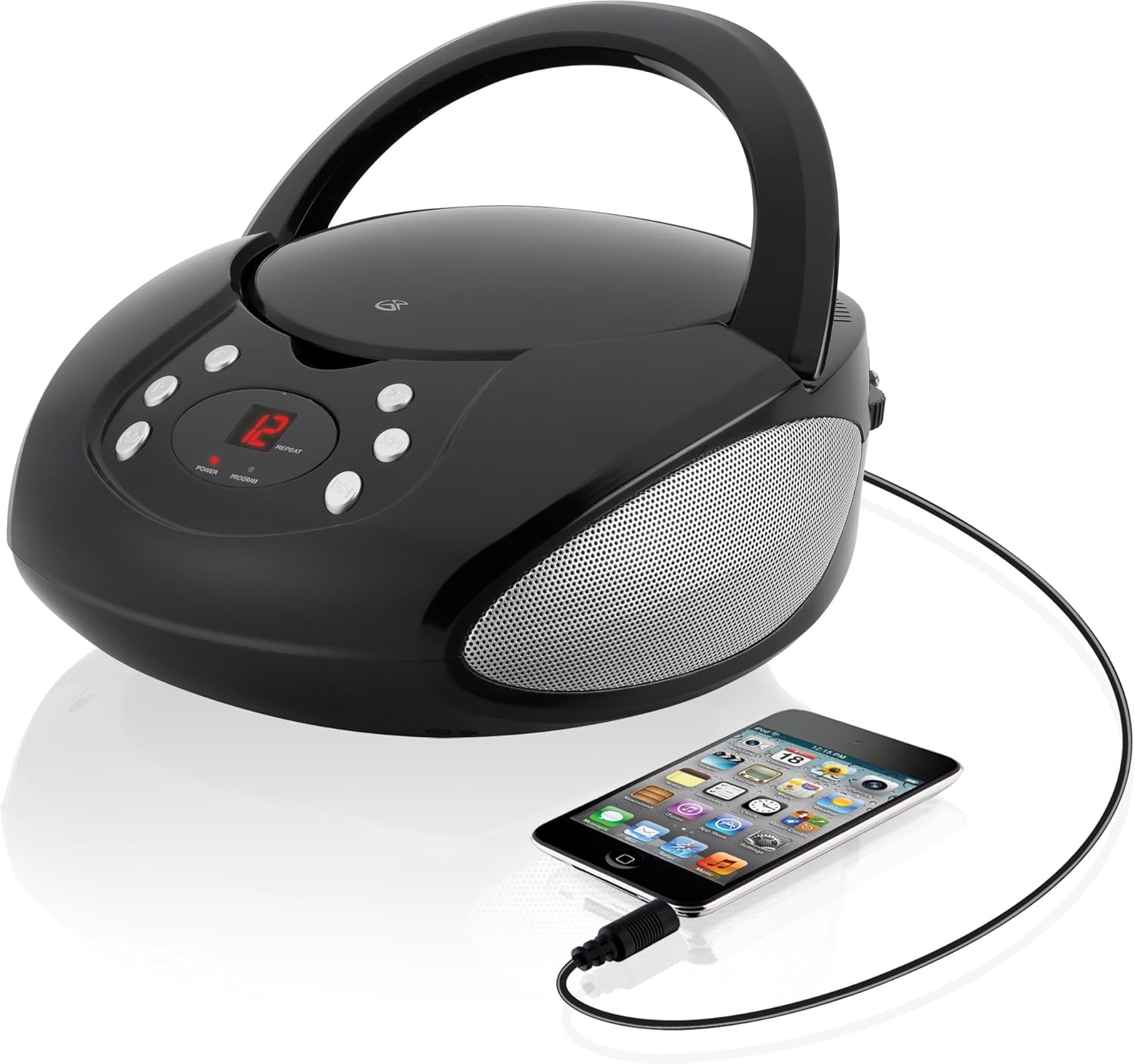
Figure 5.1: The GPX CD Boombox with a smartphone connected via the 3.5mm Line-In port, demonstrating auxiliary audio playback.
6. Maintenance
- Cleaning: Use a soft, dry cloth to clean the exterior of the unit. Do not use abrasive cleaners or solvents.
- CD Player Care: Keep the CD compartment clean and free of dust. Avoid touching the lens inside the CD player.
- Storage: When not in use for extended periods, store the unit in a cool, dry place. Remove batteries if storing for a long time to prevent leakage.
- Antenna Care: Handle the telescopic FM antenna gently to prevent damage.
7. Troubleshooting
| Problem | Possible Cause | Solution |
|---|---|---|
| No power | AC cable not connected; Batteries depleted or incorrectly installed. | Ensure AC cable is securely plugged in. If using batteries, check battery polarity and replace if necessary. |
| CD not playing / "ER" displayed | CD inserted incorrectly; Disc is dirty or scratched; Function switch not in CD/LINE IN mode. | Re-insert CD with label side up. Clean the disc. Set function switch to CD/LINE IN. |
| Poor radio reception | FM antenna not extended; Unit too close to interference sources. | Fully extend the FM telescopic antenna. Reposition the unit away from other electronic devices. |
| No sound from Line-In | Audio cable not connected; Volume too low on boombox or external device. | Ensure 3.5mm audio cable is securely connected. Increase volume on both the boombox and the external device. |
8. Specifications
- Model: BC112B
- Power Source: AC 120V ~ 60Hz or 6 x "C" Batteries (DC 9V)
- CD Compatibility: CD, CD-R/RW
- Radio Frequencies: AM, FM
- Inputs: 3.5mm Audio Line In
- Dimensions (L x W x H): 9.19 x 5.17 x 10.42 inches
- Weight: 2.51 pounds
- Manufacturer: DPI
9. Warranty and Support
This product comes with a limited warranty. Please refer to the included warranty card for detailed terms and conditions, including warranty period and coverage. For technical support or service inquiries, please contact GPX customer service. Contact information can typically be found on the warranty card or the official GPX website.
Proposition 65 Warning: This product may contain chemicals known to the State of California to cause cancer and birth defects or other reproductive harm.


