
Product Overview
The Acctim 14282 Analog Alarm Clock is designed for bedside use, featuring a classic analog display and several convenient functions. It incorporates Smartlite technology for automatic dial illumination in low light conditions, a silent non-ticking sweep seconds hand, and an Everglow adjustable brightness feature. The alarm is a crescendo type, gradually increasing in volume, and includes a snooze function and backlight.

This image displays the Acctim 14282 Analog Alarm Clock in white, showcasing its classic analog dial with black numbers and hands, and a red second hand. The clock features a silent sweep second hand.
Setup Guide
Unpacking
- Carefully remove the alarm clock from its packaging.
- Inspect the clock for any signs of damage.
- Ensure all components, including the clock and instructions, are present.
Battery Installation
The Acctim 14282 requires 3 x AA batteries (not included) for operation.
- Locate the battery compartment cover on the back of the clock.
- Remove the battery compartment cover by sliding or lifting it off.
- Insert 3 AA batteries, ensuring the correct polarity (+ and -) as indicated inside the compartment.
- Replace the battery compartment cover securely.
Operating Instructions
Setting the Time
- Locate the time setting knob on the back of the clock.
- Rotate the knob clockwise or counter-clockwise to move the hour and minute hands to the desired time.
- For accurate time setting, it is recommended to set the time slightly ahead and then turn back to the exact time.
Setting the Alarm
- Locate the alarm setting knob on the back of the clock.
- Rotate this knob to align the alarm hand with the desired alarm time on the dial.
- Ensure the alarm ON/OFF switch (usually a small switch on the side or back) is in the 'ON' position to activate the alarm.
Snooze Function and Backlight
- When the alarm sounds, press the large button located on the top of the clock to activate the snooze function. The alarm will temporarily stop and sound again after approximately 5 minutes.
- Pressing the top button also activates the backlight for temporary illumination of the dial in dark conditions.
Smartlite Technology and Adjustable Brightness
The clock features Smartlite technology, which automatically illuminates the dial for easy night time viewing when the ambient light is low.
- The Everglow adjustable brightness feature allows you to control the intensity of this automatic illumination. Refer to the small dial or switch on the back or side of the clock to adjust the brightness to your preference.
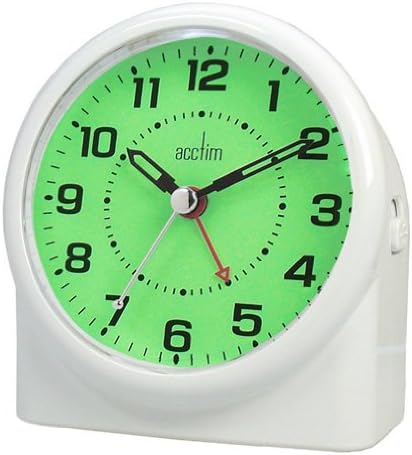
This image shows the Acctim 14282 Analog Alarm Clock with its Smartlite technology activated, illuminating the dial with a soft green glow for easy night time viewing. The adjustable brightness feature allows control over the illumination intensity.
Care and Maintenance
- Cleaning: Wipe the clock with a soft, dry cloth. Do not use abrasive cleaners or solvents, as they may damage the finish.
- Battery Replacement: Replace batteries when the clock's performance degrades, such as dimming illumination or inaccurate timekeeping. Always replace all batteries at the same time with new ones of the same type.
- Storage: If storing the clock for an extended period, remove the batteries to prevent leakage and damage. Store in a cool, dry place.
- Environment: Avoid exposing the clock to extreme temperatures, direct sunlight, or high humidity.
Troubleshooting
| Problem | Possible Cause | Solution |
|---|---|---|
| Clock not working or time is inaccurate. | Low or dead batteries; incorrect battery installation. | Replace all 3 AA batteries with new ones, ensuring correct polarity. |
| Alarm not sounding or unreliable. | Alarm switch is OFF; alarm time not set correctly; low batteries. | Ensure alarm switch is ON. Re-set alarm time. Replace batteries. |
| Dial illumination (Smartlite) is dim or not working. | Low batteries; brightness setting too low; insufficient darkness for automatic activation. | Replace batteries. Adjust Everglow brightness setting. Ensure clock is in a sufficiently dark environment for Smartlite to activate. |
| Snooze/Backlight button not responding. | Low batteries. | Replace batteries. |
Product Specifications
- Brand: Acctim
- Model Number: 14282
- Color: White
- Display Type: Analog
- Dimensions: 120 x 113 x 75 mm (approximately 4.72"H x 4.41"W x 2.95"D)
- Power Source: 3 x AA batteries (not included)
- Material: Plastic
- Item Weight: Approximately 0.21 Kilograms (7.4 ounces)
- Special Features: Smartlite Technology (automatic dial illumination), Silent Non-Ticking Sweep Seconds Hand, Everglow Adjustable Brightness, Crescendo Alarm, Snooze Function, Backlight.
- Operation Mode: Mechanical
Warranty and Support
This product is covered by a standard manufacturer's warranty against defects in materials and workmanship. Please retain your proof of purchase for warranty claims.
For technical support, troubleshooting assistance, or warranty inquiries, please contact Acctim customer service. Contact information can typically be found on the product packaging or the official Acctim website.
Note: Unauthorized repairs or modifications may void the product warranty.