
1. Introduction
The Pentax Optio WG-2 is a rugged digital camera designed for durability and performance in challenging environments. It features a 16-megapixel CMOS sensor, 5x optical zoom, and full HD 1080p video recording. This camera is built to be waterproof down to 40 feet (12 meters), shockproof from drops up to 5 feet (1.5 meters), crushproof up to 220 pounds (100 kgf), coldproof down to 14°F (-10°C), and dustproof.
This manual provides essential information for setting up, operating, maintaining, and troubleshooting your Pentax Optio WG-2 camera.

Figure 1.1: Front view of the Pentax Optio WG-2 Digital Camera.
2. Setup
2.1. Charging the Battery
Before initial use, fully charge the camera battery using the provided external charger. Connect the charger to a power outlet and insert the battery. The charging indicator will show the charging status.
2.2. Inserting the Battery and Memory Card
- Open the battery/memory card compartment cover located on the side of the camera. Ensure the cover is dry before opening.
- Insert the charged battery with the correct orientation.
- Insert an SD, SDHC, or SDXC memory card into the card slot until it clicks into place.
- Close the compartment cover securely until it locks. Ensure the seal is free of debris to maintain waterproof integrity.
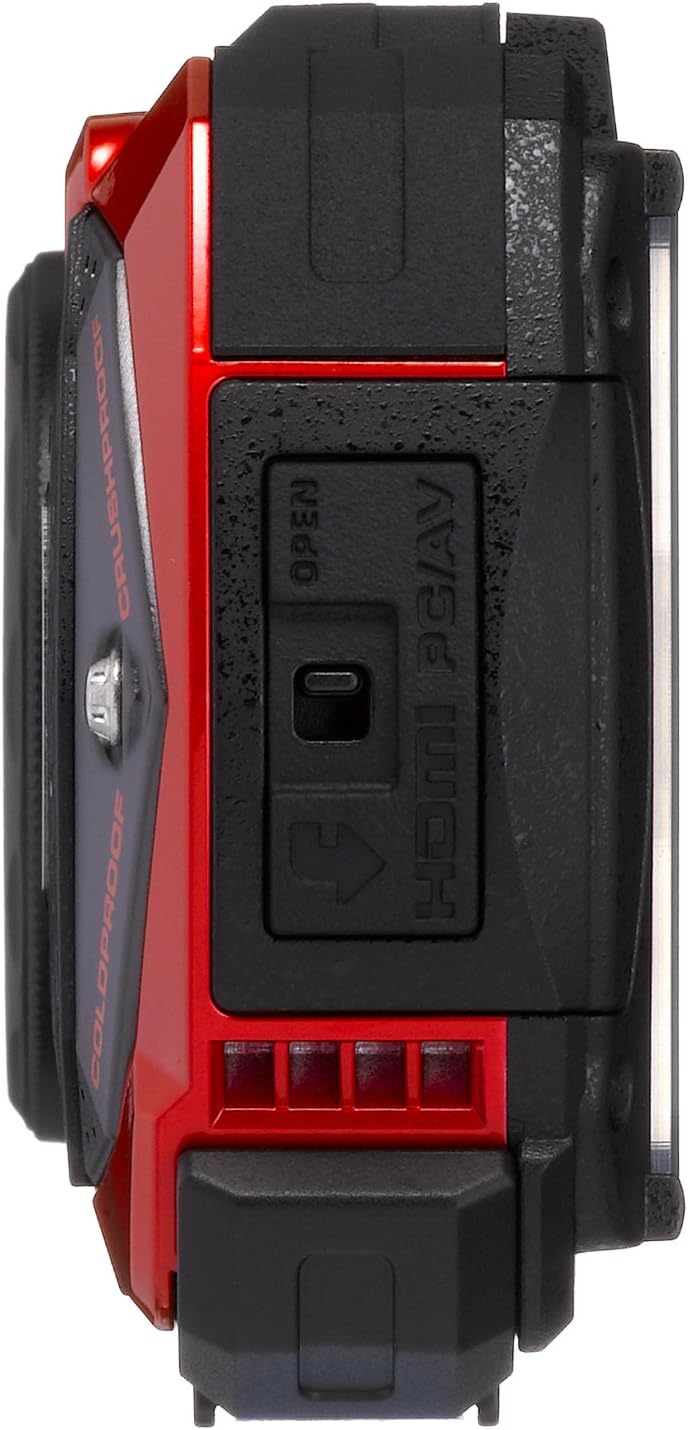
Figure 2.1: Side view with port cover open.
2.3. Initial Settings
Upon first power-on, the camera will prompt you to set the date, time, and language. Follow the on-screen instructions to configure these basic settings.
3. Operating the Camera
3.1. Power On/Off
Press the ON/OFF button located on the top of the camera to power it on or off.

Figure 3.1: Top view with Power and Shutter buttons.
3.2. Taking Photos
- Turn on the camera.
- Frame your shot using the 3.0-inch LCD display.
- Press the shutter button halfway down to focus.
- Press the shutter button fully to capture the image.
3.3. Zoom Function
Use the zoom buttons (W for wide, T for telephoto) located on the back of the camera to adjust the 5x optical zoom. The camera also features a 7.2x digital zoom.

Figure 3.2: Back view with LCD and control buttons.
3.4. Shooting Modes
Press the MODE button to select various shooting modes, including automatic, program, and specialized modes like Underwater mode. Refer to the on-screen menu for detailed options.
3.5. Video Recording
To record video, switch to video mode (if available via the MODE button or a dedicated video button). Press the shutter button to start and stop recording. The camera supports Full HD 1080p video at 30 frames per second.
3.6. Macro Photography with LED Lights
For close-up shots, the camera features a ring of six LED lights around the lens. Activate these lights in macro mode to provide even illumination for subjects as close as 1 cm.
4. Maintenance
4.1. Cleaning the Camera
- Camera Body: Wipe with a soft, damp cloth. For stubborn dirt, use a mild soap solution and rinse thoroughly.
- Lens and LCD Screen: Use a soft, lint-free cloth specifically designed for optical surfaces. Avoid harsh chemicals.
- Waterproof Seals: Regularly inspect the rubber seals on the battery/card compartment and port covers for dirt, sand, or damage. Clean with a soft brush and ensure they are free of debris before closing.
4.2. After Underwater Use
After using the camera in water, especially saltwater, rinse it thoroughly with fresh water. Allow the camera to air dry completely before opening any compartments. Do not open compartments while the camera is wet to prevent water ingress.

Figure 4.1: Pentax Optio WG-2 after water exposure.
4.3. Storage
Store the camera in a cool, dry place away from direct sunlight and extreme temperatures. Remove the battery if the camera will not be used for an extended period.
5. Troubleshooting
- Camera does not power on: Ensure the battery is fully charged and correctly inserted.
- Images are blurry: Check focus settings. Ensure the lens is clean. Use image stabilization if available.
- Water inside the camera: Immediately power off the camera, remove the battery and memory card. Contact customer support. This indicates a failure of the waterproof seals.
- Poor performance in low light: The camera may struggle in very low light conditions. Use the built-in flash or adjust ISO settings if possible.
- Memory card error: Ensure the memory card is correctly inserted and not damaged. Try formatting the card (this will erase all data).
- LCD screen not displaying: If the screen is blank or malfunctioning, try restarting the camera. If the issue persists, contact customer support.
6. Specifications
| Feature | Specification |
|---|---|
| Model Name | Pentax Optio WG-2 |
| Photo Sensor Resolution | 16 MP |
| Optical Zoom | 5x |
| Digital Zoom | 7.2x |
| Maximum Focal Length | 140 Millimeters |
| Minimum Focal Length | 28 Millimeters |
| Image Stabilization | Optical |
| Video Resolution | FHD 1080p |
| Screen Size | 3 Inches |
| Waterproof Rating | Down to 40 feet (12 meters) |
| Shockproof Rating | Up to 5 feet (1.5 meters) |
| Crushproof Rating | Up to 220 pounds (100 kgf) |
| Coldproof Rating | Down to 14°F (-10°C) |
| Dustproof | Yes |
| Flash Memory Type | SD, SDHC, SDXC |
| Connectivity Technology | HDMI, USB, EyeFi |
| ISO Range | 100-6400 |
| Item Weight | 0.44 Pounds |
7. Warranty and Support
For warranty information, please refer to the warranty card included with your product or visit the official Pentax website. For technical support, service, or additional inquiries, please contact Pentax customer service through their official channels.
Keep your proof of purchase for warranty claims.


