
1. Introduction
This manual provides essential information for the safe and effective use of your EMPIRE Cordless Phone Battery. This battery is designed as a high-capacity replacement for Sony BP-T40 batteries, compatible with Sony SPP-860F Cordless Phones and many other models.
Please read this manual thoroughly before using the battery and keep it for future reference.
2. Safety Information and Precautions
WARNING: Failure to follow these safety instructions could result in fire, electric shock, injury, or damage to the battery or device.
- DO NOT SHORT CIRCUIT: Avoid direct contact between the positive (+) and negative (-) terminals. Short-circuiting can cause the battery to overheat, leading to fire or explosion.
- USE SPECIFIED CHARGER ONLY: Only use a charger specifically designed for Ni-MH batteries with the correct voltage and current specifications. Using an incompatible charger can damage the battery or cause it to overheat.
- DO NOT DISPOSE IN FIRE: Batteries may explode or leak if disposed of in fire.
- Keep the battery away from water, moisture, and high temperatures.
- Do not disassemble, puncture, or modify the battery.
- Keep out of reach of children.
- If the battery leaks, avoid contact with the fluid. If contact occurs, wash thoroughly with water and seek medical attention.
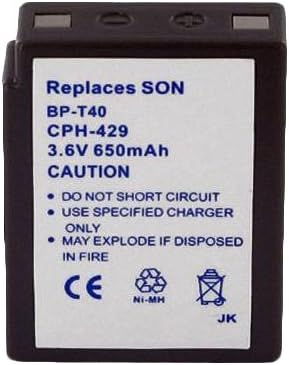
Image 1: Front view of the EMPIRE Cordless Phone Battery. The label clearly states "Replaces SON BP-T40 CPH-429 3.6V 650mAh" and includes caution warnings: "DO NOT SHORT CIRCUIT", "USE SPECIFIED CHARGER ONLY", and "MAY EXPLODE IF DISPOSED IN FIRE". It also shows CE, Ni-MH, and recycling symbols.
3. Setup and Installation
Follow these steps to properly install the EMPIRE Cordless Phone Battery into your compatible device:
- Power Off Device: Ensure your cordless phone or compatible device is powered off and unplugged from its power source before attempting battery installation.
- Locate Battery Compartment: Identify the battery compartment on your cordless phone. This is typically on the back or bottom of the handset.
- Remove Old Battery (if applicable): If replacing an old battery, carefully remove it. Note the orientation of the old battery's connector.
- Connect New Battery: Align the connector of the EMPIRE battery with the corresponding port inside the battery compartment. Gently push the connector firmly into place until it clicks. Ensure the polarity is correct (positive to positive, negative to negative).
- Insert Battery: Place the battery into the compartment, ensuring it fits snugly. Do not force the battery if it does not fit.
- Close Compartment: Replace the battery compartment cover securely.
- Initial Charge: Place the handset on its charging base for an initial charge. For optimal performance, allow the battery to charge for at least 12-16 hours before its first use, even if the phone indicates a full charge sooner.
4. Operating Instructions
Once installed and fully charged, your EMPIRE Cordless Phone Battery operates like the original battery. Here are some general operating guidelines:
- Regular Charging: For best battery life, return the handset to its charging base when not in use.
- Deep Discharge: Occasionally, it is beneficial to allow the battery to fully discharge before recharging. This can help maintain battery capacity over time.
- Temperature: Operate the phone and battery within normal room temperatures. Extreme temperatures can affect battery performance and lifespan.
5. Maintenance and Care
Proper maintenance can extend the life of your EMPIRE Cordless Phone Battery:
- Cleaning: Keep the battery terminals clean. If they appear dirty, gently wipe them with a dry, clean cloth.
- Storage: If storing the battery for an extended period, store it in a cool, dry place, ideally with a partial charge (around 50%). Avoid storing fully charged or fully discharged.
- Avoid Overcharging/Over-discharging: While Ni-MH batteries are more tolerant than some other chemistries, consistent overcharging or deep over-discharging can reduce lifespan. Modern cordless phone chargers typically manage this automatically.
6. Troubleshooting
If you experience issues with your EMPIRE Cordless Phone Battery, consider the following:
- Battery Not Charging:
- Ensure the handset is correctly seated on the charging base.
- Check that the charging base is plugged into a working power outlet.
- Clean the charging contacts on both the handset and the base.
- Verify the battery is properly connected inside the handset.
- Short Battery Life:
- Ensure the battery received an initial full charge (12-16 hours).
- The battery may need a few charge/discharge cycles to reach full capacity.
- Check if the phone is being used in an area with poor signal, which can drain the battery faster.
- Consider the age of the battery; all rechargeable batteries have a finite lifespan.
- Phone Not Powering On:
- Confirm the battery is fully charged.
- Re-install the battery to ensure a secure connection.
- Test the phone with another known good battery if available, or test the battery in another compatible device if possible.
If problems persist, refer to your cordless phone's original manual or contact customer support.
7. Specifications
Detailed specifications for the EMPIRE Cordless Phone Battery (Model: 69882-EM-CPH-429):
| Feature | Description |
|---|---|
| Battery Chemistry | Ni-MH (Nickel-Metal Hydride) |
| Voltage | 3.6V |
| Capacity | 650 mAh (Milliampere-hour) |
| Compatible with | Sony BP-T40 Battery |
| Works for | Sony SPP-860F Cordless Phone and many other models |
| Product Dimensions | 1.96 x 1.52 x 0.55 inches |
| Item Weight | 1.5 ounces |
| Manufacturer | Empire |
| Country of Origin | China |
8. Warranty and Support
For information regarding warranty coverage or technical support, please refer to the original purchase documentation or contact the retailer where the battery was purchased. You may also visit the official EMPIRE website for further assistance.
Manufacturer: Empire