1. Product Overview
The La Crosse Technology WS-9257U-IT is a wireless weather station designed to monitor indoor and outdoor environmental conditions. It provides real-time data for temperature and humidity, along with weather forecasting, moon phase display, and sunrise/sunset calculations based on your selected city.
Key Features
- Weather forecasting function with 3 distinct weather icons and a weather tendency indicator.
- Calculates sunrise and sunset times based on a user-selected city name.
- Displays 8 moon phases.
- Features a 12-hour historical pressure bar graph.
- Records MIN/MAX values for indoor and outdoor temperature (Fahrenheit) and humidity.
- Outdoor temperature range: -39.8°F.
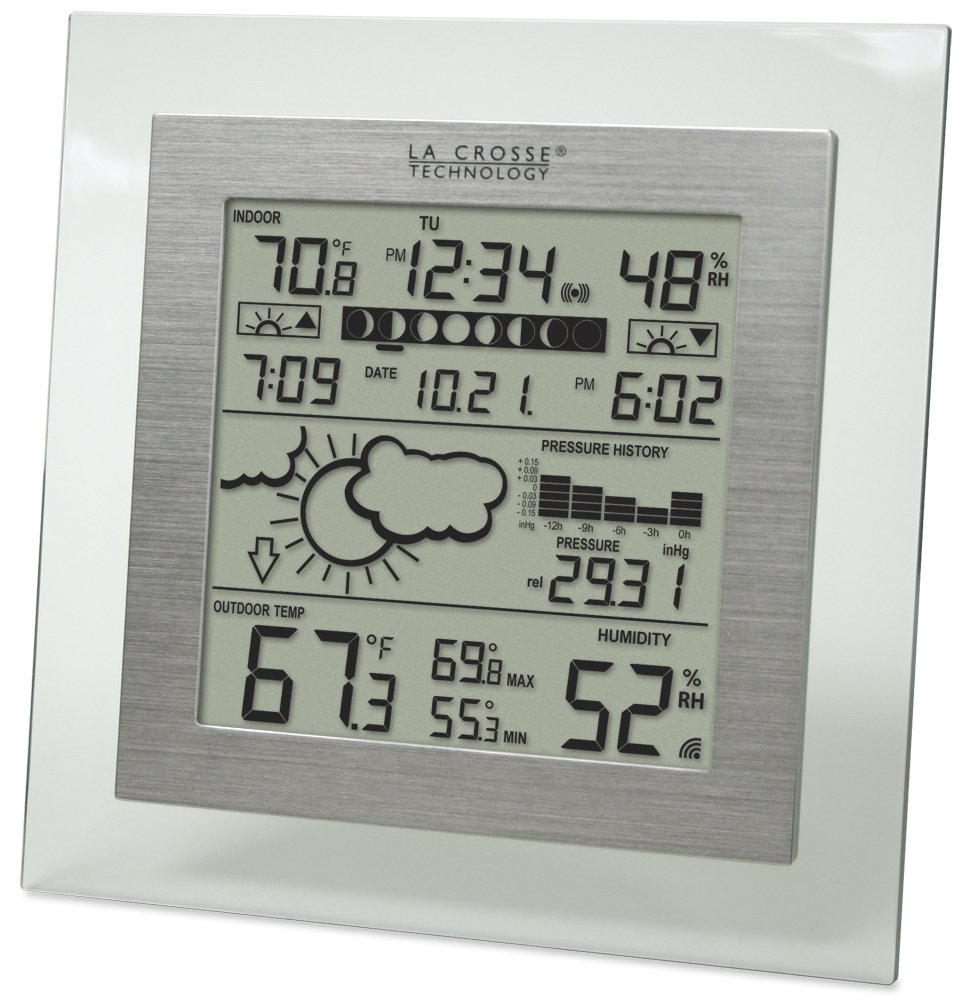
Figure 1: Front view of the WS-9257U-IT main display unit, showing various weather data.
2. Setup
2.1 Unpacking
Carefully remove all components from the packaging. Ensure all parts are present:
- Main Display Unit
- Wireless Outdoor Sensor
- Instruction Manual
2.2 Battery Installation
Install batteries into both the main display unit and the wireless outdoor sensor. Refer to the battery compartment markings for correct polarity.
- Main Display Unit: Open the battery compartment cover on the back. Insert the required batteries (typically AA or AAA, check unit for specifics). Close the cover.
- Wireless Outdoor Sensor: Open the battery compartment cover. Insert the required batteries. Close the cover.

Figure 2: Back view of the main display unit, indicating the battery compartment.
2.3 Sensor Placement
Proper placement of the outdoor sensor is crucial for accurate readings and reliable wireless transmission.
- Place the outdoor sensor in a shaded area, away from direct sunlight and heat sources, to prevent inaccurate temperature readings.
- Ensure the sensor is protected from direct rain and snow.
- Position the sensor within the specified wireless range of the main unit (typically up to 330 feet / 100 meters in open air). Walls, metal objects, and electronic devices can reduce this range.
- Mount the sensor vertically to allow for proper drainage.

Figure 3: The wireless outdoor sensor for temperature and humidity.

Figure 4: The main display unit positioned on a kitchen counter.
3. Operation
3.1 Display Layout
The main display unit presents various data points:
- Indoor Section: Displays indoor temperature and humidity.
- Time/Date Section: Shows current time, day of the week, and date.
- Weather Forecast: Icons indicate predicted weather conditions (sunny, partly cloudy, cloudy, rainy).
- Pressure History: A bar graph illustrates atmospheric pressure trends over the last 12 hours.
- Outdoor Section: Displays outdoor temperature and humidity, along with MIN/MAX records.
- Moon Phase: Icons represent the current moon phase.
- Sunrise/Sunset: Times for sunrise and sunset based on selected city.
3.2 Setting Time and Date
To set the time and date:
- Press the 'SET' button (location may vary, refer to unit's back or side).
- Use the '+' or '-' buttons to adjust the flashing value (e.g., hour, minute, year, month, day).
- Press 'SET' again to confirm the setting and move to the next parameter.
- Continue until all time and date settings are complete.
3.3 City Selection for Sunrise/Sunset
The unit calculates sunrise and sunset times based on a pre-programmed list of cities. To select your city:
- Locate the 'CITY' or 'LOCATION' button.
- Press the button to enter city selection mode.
- Use the '+' or '-' buttons to scroll through the available city options.
- Press 'SET' or 'CITY' again to confirm your selection.
Note: The accuracy of sunrise/sunset times depends on the proximity of your location to the selected city. Larger geographical areas may have limited city options, leading to minor discrepancies.
3.4 Weather Forecasting
The weather station uses changes in atmospheric pressure to predict upcoming weather conditions. The forecast icons (sunny, partly cloudy, cloudy, rainy) indicate the expected weather for the next 12-24 hours. A tendency arrow indicates if the pressure is rising or falling, suggesting improving or worsening weather.
3.5 Moon Phase Display
The unit displays 8 distinct moon phases, providing a visual representation of the lunar cycle.
3.6 Temperature and Humidity Monitoring
The main unit continuously displays indoor temperature and humidity. The outdoor sensor transmits outdoor temperature and humidity data wirelessly to the main unit. The display also shows the minimum and maximum recorded values for both indoor and outdoor temperature and humidity, which can be reset manually.
3.7 Pressure History
A bar graph on the display illustrates the atmospheric pressure trend over the past 12 hours, allowing you to observe changes in barometric pressure.
4. Maintenance
4.1 Battery Replacement
When the battery indicator appears on the display, replace the batteries in the respective unit (main display or outdoor sensor). Always replace all batteries in a unit at the same time with new batteries of the same type. Do not mix old and new batteries.
4.2 Cleaning
Wipe the display and unit casing with a soft, damp cloth. Do not use abrasive cleaners or solvents, as these may damage the display or casing. Ensure no moisture enters the battery compartments or other openings.
5. Troubleshooting
If you encounter issues with your weather station, refer to the table below for common problems and solutions.
| Problem | Possible Cause | Solution |
|---|---|---|
| No outdoor temperature/humidity reading or intermittent signal. | Weak batteries in outdoor sensor; sensor out of range; wireless interference; sensor improperly placed. | Replace batteries in outdoor sensor. Move sensor closer to the main unit. Relocate units away from electronic devices or large metal objects. Ensure sensor is mounted correctly. |
| Inaccurate temperature readings (indoor/outdoor). | Sensor exposed to direct sunlight, heat sources, or poor ventilation; unit placed near drafts or heat sources. | Relocate outdoor sensor to a shaded, well-ventilated area. Ensure main unit is not near windows, vents, or appliances that affect temperature. |
| Sunrise/sunset times are incorrect. | Incorrect city selected; geographical location significantly differs from available city options. | Verify the selected city in the settings. Choose the closest available city if your exact location is not listed. |
| Display is dim or blank. | Low batteries in main unit; unit malfunction. | Replace batteries in the main display unit. If problem persists, contact customer support. |
| Cannot switch temperature to Celsius. | Model limitation; unit designed for Fahrenheit only in certain regions. | Some models of the WS-9257U-IT may not support Celsius display. Refer to product specifications or contact support for clarification. |
6. Specifications
Detailed technical specifications for the WS-9257U-IT Wireless Barometer Station:
| Feature | Detail |
|---|---|
| Brand | La Crosse Technology |
| Model Number | WS-9257U-IT |
| Special Feature | Portable |
| Style | Modern |
| Color | Transparent/Silver |
| Item Weight | 6.4 ounces |
| Product Dimensions | 7.4 x 1.33 x 7.4 inches |
| Manufacturer | La Crosse Technology |
| Shape | Square |
| Finish Type | Silver/Chrome |
| Display Type | LCD |
| Batteries Required | No (Batteries are not included with purchase) |
7. Warranty and Support
7.1 Warranty Information
This product is covered by a 1-year limited warranty from the date of purchase. The warranty covers defects in materials and workmanship under normal use. It does not cover damage caused by misuse, accident, unauthorized modifications, or improper installation.
7.2 Customer Support
For technical assistance, troubleshooting, or warranty claims, please visit the official La Crosse Technology website or contact their customer support directly. You can find more information and resources on the La Crosse Technology Store.


