
Woods 59101WD
Woods 59101WD Indoor 24-Hour Heavy Duty Mechanical Time Switch
Model: 59101WD
Introduction
The Woods 59101WD is a robust 24-hour mechanical time switch designed for heavy-duty indoor applications. It provides reliable automated control for various electrical loads, offering convenience and energy efficiency. This manual provides essential information for the safe installation, operation, and maintenance of your time switch.
Safety Information
WARNING: To prevent serious injury or death from shock or electrocution, always turn OFF power at the main service panel before installing or servicing this time switch. This device must be installed by a qualified electrician in accordance with all local and national electrical codes.
- Do not connect aluminum wires to the switch terminals.
- Ensure the time switch is rated for the load it will control.
- This product is for indoor use only.
- Keep the enclosure securely closed after installation.
Product Overview
The Woods 59101WD features an industrial-grade lockable metal box and a durable mechanical timer mechanism. It is designed for applications requiring up to 24 ON/OFF settings per day, repeating daily.

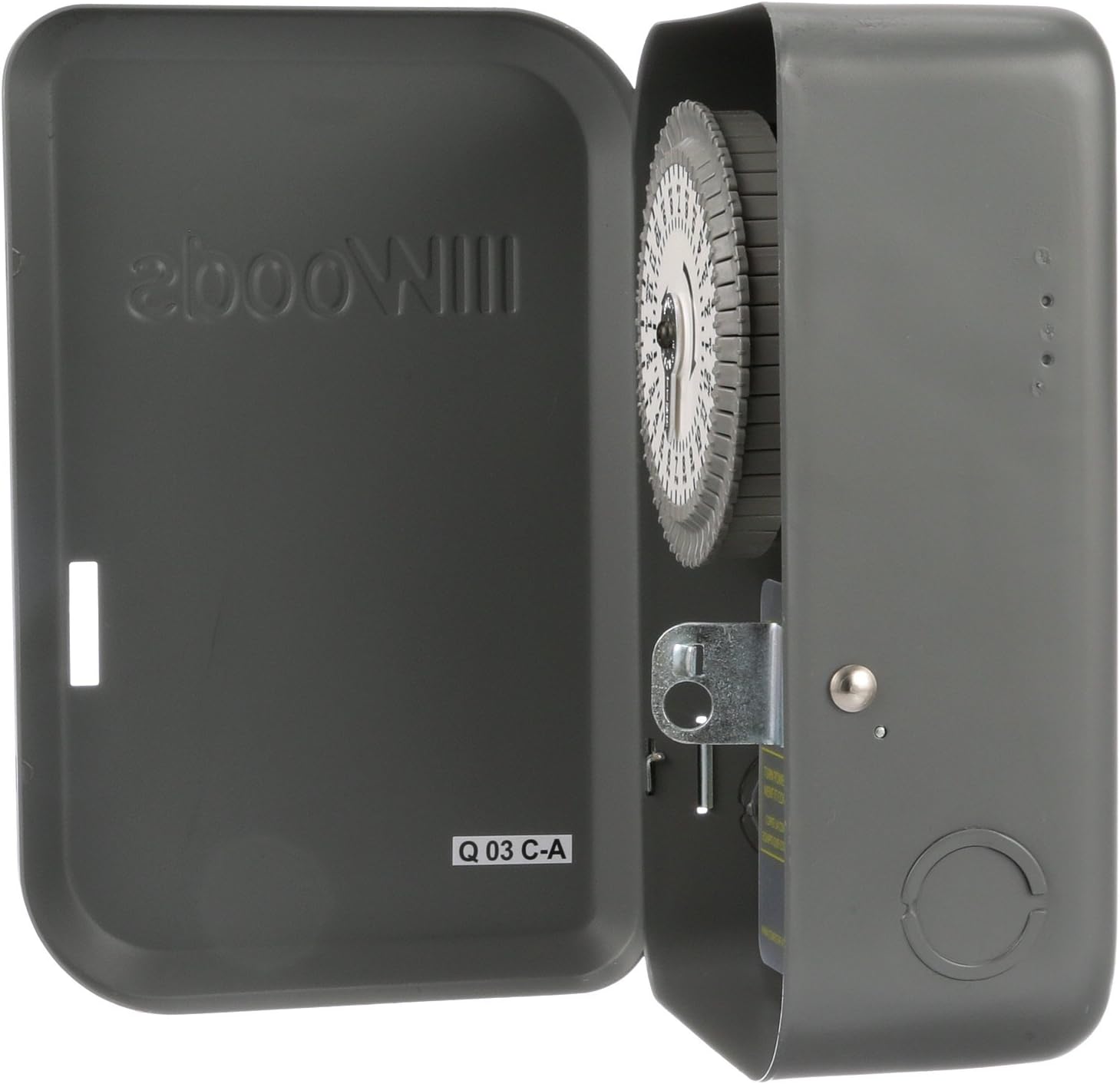

Key Features:
- Up to 24 ON/OFF settings per day; repeats daily.
- Programmable in 30-minute intervals.
- Industrial-grade lockable metal box with 1/2in and 3/4in knockouts.
- Heavy-duty gear train with non-removable segment pins.
- Manual override switch for temporary control.
- Single Pole, Single Throw (SPST) configuration.
Setup and Installation
Proper installation is crucial for the safe and effective operation of your time switch. Refer to the wiring diagram inside the unit and consult a qualified electrician if you are unsure about any steps.
Mounting the Time Switch:
- Select a suitable indoor location for mounting, ensuring it is dry and accessible.
- Use appropriate fasteners to secure the metal enclosure to a wall or sturdy surface through the mounting holes provided.

Wiring Instructions:
- IMPORTANT: Turn OFF power at the main service panel before proceeding.
- Remove the front cover of the time switch.
- Knock out the appropriate conduit holes for wiring entry.
- Connect the incoming LINE (hot) wire to the terminal labeled 'LINE'.
- Connect the NEUTRAL wire to the terminal labeled 'NEUTRAL'.
- Connect the LOAD (to appliance/fixture) wire to the terminal labeled 'LOAD'.
- Ensure all connections are tight and secure.
- Do not remove the clear insulator over the terminals until wiring is complete. Replace it after wiring.
- Replace the front cover and secure it.
- Turn ON power at the main service panel.
Operating Instructions
The Woods 59101WD uses a mechanical dial for setting ON/OFF times.
Setting the Current Time:
- Rotate the outer dial clockwise until the current time aligns with the 'TIME SET' arrow (usually located near the top of the dial). The dial is marked with AM/PM indicators.
Programming ON/OFF Times:
- The outer dial has segments around its perimeter. Each segment represents a 30-minute interval.
- To set an 'ON' period, push the pins (segments) outwards for the desired duration.
- To set an 'OFF' period, leave the pins (segments) in their inward position.
- The timer will activate the connected device when the dial rotates to an 'ON' segment and deactivate it when it rotates to an 'OFF' segment.
- The settings will repeat daily.
Manual Override:
A manual override switch is typically located on the side of the timer mechanism. This allows you to temporarily turn the connected device ON or OFF, overriding the programmed settings without affecting the timer's schedule. Return the switch to the 'TIMER' position for automatic operation.
Maintenance
The Woods 59101WD is designed for minimal maintenance. Regular inspection is recommended.
- Periodically inspect the time switch for any signs of damage, loose connections, or wear.
- Keep the enclosure clean and free of dust and debris. Use a dry cloth for cleaning.
- Do not use liquid cleaners or solvents.
- Ensure the lockable cover is securely closed to protect internal components.
Troubleshooting
| Problem | Possible Cause | Solution |
|---|---|---|
| Device does not turn ON/OFF at programmed times. | Incorrect time setting on dial. Pins not pushed out/in correctly. Manual override switch is engaged. | Verify current time is set accurately. Ensure pins are correctly set for ON/OFF periods. Check manual override switch position; return to 'TIMER' for automatic operation. |
| Device does not turn ON at all. | No power to the time switch. Loose wiring connections. Overload or faulty device. | Check circuit breaker/fuse. Turn off power at main panel and check all wiring connections. Test the connected device directly to ensure it is functional. |
| Timer dial is not rotating. | No power to the time switch. Internal mechanical issue. | Check power supply. If power is present and dial is not moving, the unit may require service or replacement. |
Specifications
| Attribute | Value |
|---|---|
| Model Number | 59101WD |
| Voltage | 120V AC, 60Hz |
| Amperage | 40A General/Resistive |
| Tungsten Rating | 40A |
| Ballast Rating | 20A |
| Pilot Duty | 1000 VA |
| Horsepower | 2 Hp (24FLA) |
| Number of Settings | Up to 24 ON/OFF per day |
| Intervals | 30-minute programmable |
| Material | Metal enclosure |
| Dimensions (D x W x H) | 3.87"D x 5.37"W x 8.37"H |
| Weight | 2.64 pounds |
| Certifications | CSA Certified, Meets UL standard 917 |
Warranty and Support
For detailed warranty information or technical support, please refer to the official Woods website or contact their customer service. A PDF version of the user manual is also available for download: Woods 59101WD User Manual (PDF).
Related documents59101WD


Ask a question about this manual
Ask about setup, troubleshooting, compatibility, parts, safety, or missing instructions. Manuals+ will review the question and use this page’s manual context to help answer it.