
Introduction
This manual provides detailed instructions for the proper setup, operation, and maintenance of your Weighmax W-2812-25LB Digital Shipping Postal Scale. Please read this manual thoroughly before using the scale to ensure accurate measurements and prolonged product life.
The Weighmax W-2812-25LB is designed for weighing packages and mail up to 25 pounds (11 kg) with a graduation of 0.1 ounce. It features a large LCD display, a sleek black platform with a foldable mailer holder, and functions for mode selection, tare, and hold.
Package Contents
- Weighmax W-2812-25LB Digital Shipping Postal Scale
- One 9V Battery
- User Manual (this document)

Image: The retail packaging for the Weighmax W-2812-25LB Digital Shipping Postal Scale, showing the product name, capacity, and key features.
Setup
1. Battery Installation
- Locate the battery compartment on the underside of the scale.
- Open the battery compartment cover.
- Insert the included 9V battery, ensuring correct polarity (+/-).
- Close the battery compartment cover securely.
2. Placement
Place the scale on a flat, stable, and level surface to ensure accurate readings. Avoid placing it near strong electromagnetic fields or areas with significant vibrations.

Image: Top view of the Weighmax W-2812-25LB Digital Shipping Postal Scale with the weighing platform closed, showing the display and control buttons.
Operating Instructions
1. Power On/Off
- To turn on the scale, press the ON/OFF button. The display will show "88888" and then "0.0" or "0.00".
- To turn off the scale, press and hold the ON/OFF button for a few seconds until the display turns off.
- The scale features an energy-saving auto shut-off function that activates after approximately 7-10 minutes of inactivity.
2. Weighing Items
- Ensure the scale is powered on and displaying "0.0" or "0.00".
- Place the item to be weighed gently on the center of the weighing platform.
- Read the weight displayed on the LCD screen.
3. Using the Foldable Mailer Holder
For larger envelopes or packages that might obscure the display, the scale features a foldable mailer holder. Lift the platform to an upright position to support taller items.

Image: The Weighmax W-2812-25LB Digital Shipping Postal Scale with its weighing platform lifted to an upright position, designed to hold larger mailers or packages.
4. Mode Function (Unit Conversion)
- Press the MODE button to cycle through available weighing units: ounces (oz), grams (g), kilograms (kg), and pounds (lb).
- The selected unit will be indicated on the LCD display.
5. Tare Function
The Tare function allows you to subtract the weight of a container, so you only measure the contents.
- Place an empty container on the weighing platform.
- Press the TARE button. The display will reset to "0.0" or "0.00".
- Add the items to be weighed into the container. The display will show the net weight of the items.
6. Hold Function
The Hold function locks the displayed weight, which is useful when weighing large items that might obscure the display.
- Place the item on the weighing platform.
- Once the weight stabilizes, press the HOLD button. The displayed weight will be locked.
- You can now remove the item and read the locked weight. Press HOLD again to release the reading.
Maintenance
1. Cleaning
- Wipe the scale with a soft, damp cloth.
- Do not use abrasive cleaners or immerse the scale in water.
- Keep the scale dry to prevent damage to electronic components.
2. Battery Replacement
When the battery indicator appears on the display or the scale fails to power on, replace the 9V battery following the installation steps in the Setup section.
3. Storage
Store the scale in a cool, dry place. If storing for an extended period, it is recommended to remove the battery to prevent leakage.
Troubleshooting
- Scale does not turn on:
- Check if the 9V battery is installed correctly with proper polarity.
- Replace the battery with a new one.
- Ensure the battery contacts are clean and free from corrosion.
- If using an AC adapter (not included), ensure it is properly connected and functional.
- Inaccurate readings:
- Ensure the scale is placed on a flat, stable, and level surface.
- Avoid placing the scale near air vents, fans, or vibrating machinery.
- Make sure no objects are touching the scale or platform during weighing.
- Perform a Tare operation before weighing if a container is used.
- Display shows "EEEE":
This indicates an overload error. Remove the item immediately to prevent damage to the scale. The maximum capacity is 25 lbs (11 kg).
Specifications
| Model Number | W-2812-25LB |
| Capacity | 25 lbs (11 kg) |
| Graduation | 0.1 oz |
| Weighing Units | lb, oz, g, kg |
| Display | Large LCD |
| Power Source | 1 x 9V Battery (included), AC Adapter (not included) |
| Material | Plastic |
| Product Dimensions | 20.83 x 14.99 x 6.35 cm (8.2 x 5.9 x 2.5 inches) |
| Item Weight | 598.74 g (1.32 lbs) |
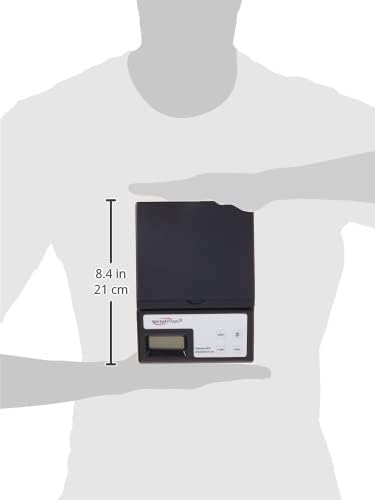
Image: The Weighmax W-2812-25LB Digital Shipping Postal Scale held in hands, illustrating its compact size and approximate dimensions (8.4 inches / 21 cm in length).
Warranty and Support
Warranty Information
The Weighmax W-2812-25LB Digital Shipping Postal Scale comes with a 10-year manufacturer warranty. This warranty covers defects in materials and workmanship under normal use. Please retain your proof of purchase for warranty claims.
Customer Support
For technical assistance, warranty claims, or further inquiries, please contact Weighmax customer support. Refer to the product packaging or the official Weighmax website for current contact information.

