
1. Product Overview
The Scosche GMT2049AB Dash Kit is designed to facilitate the installation of an aftermarket double DIN or single DIN car stereo with a storage pocket into select 1994-2012 GM vehicles. This kit provides a factory-like appearance for your new stereo, ensuring a seamless integration with your vehicle's interior. It is constructed from durable materials to securely hold your stereo.
Package Contents
- Instruction Manual
- Mounting Brackets
- Radio Bezels
- Storage Pocket

Image 1.1: The Scosche GMT2049AB Dash Kit, including mounting brackets, radio bezels, and a storage pocket for single DIN installations.
2. Compatibility
Vehicle Compatibility
This dash kit is compatible with select 1994-2012 GM vehicles that do not have factory navigation systems. It is crucial to verify your vehicle's specific make, model, and year against the provided fit guide to ensure proper fitment.

Image 2.1: Part 1 of the vehicle compatibility list, detailing compatible Buick, Cadillac, Chevrolet, and Geo models from 1994-2012.
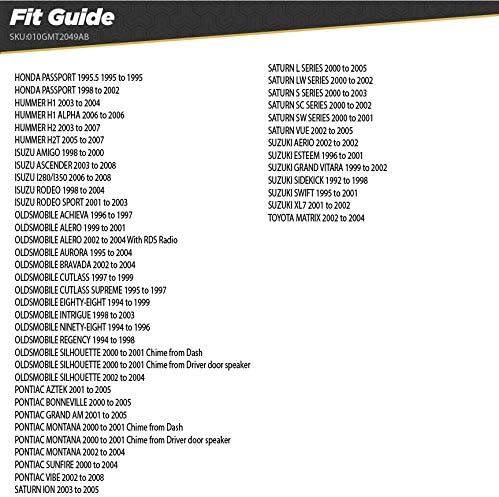
Image 2.2: Part 2 of the vehicle compatibility list, detailing compatible Honda, Hummer, Isuzu, Oldsmobile, Pontiac, Saturn, Suzuki, and Toyota models from 1994-2012.
Stereo Compatibility
Scosche Double DIN Kits are designed to fit true double DIN stereos with a maximum faceplate opening of 96.8mm x 173mm (approximately 3 13/16 inches x 6 13/16 inches). Some radios labeled as double DIN may be oversized and require minor trimming of the kit for a proper fit. Always measure your aftermarket stereo's faceplate dimensions before installation.

Image 2.3: Diagram illustrating the standard double DIN opening dimensions of 96.8mm (3 13/16 inches) by 173mm (6 13/16 inches).
3. Installation Guide
This section provides a general overview of the installation process. For detailed, step-by-step instructions specific to your vehicle and stereo, please refer to the comprehensive instruction manual included in your package.
General Installation Steps:
- Prepare Vehicle: Disconnect the vehicle's battery. Carefully remove the factory radio and any surrounding dash trim panels.
- Assemble Dash Kit: Depending on whether you are installing a double DIN or single DIN stereo, assemble the appropriate mounting brackets and radio bezels from the kit. If installing a single DIN stereo, attach the storage pocket.
- Secure Stereo: Mount your aftermarket stereo to the assembled dash kit using the provided hardware. Ensure the stereo is securely fastened and aligned correctly within the kit.
- Connect Wiring: Connect the aftermarket stereo's wiring harness to the vehicle's wiring harness. This may require a separate wiring adapter (sold separately) for proper integration.
- Test Functionality: Before fully reassembling the dash, temporarily connect the battery and test the stereo's functionality (power, audio, balance, fader, etc.).
- Reassemble Dash: Once functionality is confirmed, carefully reinstall the dash kit assembly into the vehicle's dashboard opening. Reattach all removed trim panels and reconnect the vehicle's battery.
4. Product Specifications
| Model Number | GMT2049AB |
| Product Dimensions | 3.25 x 4.5 x 9 inches |
| Item Weight | 6.6 ounces |
| Color | Black |
| Material | High-quality materials (typically ABS plastic) |
| Compatibility | Select 1994-2012 GM Vehicles (Non-Factory Nav Models) |
5. Troubleshooting
If you encounter issues during or after installation, consider the following common troubleshooting steps:
- Dash kit does not fit: Double-check the vehicle compatibility list and ensure your vehicle is listed. Verify that your aftermarket stereo's faceplate dimensions do not exceed the kit's maximum opening (96.8mm x 173mm). Minor trimming may be required for some oversized stereos.
- Stereo not powering on: Ensure all wiring connections are secure and correctly matched. Verify that the vehicle's battery is fully charged and properly reconnected. Check all fuses related to the radio and vehicle power.
- Loose fit or rattling: Ensure all mounting brackets and screws are tightened securely. Verify that the dash kit is properly seated and clipped into the vehicle's dashboard.
- Missing parts: Refer to the "Package Contents" section. If any components are missing, contact Scosche customer support.
For more specific issues or advanced troubleshooting, consult the detailed instruction manual provided with the kit or contact Scosche technical support.
6. Warranty and Technical Support
The Scosche GMT2049AB Dash Kit is backed by Scosche's Limited Lifetime Warranty, ensuring quality and reliability. Scosche also provides Lifetime Technical Support to assist with any installation questions or product-related inquiries you may have.
For warranty claims or technical assistance, please visit the official Scosche website or refer to the contact information provided in your product packaging. You can also find more information and support resources at the Scosche Brand Store.


